 Key Findings
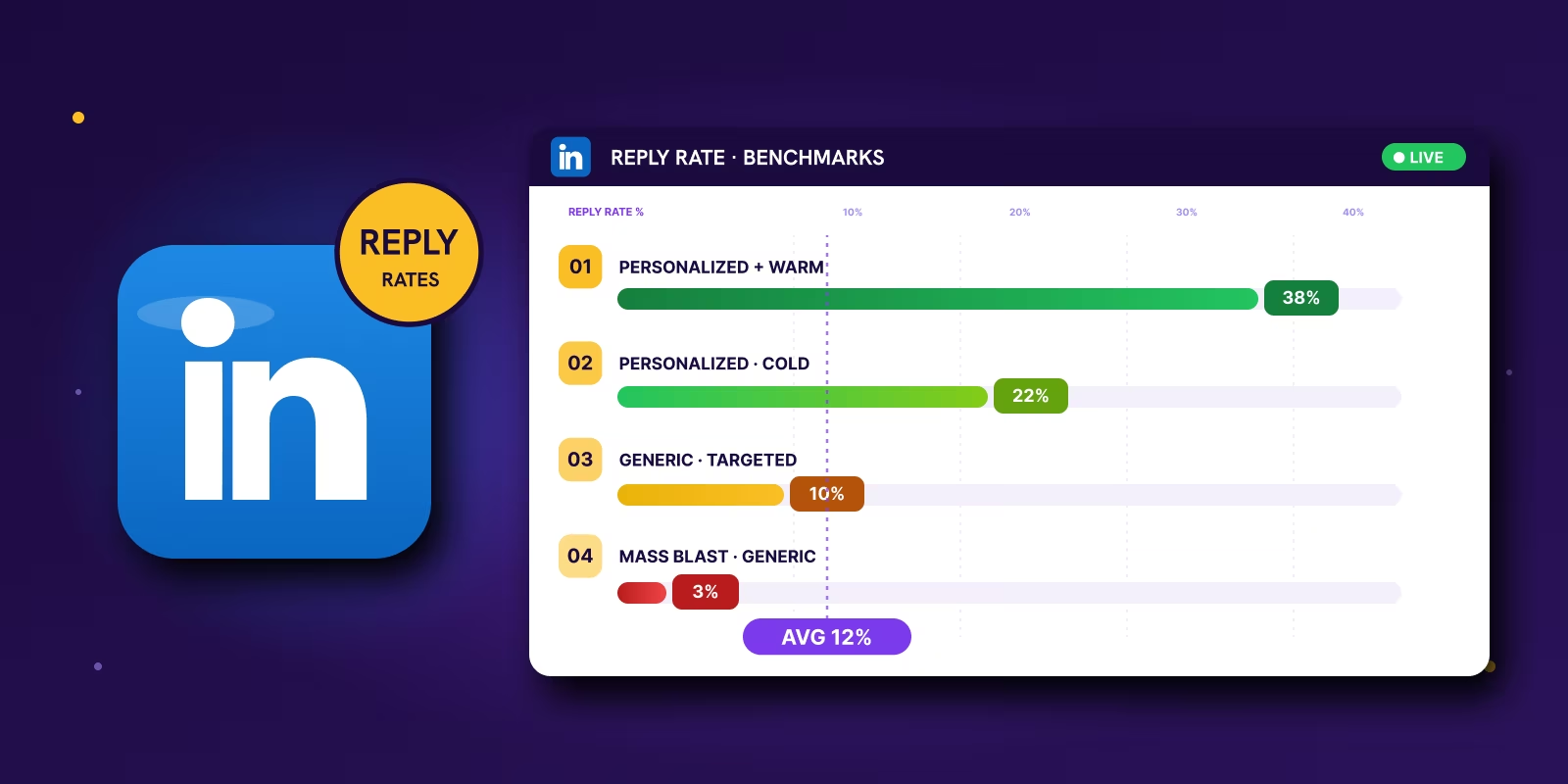
The broad LinkedIn outbound average is 10.4% across 13.2 million messages. Treat that as a starting line, not a target. The same 10% can be strong on a cold broad list and weak on a tight, signal-led one.
A cold DM, a connection request with context, and a matched InMail should not be judged on the same scale. InMail ceilings rise fast when the list is tight and the timing is right. Relevance changes the expected outcome.
Audit in this order: account list, contact selection, trigger, then message. Tight copy improves a good setup. It rarely rescues a weak list with no signal behind it.
Contact accounts because something changed (funding, a new hire, a stack switch), not because they matched a static filter weeks ago. A personalized connection note reached 9.36% versus 5.44% with no message. Tying the note to a live business event matters more than a podcast mention.
Track positive reply rate, qualified lead rate, meeting booked rate, and channel contribution. LinkedIn often assists meetings credited elsewhere, so siloed tracking understates it. Scale by adding signal categories and routing rules, not by widening filters.
Many professionals seek a single number. They aim to discover what a “good” LinkedIn reply rate is, then assess all efforts against that.
That's the wrong way to use benchmarks.
A campaign sitting around 10% can be healthy if the audience is cold and the targeting is broad. Another campaign at the same number can be underperforming if it's built on sharp intent signals and tight account selection. Context decides whether your numbers are fine or a warning sign.
The useful question isn't “what's average?” It's “what should this motion produce, given how I'm targeting, sequencing, and timing it?” That's where most benchmark articles fall apart. They flatten everything into one percentage and call it insight.
The numbers matter. But the playbook behind the numbers matters more.
The Real LinkedIn Outreach Reply Rate Benchmarks for 2026
10.4% is the broad average for LinkedIn outbound reply rate across 13.2 million messages, according to Expandi's 2026 LinkedIn outreach benchmarks. Use that as a starting line, not a target. In the same analysis, campaigns above 12% showed strong targeting and message fit, while campaigns below 8% usually had a relevance problem before copy became the issue.
That range matters more than a single average because LinkedIn outreach is not one motion.
What different outreach types should actually produce
A cold DM to a stranger, a connection request with context, and a paid InMail sent to a highly matched prospect should not be judged on the same scale. Teams that lump them together usually either overrate mediocre performance or kill campaigns that are doing fine for the audience quality.
Those InMail numbers look strong because the ceiling rises fast when the list is tight and the timing is right. That does not mean every team should switch to InMail. It means relevance changes the expected outcome. Agencies that consistently beat benchmark are rarely sending more messages. They are picking better moments to send them.
LinkedIn also tends to outperform cold email on response rate in broad benchmark comparisons, as noted earlier from Expandi's 2026 analysis. That is why LinkedIn works best as part of a multichannel outbound system. It gets attention faster, especially when the prospect has shown a recent signal you can reference.
Practical rule: Benchmark by outreach type, list quality, and signal strength. Averages without that context are noise.
Personalization and sequence design move the number
Belkins found that connection requests with a personalized message reached a 9.36% reply rate, compared with 5.44% when no message was included in its 2025 LinkedIn outreach study. That gap is useful because it shows what basic context can do before you touch the rest of the sequence.
The same study found that a direct message plus added actions such as profile visits could reach 11.87%. Familiarity matters. So does sequence design. A prospect who has seen your name, your face, and a relevant point of view is easier to convert than someone getting a cold pitch out of nowhere.
Audience mix changes the benchmark too. Belkins reported 11.81% reply rate in Southern Europe and 4.77% in software and SaaS in the same study. A team selling to SaaS executives should not compare its campaign against a blended B2B average and assume the copy is broken.
This context problem shows up in other channels too. Click Click Bang Bang on good CTR makes the same point from the paid media side. Benchmarks help only when they match the channel, audience, and buying situation you are working with.
Why Your Reply Rate Is Stuck Below 8 Percent
When LinkedIn reply rates slip under 8%, B2B teams usually start rewriting the opener. That is usually the wrong diagnosis.
As noted earlier, sub-8% performance usually points to a relevance problem before it points to a writing problem. In practice, I see the same failure pattern across agency accounts. The campaign is built on static filters, broad titles, and weak timing. The copy gets blamed because it is the easiest variable to change.
The list is usually the first problem
Poor targeting kills reply rate before the first message goes out.
This shows up when teams pull contacts from Sales Navigator using loose filters like job title, company size, and industry, then treat that list like a qualified market. “VP Sales at a SaaS company” can describe a founder-led startup, a 300-person PLG business, or a regional services firm with a completely different sales motion. Those buyers do not respond to the same message because they do not have the same priorities.
Cheap scraped data makes it worse. You end up with stale companies, wrong seniority, duplicate records, and people who do not own the problem. No copywriter fixes that.
Relevance comes from the trigger, not the wording
Low-performing campaigns usually sound fine. They are clear, polite, and reasonably personalized. They still fail because the message arrives without a reason to matter this week.
A real why-now trigger changes the odds fast. A company opens roles for SDRs in Germany. A new CRO joins and starts posting about pipeline coverage. The team adds HubSpot after years on Salesforce. A series B company starts hiring outbound managers for the first time. Those are outreach moments because they create context, pressure, or change.
Generic messaging fails for a simple reason. It asks the buyer to connect your offer to their situation on their own.
Timing is where benchmark-beating campaigns separate from average ones
A lot of outbound programs contact the right account at the wrong moment. The problem exists, but it is not active. The budget may show up next quarter. The owner is buried in another priority. On paper, the prospect fits. In reality, there is no immediate reason to reply.
That is why signal-led teams outperform list-led teams with less volume. They are not smarter copywriters. They are better at choosing when to show up. We document that workflow in this signal-based outbound playbook.
The research process matters here too. Reps who can verify hiring patterns, leadership changes, recent launches, and public buying signals build tighter lists and stronger first messages. If your team needs a starting point for safe account research, this guide for digital privacy management is a useful primer on OSINT tools and process.
Here's the order I use when a campaign stalls below benchmark:
- Audit the account list first. Check market, growth stage, business model, and go-to-market motion.
- Audit the contact selection next. Make sure the person owns the problem or feels the pain directly.
- Audit the trigger next. Look for a visible event that makes outreach timely.
- Audit the message last. Tight copy improves a good setup. It rarely rescues a weak list with no signal.
That trade-off matters. Sending 500 more messages to an audience with no trigger usually gives you more ignores, more noise in your data, and no real learning. Sending 100 messages tied to active signals gives you cleaner feedback and a better chance of starting sales conversations.
The Fix Shift From Volume to Signal-Led Outreach
The old model was simple. Pull a big list, write one acceptable message, and send enough volume to force replies.
That model still creates activity. It just doesn't create enough useful conversations.
The fix is signal-led outreach. That means you contact accounts because something happened that makes your message timely, not because they matched a static filter in Sales Navigator six weeks ago.
What counts as a useful signal
A signal is any observable change that suggests a company has a new initiative, a fresh problem, or a reason to buy.
Good signals are practical. New funding. A leadership hire. Headcount growth in a target team. A job post tied to your category. A tech stack change. Rising activity in a new region. Even a public content push can matter if it hints at a go-to-market shift.
Bad signals are too vague to act on. “Active on LinkedIn” isn't enough. “Works in SaaS” isn't a signal. Neither is “recently viewed your profile” unless it sits inside a stronger pattern.
Why this approach works better
Signal-led outreach changes the message from interruption to interpretation.
Instead of saying, “we help companies like yours,” you say, “you hired a new regional sales leader and opened roles in APAC, which usually means outbound capacity is becoming urgent.” That's a different conversation. It proves you noticed something real and gives the buyer a concrete reason to respond, even if the answer is “not yet.”
This is also where many teams confuse personalization with relevance. Mentioning a podcast or college background is surface-level personalization. Tying your message to an active business event is relevance.
Field note: The best-performing LinkedIn messages usually don't sound more creative. They sound more timely.
How teams actually operationalize signals
This doesn't need to be manual. It just needs a system.
Most outbound teams I trust use a mix of Sales Navigator, Clay, company news sources, hiring pages, and enrichment layers to turn raw signals into small batches of accounts worth contacting. Then they route those accounts into LinkedIn and email sequences with different messaging by trigger type.
If your team is still guessing what to track, this guide for digital privacy management is useful because it gives a grounded overview of OSINT-style research habits that translate well into signal gathering for B2B outreach.
For a more direct outbound workflow, Reachly's own signal-based outbound playbook is a solid reference on turning those account changes into messaging angles and multichannel sequences.
Volume has a place. But volume works best after signal selection, not before it.
Your Competitive Intelligence Playbook for B2B
Teams often collect signals randomly. They save a post, notice a funding round, maybe flag a hiring page, then forget to turn any of it into a repeatable campaign.
That's wasted effort.
You need a simple competitive intelligence engine that turns public changes into outbound lists your team can use.
As noted earlier, sub-8% performance usually points to a relevance problem before it points to a writing problem. In practice, I see the same failure pattern across agency accounts. The campaign is built on static filters, broad titles, and weak timing. The copy gets blamed because it is the easiest variable to change.
Start with the signals that map to your offer
Don't track everything. Track the few signals that usually show up before your buyers need help.
If you sell outbound support, watch for hiring in sales and demand gen, regional expansion, new funding, and changes in go-to-market leadership. If you sell revops, track CRM migrations, sales operations hiring, and territory changes. If you sell security, watch vendor consolidation talk, compliance roles, and cloud stack changes.
The rule is simple. Track signals that create a believable why-now message.
Build the collection layer
You can do this manually, but you shouldn't stay manual for long.
Use LinkedIn Sales Navigator for people and account filters, Crunchbase for funding signals, BuiltWith for tech stack changes, company career pages for role-based triggers, and public LinkedIn activity for launch, expansion, and hiring context. Then push that into Clay so you can enrich records, clean them, route them by trigger type, and prepare them for sequence entry.
If your team isn't using Sales Navigator filters properly, this walkthrough on LinkedIn Sales Navigator search filters is worth reviewing before you build anything more complex.
Turn raw data into campaign-ready segments
This is the step frequently skipped.
A signal by itself is not a segment. “Raised funding” is too broad. You need combinations. Raised funding in the last few months, hiring AEs, expanding into a new market, and using a stack that suggests outbound maturity. That's a segment with a message angle.
I usually separate signal-led lists into three buckets:
- Active expansion accounts
These are companies hiring, launching, or entering a market. They tend to respond well to operational help because there's visible motion. - Replacement-risk accounts
These are firms with signs of stack change, role churn, or process friction. The angle here is usually inefficiency, missed coverage, or execution gaps. - Intent-without-capacity accounts
These companies show buying intent but not enough internal resources. They often need a partner, agency, or temporary system more than another tool.
Run small batches, not giant blasts
Once Clay enriches the list, move accounts into HeyReach for LinkedIn execution and pair it with Smartlead if you're running email alongside it. Keep campaigns small enough that you can still review signal quality before launch.
That's not busywork. It's quality control.
A list of 50 accounts built on clear triggers will usually teach you more than a list of 1,000 “relevant” companies with no timing. You'll spot weak segments faster, adjust angles faster, and protect account health because you're not forcing volume through a mediocre list.
The goal isn't to collect more data. The goal is to collect fewer, better reasons to reach out.
Keep an analyst mindset
Competitive intelligence for outbound is not spying. It's pattern recognition.
You're looking for visible business changes that explain demand before the buyer fills out a form. The teams that do this well don't sound more polished in their outreach. They sound more informed. That difference is why signal-led campaigns feel useful while generic sequences feel disposable.
Turning Signals Into High-Reply Messages
Signal-led outreach works or fails in the first two lines.
A trigger gives you permission to reach out. The message has one job after that. Prove you understand what changed and why it matters to the buyer right now. Generic copy underperforms because it treats every signal like a personalization token instead of a business event.
The LinkedIn message structure I keep coming back to is Observation, Implication, Question. It is short enough for the inbox, specific enough to earn a reply, and flexible enough to use across funding, hiring, leadership changes, product launches, and stack shifts.
Example one funding signal
Weak message
“Hi Sarah, congrats on the recent growth at your company. We help B2B teams generate more pipeline through outbound. Open to chatting?”
This usually dies because there is no point of view. “Growth” is vague, and the sender has not shown why now matters.
Better message
“Hi Sarah, saw the funding announcement and the sales hiring push. That usually means pipeline targets rise before outbound capacity catches up. Are you planning to build that internally first, or add outside support while the team ramps?”
That works because it ties the signal to an operating problem. Buyers reply to pressure they recognize.
Example two new leadership hire
A new VP, regional GM, or head of revenue often reviews coverage, vendors, and channel mix in the first 30 to 90 days. That window matters. If you wait until the new leader has already reset the team, your message shows up late and reads like every other pitch.
Weak message
“Congrats on the new role. I work with revenue leaders to improve outbound results. Worth a conversation?”
Polite. Empty. Easy to ignore.
Better message
“Congrats on the new role, James. New revenue leaders usually inherit a number before the team, tooling, and outbound process are fully aligned. Curious whether LinkedIn is already part of your outbound mix, or if that channel is still being rebuilt.”
The point is not clever wording. The point is a credible implication.
Example three hiring signal
Job posts show planned headcount, region, and function. They also show where execution is thin.
Weak message
“Noticed you're hiring. We help companies like yours with lead generation and outreach.”
That could describe half the companies on LinkedIn.
Better message
“Noticed you're hiring SDRs in APAC. That usually points to either new market coverage or a gap in outbound capacity in-region. Are you planning to build that entirely through hiring, or add an external layer while the new team ramps?”
That question is easier to answer than “want to hop on a call?” and it gives the buyer room to explain their actual setup.
As noted earlier, the gap between average reply rates and strong campaigns comes from relevance and timing. Better copy helps at the margin. Better context changes the outcome.
A reusable framework that holds up in real campaigns
Use this baseline:
- Observation
Name the public trigger in plain language. Funding, hiring, leadership change, product launch, expansion, stack change. - Implication
Connect that trigger to a likely business constraint, priority, or risk the buyer would recognize immediately. - Question
Ask one low-friction question about current process, ownership, or timing. Avoid meeting asks in the first message.
A few trade-offs matter here.
If the implication is too broad, the note sounds templated. If it is too specific, the message can feel creepy or wrong. The sweet spot is a business conclusion the prospect can validate in two seconds. Public signal in, plausible operational impact out.
Timing matters too. A strong message sent a week late often loses to a decent message sent the day the trigger appears. That is why teams that care about reply rates build around monitoring and response time, not just copywriting. CleanMyList's data-driven timing guide is about newsletters, but the principle carries over. Recency affects response because context decays fast.
If you want more trigger-specific examples, this guide on buying signals in B2B sales that book meetings with real reply rates is a useful reference.
One more rule. Do not cram three observations into one message to prove you did research. That usually lowers replies. One clear signal, one sharp implication, one simple question is enough.
Measuring What Matters and Scaling Your System
Total reply rate is useful. It is not enough.
You can hit a decent reply rate and still create no pipeline if most replies are brush-offs, referrals to junior staff, or soft “not interested” notes. That's why mature teams stop treating reply rate as the scoreboard and start treating it as an early signal.
What to track instead of just total replies
You need a simple reporting stack that separates noise from business value.
Track these first:
- Positive reply rate
Replies showing interest, curiosity, or willingness to continue. - Qualified lead rate
Prospects who match your ICP and have a live problem worth pursuing. - Meeting booked rate Conversations that make it onto a calendar.
- Channel contribution
Which replies started on LinkedIn, which started on email, and which needed both.
LinkedIn often assists meetings that get credited somewhere else. A prospect sees your profile, gets your email later, then replies there. If you track channels in silos, you'll underestimate what LinkedIn is doing.
Scale systems, not just send volume
Once a signal-led workflow starts working, the temptation is to widen filters and send more.
That's where teams break their own results.
Scale by adding more signal categories, more market segments, and better routing rules inside Clay, Smartlead, and HeyReach. Don't scale by turning a sharp campaign into a generic one. Keep sequence logic separate by trigger type. Funding signals should not get the same messaging as hiring signals. New executives should not get the same cadence as mid-level operators.
Operationally, this also means protecting email infrastructure and pacing outreach intelligently across channels. Timing guides built for email can still help here because they train teams to respect send windows and audience habits. If you want a useful example, CleanMyList's data-driven timing guide is worth reading for the broader discipline of send-timing decisions.
When to keep this in-house and when not to
If you already have a strong revops team, clean data, and someone who can own Clay workflows, LinkedIn sequencing, inbox management, and qualification, keep it inside the company.
If you don't, the system usually breaks in the middle. Signals get collected but not routed. Copy gets written but not adapted to the trigger. Replies come in but nobody qualifies them properly. That's where a done-for-you partner can make sense. Reachly is one option if you need coordinated LinkedIn, email, and phone outreach with signal enrichment, sequencing, and reply handling managed in one motion.
The benchmark is only the start. The actual goal is predictable conversations with buyers who have a reason to care now.
Recommended service
LinkedIn Outreach Agency
Reachly runs signal-led LinkedIn campaigns that open conversations with your ICP, from targeting through follow-up.