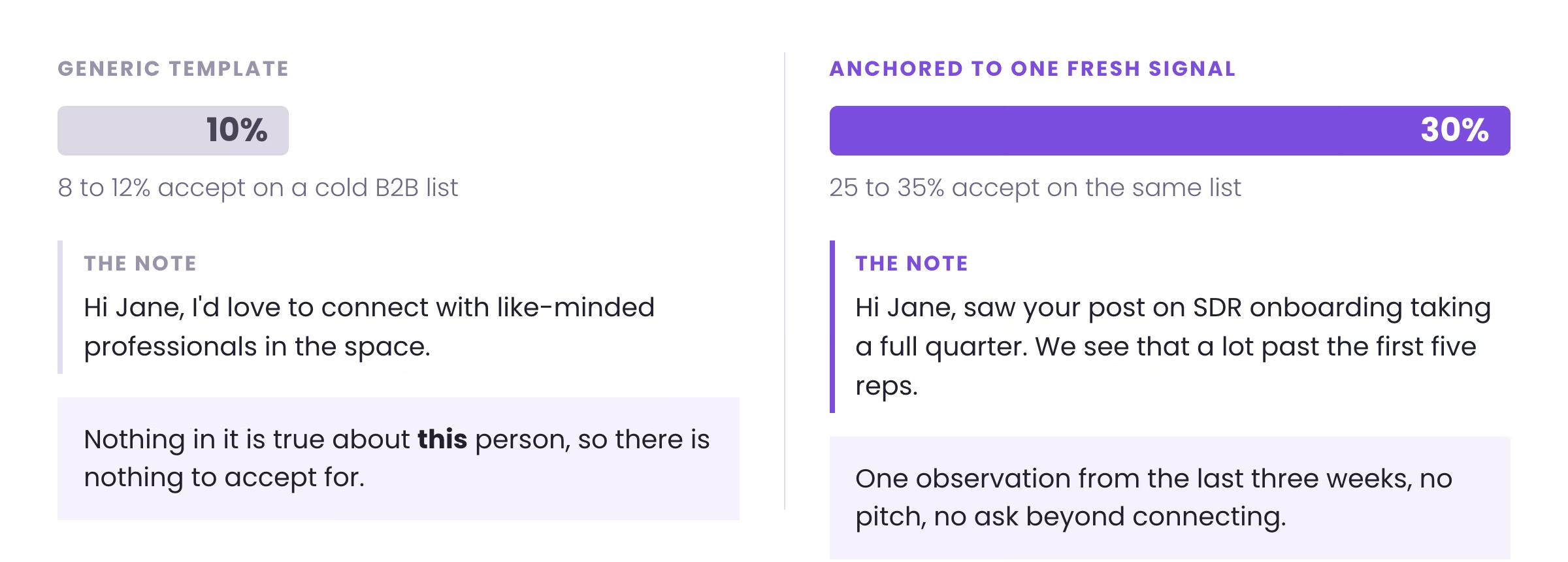
LinkedIn lead generation works when the connection request is anchored to something that happened in the last three weeks. A signal-anchored note accepts at 25 to 35% on cold B2B lists against 8 to 12% for a generic template, and the only variable that changed is the reason you gave the reader to care. This is the operator version of the playbook we run for B2B clients across APAC, the USA, Canada, the UK and ANZ: the eight strategies worth your time, the signal system that decides who gets contacted, the sending limits, and the benchmarks to hold yourself to.
TL;DR: Summary
- Targeting, offer, message, in that order. Teams A/B test the note while the list underneath it is unqualified.
- A note anchored to one fresh signal accepts at 25 to 35%. A generic template accepts at 8 to 12%.
- Sales Navigator is the targeting tool, not the sending tool. Saved searches and the job-change filter do most of the work.
- Keep the connection note under 300 characters and sell nothing in it. Its only job is the accept.
- A warmed account holds roughly 100 requests a week, about 20 a business day. Newer accounts stay under 50.
- Run LinkedIn next to cold email and cold calling on the same signal, not as a channel of its own.
- Reachly runs the whole motion as a managed service. See LinkedIn outreach.
Why does LinkedIn still work for B2B lead generation?
LinkedIn gives you something no other channel does: the ability to target a decision maker by exact role, industry, company size, seniority and recent activity, then start a conversation in the place they already expect to be sold to. According to LinkedIn, roughly 80% of B2B leads sourced from social media come from the platform, more than every other network combined.
The catch is competition. Every founder, SDR and agency is in the same inbox. Funded-startup CEOs and CROs now get 60 to 70 cold messages a week across email and LinkedIn combined, and they are not reading most of them. The bar is no longer being on LinkedIn. The bar is being the one message that references something true about them and asks for one small thing.
What decides whether LinkedIn outreach lands?
Three things, and they rank in this order: targeting, offer, message. The message is last. You can write the cleanest connection note on the platform and still get ignored if it went to a prospect with no reason to care and nothing worth replying to behind it.
Most teams invert this. They spend weeks testing the note while the list underneath it is unqualified and the offer is forgettable. Get the list right first, get the offer right second, then write a note that references one real signal and makes one specific ask.
Not having an offer is the biggest mistake every single company is making. Those decision makers get cold messages every other day. You need something that is too good for them to say no to. The note gets you the connection. The offer is what turns the connection into a reply.
Thibault Garcia, Founder, Reachly
Which eight LinkedIn lead generation strategies work?
Eight earn their place, split between free and paid. None work without the targeting and offer above them, and all eight compound once those are in place.
The four free plays
Sharpen the personal profile first, because it is the first thing a prospect sees after your request lands. Then connect deliberately: research the profile, confirm the seniority and the fit, and write in a plain, lowercase tone rather than a pitch. Post industry-relevant content on a consistent cadence so interested buyers can find and follow you. And engage daily, because comments and replies are what the algorithm rewards with reach, and engagement is also how you spot warm prospects before you ever send a request.
The four paid plays
Paid buys precision and speed. Sponsored content puts your message into a targeted feed. Sales Navigator opens the advanced filters that narrow a billion-member platform to the accounts and titles worth contacting. InMail reaches prospects outside your network without a connection. Lead Generation Forms capture interest with pre-filled fields, so a prospect converts in two taps instead of a long form.
| Strategy | Free or paid | Best for |
|---|---|---|
| Sharpen the profile | Free | Turning profile views into trust before the first message |
| Connect deliberately | Free | Building a network of qualified, in-ICP prospects |
| Post relevant content | Free | Pulling inbound interest and warming cold prospects |
| Engage daily | Free | Algorithm reach, plus spotting warm leads early |
| Sponsored content and ads | Paid | Reaching a targeted audience quickly |
| Sales Navigator | Paid | Advanced filters to find exact-fit accounts |
| InMail | Paid | Reaching prospects outside your network |
| Lead Generation Forms | Paid | Capturing interest with low-friction, pre-filled fields |
How do you set up a profile that converts?
The profile is a landing page, not a resume. Most are written to attract recruiters, and the prospect who checks you out after your request lands is looking for something else entirely: whether you understand their problem.
Lead the headline with the problem, not the title
The headline is the most valuable space on the profile, and a job title spends it on nothing. Name the problem you solve and who you solve it for. Compare "SDR Manager at Tech Corp" with "I help B2B SaaS founders book 10+ qualified demos a month without hiring more SDRs". The first is forgettable. The second starts the conversation.
Write the About section the way you talk
First person, short paragraphs, no third-person career summary. Tell the reader you have seen their problem, name the outcome you deliver, and structure it for someone scanning rather than reading. One question should be answered before they scroll away: what is in this for me.
The three things that cost you credibility if you skip them
- A clear, well-lit headshot. No logos, no group photos, no phone-camera crops.
- A banner that repeats the value statement, a client result or the logos you have worked with.
- A Featured section pointing at real proof: a case study, a guide, a short video.
How do you build the list in Sales Navigator?
Sales Navigator is the targeting layer, not the outreach layer. Filtering for CEOs in software is why those people get hundreds of identical requests a week. The value is in the filters most people never open.
Use Spotlights as the signal layer
Spotlights surface behavior rather than firmographics. Posted on LinkedIn in the last 30 days finds people who are active enough to see your message. Changed jobs in the last 90 days finds new priorities, a fresh budget and a leader who wants a visible win. Shared experiences finds an honest reason to open. We never build a list on title and industry alone; at least one behavioral filter goes on top, usually job changes or recent posts.
Save the search so the list refreshes itself
A static list decays from the day you export it. Saved searches alert you when a new person matches the criteria, which turns prospecting into a queue rather than a project. Build several narrow saved searches rather than one broad list, each one tied to a signal you can open on.
Map the buying committee, not the one decision maker
Start with an account search rather than a lead search. Filter companies to the ICP, then open the employee list and pull the roles separately: the economic buyer, the champion, the person who will use the thing. Save each as its own list. That gives you a multi-threaded campaign instead of a single point of failure when your one contact goes quiet. The filter-by-filter walkthrough is in our Sales Navigator guide.
How do you write a connection request that gets accepted?
The note has one job, and it is not selling. Under 300 characters, about them, no pitch. Build it on two questions: why you, and why now. Why you proves a minute of homework, a post they shared, a hire they made, a market they just entered. Why now ties that to a problem worth a reply this month.
The shape that works
A hook that names the observation, a bridge that connects it to your world without pitching, and an ask with no pressure in it. You are a guest in their notifications.
Hi Jane,

I'm a founder and I'd love to connect with like-minded
professionals. My company has a platform that automates lead
generation and helps teams hit their targets.

Can we chat for 15 minutes next week about how we can help?
Hi Jane,

Saw your post on SDR onboarding taking a full quarter. We see
that a lot with teams scaling past their first five reps.

Would be good to connect and follow your thinking on it.
The accept is step one. The post-acceptance message is where the offer goes, and the ask phrasing that works there is the same phrasing that works in cold email, covered in the cold email playbook.
What does the signal-based LinkedIn sequence look like?
A signal is a recent, specific fact that gives you a reason to reach out: a funding round, a new VP of Sales, a hiring spree, a tech-stack change, a comment on a relevant post. You contact the prospect inside the two to four week window before competitors catch the same trigger, and you run the request next to the other two channels rather than on its own.
| Day | Channel | Action | Why it is there |
|---|---|---|---|
| 1 | Profile visit, then a connection request anchored to one fresh signal | Earns the connection and puts your name in their notifications | |
| 1 | Cold email | First email, same signal, 70 to 80 words | Parallel channel, same day, same reason |
| 3 | Cold email | Second email, a new angle | A different angle keeps the sequence alive |
| 3 to 4 | Post-acceptance message, one question, no pitch | Sent after a one to three day wait | |
| 8 | Cold email | One sentence with an easy out | The wrong-person forward is often the lever |
| 12 | Phone | Cold call, then a final close-the-loop email | They have seen your name four times by now |
The LinkedIn cadence runs through HeyReach so signal-anchored notes and post-acceptance messages route from the same connected sender. Enrichment and signal detection run through Clay, and engagement monitoring through Trigify. The targeting layer that decides who gets contacted is covered in our buying signals guide, and the whole outbound motion around it in our outbound lead generation guide.
Personalization is one line, not a paragraph. We pull a single fresh signal per prospect through Clay, write the opener around it and leave the rest templated. AI drafts the signal line only, never the whole message, and every snippet gets a human check before it sends.
How much can you send before LinkedIn restricts the account?
LinkedIn caps a warmed account at roughly 100 connection requests a week, about 20 a business day, and it throttles accounts that push past that. A profile under 90 days old should stay below 50 a week. Scale by adding sender accounts rather than by raising the per-account number.
| Decision | Safer option | What goes wrong otherwise |
|---|---|---|
| Weekly requests per account | About 100 on a warmed profile | Throttling, then a restriction that costs the account |
| New accounts | Under 50 a week for the first 90 days | New profiles get limited faster and recover slower |
| Automation type | Cloud-based tools with human-pattern delays | Browser extensions run off your own session and look robotic |
| Scaling volume | More sender accounts, same per-account cap | Raising the cap is what triggers the restriction |
| Messaging non-connections | InMail credits | Bulk requests to strangers raise the ignore rate against you |
The tools we run for this, and the alternatives at each step, are compared in our B2B lead generation tools guide.
What benchmarks should you hold yourself to?
These are the numbers we hold our own campaigns to.
| Metric | Benchmark | Notes |
|---|---|---|
| Connection acceptance, generic note | 8 to 12% | Templated, no signal. The floor to beat |
| Connection acceptance, signal-anchored | 25 to 35% | One fresh signal per note, on a cold list |
| Positive reply rate | 10 to 20% normal, 35% and above is strong | Depends on offer strength more than copy |
| Requests per warmed account | About 100 a week | Roughly 20 a business day |
| Time to first meeting | Weeks 5 to 7 | Matches the wider outbound program |
If acceptance sits below 12%, the problem is targeting first and the note second. If acceptance is healthy and replies are flat, the offer is too weak, and no rewrite of the message fixes that.
How do you handle replies and book the meeting?
A positive reply is the halfway point, and the gap between reply and meeting is where most LinkedIn programs lose their output. Answer the same day, in the same thread. Read the intent behind the words, because a request for pricing and a polite brush-off can look similar in one line. Answer the question, then move to the ask in that same message rather than trading four more.
Send the calendar link with the answer rather than after it. Every extra step between interest and a confirmed slot costs meetings you had already won.
What does Reachly run differently?
LinkedIn is one of three coordinated channels here, never a standalone campaign. Every prospect gets a signal-anchored connection request, a same-day cold email, a post-acceptance follow-up and a phone touch inside 12 days, all chosen by a layer that scores who is worth contacting and which message they get. The note is a function of the signal rather than of the person sending it.
The wider program is what the numbers come from. For Primal, outbound returned 4.57x ROI and 85+ SQLs in six months at an 8% positive reply rate. For The Great Room, the same signal-based system helped close $250K+ in contract value and moved meetings from around two a quarter to around two a month, with no added headcount. None of that came from a clever connection note. It came from picking the right accounts on the right signal, putting a real offer in front of them, and running LinkedIn beside cold email and cold calling.
Reachly is a Clay Solutions Partner and a certified Smartlead and HeyReach partner, running done-for-you cold email, LinkedIn and cold calling for B2B teams across APAC, the USA, Canada, the UK and ANZ. The fifteen plays that feed the top of this funnel are in our B2B lead generation strategies guide.
LinkedIn outreach that books the meeting
Reachly picks the accounts on signal, writes the connection requests, times the post-acceptance follow-ups, and runs the cold email and calling layer alongside. One flat retainer from $3,500 a month, first qualified meetings in weeks 5 to 7.
See how Reachly works
LinkedIn lead generation FAQs
What is the best LinkedIn lead generation strategy for B2B?
Signal-based targeting paired with a multichannel sequence. Pick prospects on a fresh trigger such as funding, a new leader or a hiring spree, anchor the connection note to that signal, and run the request alongside a same-day cold email and a later call. Targeting and offer decide the result; the message is the cheapest variable.
How do you generate B2B leads on LinkedIn for free?
Four free moves compound: sharpen the profile so views convert, connect deliberately with in-ICP prospects, post relevant content on a consistent cadence, and engage daily so the algorithm gives you reach. They pull warmer leads than paid does, and they take longer to show pipeline.
What is a good LinkedIn connection acceptance rate?
25% is the working benchmark on cold B2B lists when the note is anchored to a fresh signal. 8 to 12% is normal for generic templates. Anything above 35% usually means the list was warmer than cold.
How many LinkedIn connection requests can you send per day?
About 20 a business day, roughly 100 a week, on a warmed account. Profiles under 90 days old should stay below 50 a week. Scale by adding sender accounts rather than by raising the per-account number.
Is Sales Navigator worth it for lead generation?
Yes, used as a targeting tool rather than a sending tool. The value sits in Spotlights and saved searches, particularly the job-change filter, because a leader in their first 90 days is actively looking to fix something.
How long should a LinkedIn connection request be?
Under 300 characters, and shorter is better. One observation about them, one line connecting it to your world, one no-pressure ask. The note's only job is the accept, so nothing in it should need a decision.
Should you pitch in the connection request?
No. A pitch in the request converts the accept into a decision about buying, which is a much bigger ask than connecting. Save the offer for the post-acceptance message, one to three days later.
What should the post-acceptance message say?
One question, no pitch, tied to the same signal you opened on. The goal is a reply, not a booking. Once they answer, the offer and the calendar link go in the same message rather than three emails later.
Should you use LinkedIn or cold email for B2B lead generation?
Both, on the same signal and the same day. LinkedIn earns the connection and the warmer reply, email carries the offer, and the phone closes the loop later in the sequence. Treat them as one sequence rather than competing channels.
Does LinkedIn automation get accounts banned?
Pushing past the platform's limits does. Cloud-based tools with human-pattern delays and per-account caps are safer than browser extensions running off your personal session, and the cap matters more than the tool.
Is InMail worth paying for?
For prospects outside your network who will not accept a request, yes, used sparingly. For anyone you can reach with a connection request, the request plus a post-acceptance message performs better and costs nothing.
How long does LinkedIn lead generation take to produce meetings?
Weeks 1 to 4 cover list building, profile work and warm-up on new sender accounts. First qualified meetings usually land in weeks 5 to 7, which matches the wider outbound program rather than beating it.
How does Reachly run LinkedIn lead generation?
Reachly scores the accounts on buying signals, writes a connection request anchored to one fresh signal per prospect, sends a same-day cold email off the same trigger, follows up after acceptance and adds a phone touch inside 12 days. The LinkedIn layer runs through HeyReach, enrichment through Clay and signal monitoring through Trigify.
Recommended service
LinkedIn Outreach Agency
Reachly runs signal-led LinkedIn campaigns that open conversations with your ICP, from targeting through follow-up.