 Key Findings
Treating Clay as a fancy enrichment tool caps results at 1% reply rates. The real edge is in the five-layer architecture connecting lead source, signals, waterfall, AI personalization, and the Smartlead handoff.
Reachly's tested order (Icypeas, Prospeo, LeadMagic, BetterContact, then ZeroBounce + MillionVerifier) runs around 22% cheaper per verified email than a single-finder setup, and catches a higher share of valid emails.
Reachly's 30/25/20 weighting (funding, headcount growth, tech stack change) came from 400 plus campaigns, not theory. Funded companies that were also hiring converted at three times the rate of either signal alone.
If your AI opener could be sent to a hundred different prospects with one find-and-replace, it is not personalization. Real personalization references something the prospect did, said, or experienced in the last 30 days.
Final copy lives in Clay. Smartlead receives the row data via webhook, slots variables in double curly brackets into the sequence, and runs the multichannel cadence with HeyReach for LinkedIn-fallback automation.
Why most teams use Clay wrong for cold email
Most teams treat Clay as a fancy enrichment tool. They build a list, dump it into a Clay table, run a finder, push to a sequencer. Then they wonder why reply rates sit at 1% and pipeline does not move.
Clay is not where cold email starts. It is where the system that runs cold email lives. The lead source layer, the signal layer, the enrichment waterfall, the AI personalization layer, and the Smartlead handoff are five separate components that have to be designed together. Skip one and the whole sequence performs at the level of the weakest layer.
This is the workflow Reachly runs across 400 plus campaigns for B2B clients. Every part of it has been tested in production. Every number in this article comes from real campaigns, including the Primal case study referenced throughout.
The full Reachly Clay-to-Smartlead workflow at a glance
Before getting into the steps, here is the full system at the top level. Five layers, each with a purpose, each running into the next.
| Layer | Tools | Purpose |
|---|---|---|
| Lead source | AI Ark, LinkedIn Sales Navigator | Lookalike sourcing inside the ICP |
| Signal layer | Trigify, RB2B, custom HTTP columns | Trigger-based prioritization of the list |
| Enrichment waterfall | Icypeas, Prospeo, LeadMagic, BetterContact, ZeroBounce, MillionVerifier | Verified emails, cost-optimized order |
| AI personalization | Claygent, OpenAI integrations inside Clay | Signal-specific openers, role-specific value lines |
| Sending and sequencing | Smartlead (email), HeyReach (LinkedIn) | Multichannel sequence with webhook fallback |
What this article walks through is everything that happens inside Clay before Smartlead sends a single email. If you only build the lead source and the enrichment, you have a list. If you build all five layers, you have a system. The difference is whether the campaign ends with reply rates or with a modern outbound sales strategy that books meetings.
Step 1, build the lead source layer
The lead source layer is upstream of Clay. AI Ark handles top-of-funnel prospecting because its lookalike company discovery surfaces accounts that match the profile of a client's best-converting customers, which goes deeper than what LinkedIn Sales Navigator filters can produce on their own. Sales Navigator is the layer that gets used for advanced persona filtering once AI Ark has produced the account list." Lookalike discovery is one of several B2B prospecting methods we use to build the first list.
Once the list exists, it imports into a Clay table directly via integration. Reachly tables are segmented by ICP from the start. One workspace per client, one tab per persona inside the workspace. The reason is operational. Every persona gets different signal triggers, different scoring weights, and different personalization prompts. Mixing personas in one tab makes the next four layers harder than they need to be.
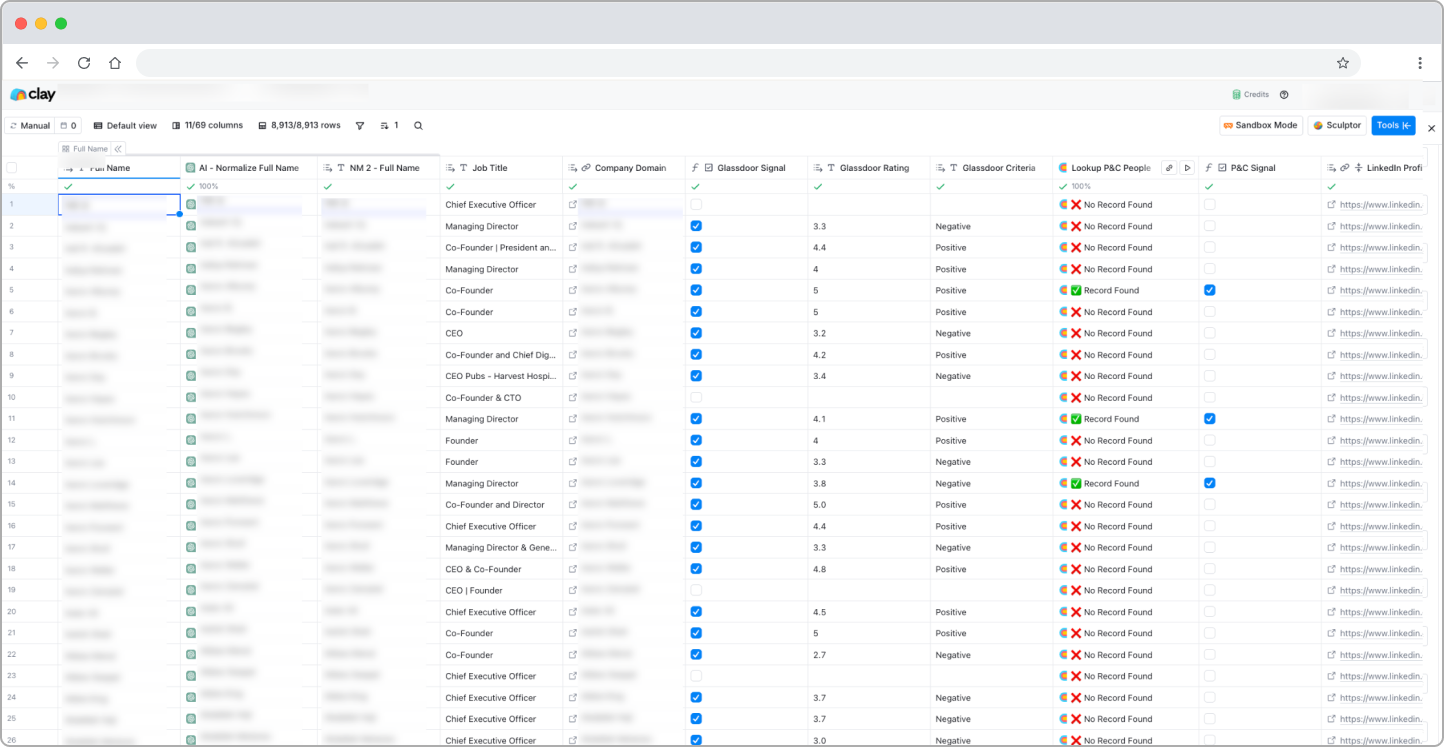
The table shape Reachly uses across all ICPs has the same first six columns: full name, AI-normalized name, job title, company domain, LinkedIn profile URL, and persona tag. The right side of the table is where it gets persona-specific. Each ICP tab pulls in different signal columns, different enrichment, and different personalization fields. The base structure stays consistent so it can be replicated for the next client without rebuilding from scratch.
Step 2, set up the email finder waterfall
This is the layer most teams skip and most articles miss. A waterfall stacks multiple email finders in order, runs the cheapest one first, and only escalates to the more expensive finders when the cheaper one cannot find an email. The result is lower cost per verified email than running a single finder, and higher hit rate than running them in parallel.
The Reachly stack, in production order:
- Icypeas (code REACHLY) runs first. Highest hit rate per credit on B2B APAC profiles.
- Prospeo runs second. Strongest coverage on global B2B profiles, especially North America and EMEA, where Icypeas hits less reliably.
- LeadMagic runs on the leads where the first two could not find an email.
- BetterContact runs on the long tail where the first three missed.
- ZeroBounce and MillionVerifier run in parallel as the final verification step. A lead has to pass both checks before any email gets sent.
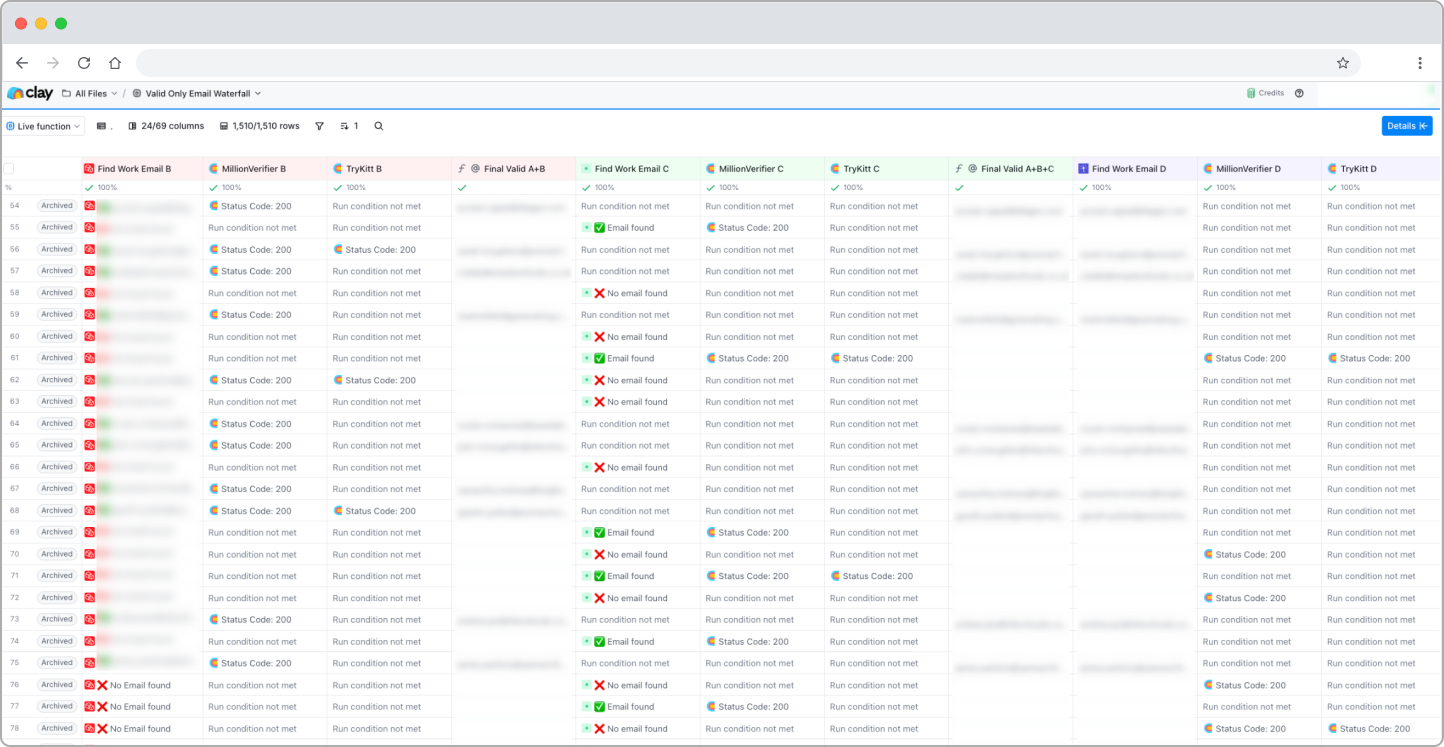
We tested every ordering across six weeks of live campaigns before locking it in. Icypeas first, Prospeo second, then LeadMagic and BetterContact runs around 22% cheaper per verified email than starting with the more expensive finders. The reason is hit rate, not pricing. Icypeas catches the highest share of APAC profiles on the first pass and Prospeo cleans up most of the global ones, so the expensive finders only spend credits on the long tail.

Step 3, add the signal layer
The signal layer is where Reachly's targeting actually happens. Without it, a Clay table is a list of names and emails. With it, the table becomes a prioritized queue where the prospects most likely to reply this month float to the top.
Reachly uses five signal categories:
- Company-level signals: funding announcements, hiring sprees (especially SDR and marketing roles), new leadership hires, tech stack changes, headcount growth or decrease above 25%
- Website behavioral signals: individual-level visitor identification via RB2B, engagement on pricing or solutions pages, traffic patterns
- LinkedIn signals: engagement on specific content via Trigify, job changes and promotions, posts about specific pain points
- Intent signals: combined indicators with short shelf life (2 to 4 weeks before competitors arrive)
- Technographic signals: installs and uninstalls of competitor tools
Not every signal carries the same weight. Reachly runs a scoring matrix that weights each signal type, and only prospects above the threshold enter the highest-priority sequence track.
| Signal type | Indicator | Weight |
|---|---|---|
| Funding announcement | Round closed in last 60 days | 30% |
| Headcount growth | 25%+ change in last quarter | 25% |
| Tech stack change | Competitor tool installed or uninstalled | 20% |
| Leadership hire | New decision-maker in last 90 days | 15% |
| Engagement signal | LinkedIn content engagement or website visit | 10% |
The 30/25/20 split was not a guess. It came from one pattern we kept seeing across the 400 plus campaigns we have run. A funded company that was also hiring converted at roughly three times the rate of either signal in isolation. Tech stack changes were noisier, but when they fired they caught the highest-intent prospects in the dataset. The weights are not theoretical. They are what the campaigns paid out.

This is also where the Primal example proves out. Primal ran one evergreen campaign plus four signal-based campaigns: hiring marketing roles, raised funding, decreasing traffic, and not on page 1 of Google. Across six months, the signal-based campaigns produced an 8% positive reply rate and 4.57x ROI. The signal layer is not optional. It is the difference between signal-based outbound and spray-and-pray. The underlying logic sits in the B2B intent data guide.
Step 4, generate personalization with Claygent or OpenAI
Once leads are sourced, enriched, and scored, the next column generates the personalization. Inside Clay, the cleanest path is Claygent (Clay's native AI agent) or a direct OpenAI integration column.
The Reachly variable library has three core personalization fields per prospect:
- Signal-specific opener: a one to two sentence opener referencing the signal that triggered the campaign (the funding round, the role they hired for, the tech they uninstalled).
- Company-context line: one sentence referencing something specific about the company that the prospect would recognize.
- Role-specific value angle: one sentence connecting Reachly's offer to the prospect's role, not the company in general.
The prompt structure that produces these consistently:
- Input: lead data (name, role, company), signal context (the trigger that fired), and any enrichment data relevant to the persona
- Instruction: write a one to two sentence opener that references the signal, includes one specific detail from the lead data, and matches the email's overall tone
- Constraint: under 25 words, no buzzwords, no rhetorical questions, no fake compliments
The tighter the constraint, the better the output. Loose prompts produce openers that read like generic templates with names swapped in.
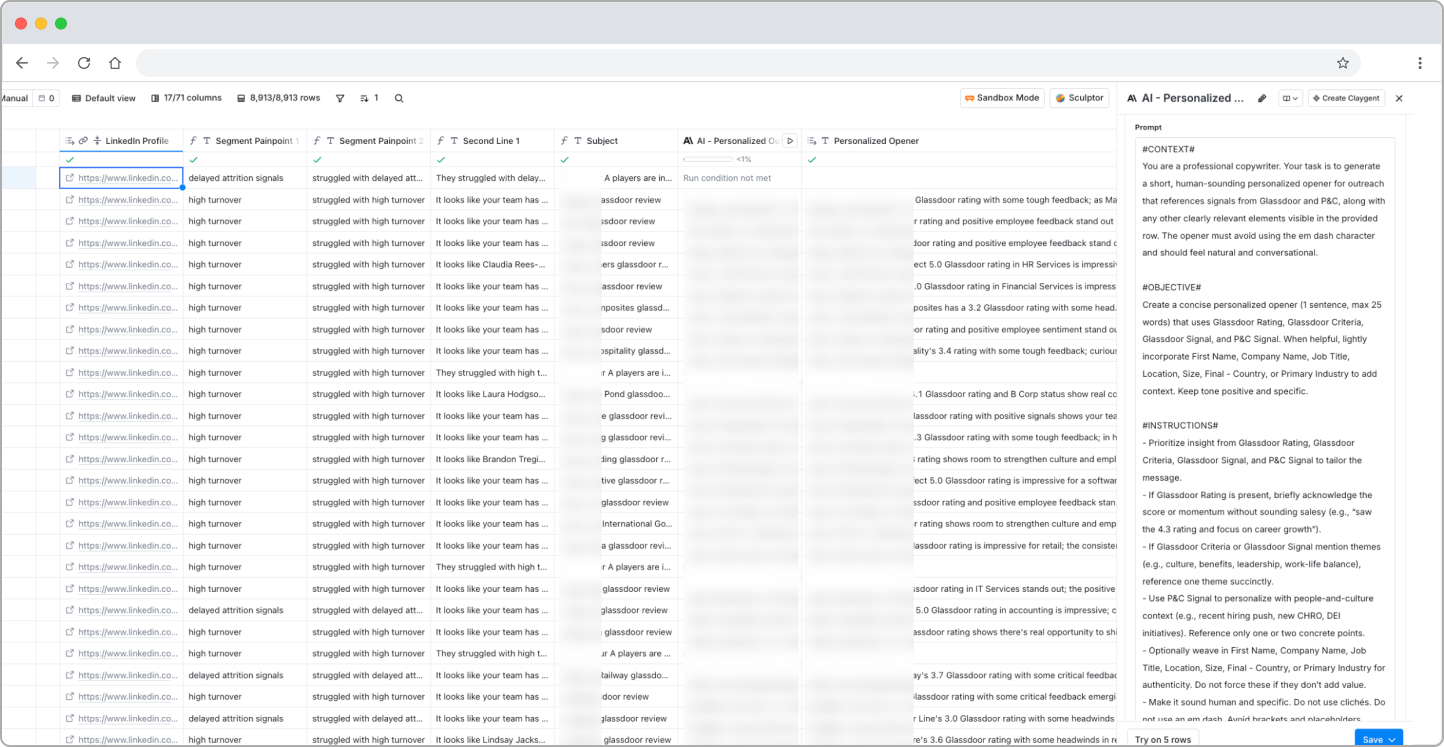
The whole point of this layer is that the email body stays under the 70 to 80 word target Reachly recommends for 2026 cold email. Long emails are competing for attention span, not against other cold emails. Short, signal-specific, and direct outperforms long-form pitches every time. More on the body structure in cold email best practices for higher reply rates in 2026.
If your AI-generated opener could be sent to a hundred different prospects with one find-and-replace, it is not personalization. It is templating with extra steps. Real personalization references something the prospect did, said, or experienced in the last 30 days. Anything older than that is just public data dressed up to look custom.
For the Clay-side perspective on running multiple campaigns from one table, Clay's own Automate 6 cold email campaigns in a single Clay workflow is the canonical post. Reachly's approach adds the signal layer and the scoring matrix on top of that base.
Step 5, push to Smartlead via webhook
The handoff from Clay to Smartlead happens via webhook. The final copy lives in the Clay table inside dedicated columns: subject line, email body, and personalization variables. Smartlead receives the row data through the webhook and slots each variable into the sequence using double curly bracket syntax: {{first_name}}, {{custom_signal_opener}}, {{company_name}}.
Inside Smartlead, the campaign sequence references those variables in both the subject lines and the bodies. Each step of the sequence calls a different combination of variables so the same prospect receives different signal-specific framing across days 1, 3, 5, 8, and 12. No two prospects in the same campaign receive the same exact email content.
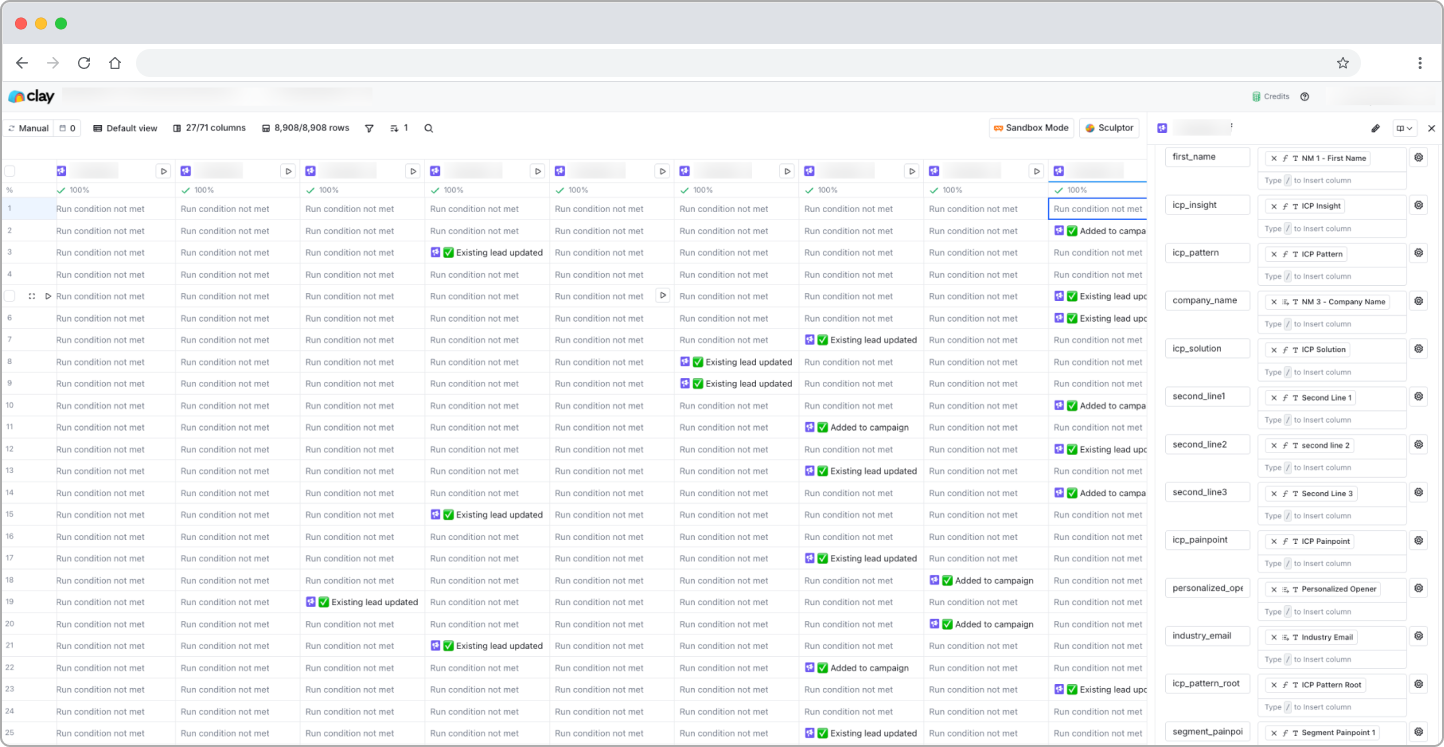
The LinkedIn-fallback flow is what closes the multichannel loop. Reachly runs LinkedIn-first sequences via HeyReach (code REACHLY). When a prospect does not accept the LinkedIn connection within 14 days, a webhook fires from HeyReach to Smartlead with the enriched email address, and the prospect enters the email-only sequence automatically. One sequence, two channels, no duplicate touchpoints.
The standard Reachly sequence:
A 12-day signal-triggered sequence built on top of the Clay layer described above.
| Day | Channel | Action | Why it works |
|---|---|---|---|
| 1 | Profile visit + connection request referencing the signal | Triggers warm recognition before any email arrives | |
| 1 | Email 1, signal-specific opener, 3 to 4 sentences, low-friction CTA | Lands in the inbox while the LinkedIn notification is fresh | |
| 3 | Email 2, new angle, relevant result or stat, short | Adds value without repeating the first email | |
| 5 | LinkedIn or Email | LinkedIn message if connected, Email 3 if not | Channel-switching prevents fatigue on either side |
| 8 | Email 4, one sentence, direct ask, easy out | Forces a yes or no while staying respectful | |
| 12 | Phone + Email | Cold call attempt for high-value accounts plus final email | Highest-friction touch only on the leads that earned it |
How Reachly runs this across client campaigns: every lead exits the sequence the moment they reply or unsubscribe. The webhook layer means the team manages conversations, not routing. The system handles the rest.
For deeper coverage of the Smartlead handoff specifically, see the Reachly email deliverability guide and the automated email follow-ups walkthrough. Clay University's Smartlead step-by-step walkthrough is the canonical Clay-side resource on the variable handoff itself.
The biggest mistake teams make running this workflow
The workflow above is operational. It builds the table, the signals, the waterfall, the personalization, and the handoff. None of it matters if the offer in the email body is generic.
Most cold emails fail before personalization even matters. The body talks about the company sending the email instead of addressing a specific pain point the prospect actually has. Then there is no offer, just a meeting request. CEOs receive ten of those a day. They delete them in two seconds.
Not having an offer is the biggest mistake that every single company is doing. Those CEOs get cold emails every other day. You need to have something that's too good for them to say no to. That's the offer, which is the most overlooked part of every cold outbound campaign.
The fix is simple to state and harder to execute. The offer goes in the body of email 1. It is specific (a deliverable, not a meeting). It is time-bound (this month, not "whenever"). It is low-friction (no calendar, no form, just a yes or no reply). The Clay-to-Smartlead workflow described above makes the delivery operational. The offer is what makes the delivery worth reading.
What it looks like when it works, the Primal campaign
Throughout this article, one campaign comes up as the example: Primal, a digital marketing agency in Thailand. Primal ran a Reachly Clay-to-Smartlead workflow for six months with the exact architecture described above. One evergreen campaign targeting CMOs and CEOs in industries Primal had strong case studies in, plus four signal-based campaigns: hiring for a marketing role, raised funding, decreasing traffic, and not on page 1 of Google.
The outcomes:
- 4.57x ROI across the six-month engagement
- 85+ SQLs generated
- 6 deals signed
- 35% CAC reduction
- 8% positive reply rate average
- Break-even at month 3
The same workflow is currently running for B2B clients across APAC, the United States, Canada, the United Kingdom, and ANZ.
The point is not that this workflow is unique to Primal. It is that the workflow is replicable. Once the five layers are wired up correctly, the variables that change between clients are the ICP, the signals, the offer, and the sequence cadence. The Clay table architecture, the waterfall, the personalization columns, and the Smartlead handoff stay the same.
Get more meetings with the people who matter, 100% done for you.
We don't spray and pray. We use real buying signals to reach the right people at the right time, then run coordinated outreach across email, LinkedIn, and phone with messaging that earns replies.
Get Started
Frequently asked questions
Clay is the workflow layer that sits between your lead source and your sending tool. It enriches contacts, runs an email finder waterfall, pulls in buying signals, generates AI personalization, and pushes the final list to a sequencer like Smartlead via webhook. Clay does not send emails. It builds the system that makes sending worth it.
Yes, they do different jobs. Apollo is a lead source: it gives you the initial list with firmographic and contact data. Clay is the workflow layer on top: signals, waterfall enrichment, AI personalization, and the handoff to your sequencer. Reachly uses AI Ark for lookalike account discovery and Clay to operationalize the campaign on top of it.
A waterfall stacks multiple finders in order. The cheapest finder runs first. The more expensive ones only run on the leads where the cheaper one missed. Reachly's testing showed the right order (Icypeas, Prospeo, LeadMagic, BetterContact, then ZeroBounce + MillionVerifier as the verification step) runs around 22% cheaper per verified email than a single finder, with higher hit rate.
No, and it is not designed to. Clay is the workflow layer. Sending happens through a dedicated cold email tool like Smartlead, which handles inbox rotation, deliverability monitoring, warmup, and sequence logic. Clay pushes the enriched, personalized data to Smartlead via webhook and Smartlead handles the rest.
Via webhook. Clay sends the enriched row data to a Smartlead campaign endpoint. Smartlead receives the data, slots each personalization variable into the sequence using double curly bracket syntax (like {{first_name}} and {{custom_signal_opener}}), and starts sending according to the campaign schedule.
Recommended service
Cold Email Agency
Reachly runs cold email end to end: dedicated infrastructure, signal-led copy, and replies handled until a meeting is booked.