


- LinkedIn renders feed images at a maximum ratio of 4:5, so 1080 x 1350 px is the tallest frame that shows in full and 1200 x 1200 px is the size that never crops anywhere.
- A multi-image post arranges itself from the first image alone. Landscape first takes the top row, portrait or square first takes the left column, and the bottom row gets cropped.
- Link previews need 1200 x 628 px at 1.91:1. Under 200 px wide the card collapses to a small thumbnail beside the post.
- Hard ceilings worth knowing: 20 photos per post, 5 MB per upload, 36 megapixels per image, and 100 MB for organic video against 500 MB for a video ad.
- The vertical single image ad spec most guides publish is out of date. LinkedIn's current recommendation is 720 x 900 px at 4:5, accepted from 360 x 640 px up to 2430 x 4320 px.
- Reachly writes and ships the posts through LinkedIn ghostwriting.
LinkedIn post image sizes in 2026 start at one number: 1200 x 1200 pixels. A square clears LinkedIn's feed rendering limit, which caps images at a maximum ratio of 4:5, so a square survives desktop, mobile and every notification thumbnail without a crop. The tallest frame LinkedIn will show in full is 1080 x 1350 pixels. Anything taller than 4:5 gets trimmed or padded. Every figure on this page is traced to LinkedIn's own help pages and advertising specifications, with the document named beside it.
TL;DR: Summary
- 1200 x 1200 px is the default that never breaks. LinkedIn recommends the 1:1 square for delivery across desktop and mobile.
- LinkedIn renders feed images at a maximum ratio of 4:5, which puts the tallest safe frame at 1080 x 1350 px. A 9:16 export loses the top and bottom.
- A multi-image post arranges itself from the first image. Landscape first sits on top with the rest below it. Portrait or square first sits in the left column with the rest stacked to its right.
- Link previews want 1200 x 628 px at 1.91:1. Under 200 px wide the image collapses into a small thumbnail on the left of the post.
- Hard ceilings: 20 photos per post, 5 MB per upload, 36 megapixels per image, 300 pages and 100 MB for a document post.
- Profile and Page images run on a different spec sheet. Those live in the LinkedIn banner size guide.
- Reachly builds the whole posting system, from spec sheet to calendar, through LinkedIn ghostwriting.
What is the best image size for a LinkedIn post in 2026?
1200 x 1200 pixels. LinkedIn's own advertising documentation names the 1:1 square as its recommendation for delivery across desktop and mobile, and the square is also the only shape that survives the crop in comment previews, notification thumbnails and search results.
The reason a square wins is a rendering rule rather than a design preference. LinkedIn's help documentation on sharing photos states that images render at a maximum ratio of 4:5. A 1:1 image sits comfortably inside that. A 4:5 image sits exactly on the line. A 9:16 export, which is what most people hand over when a designer asks for a vertical, sits well outside it.
That gives three frames worth keeping in a template file, and no others:
| Orientation | Export at | Ratio | What happens in the feed | Source |
|---|---|---|---|---|
| Square | 1200 x 1200 px | 1:1 | Full width, no crop, safe in every placement | LinkedIn Ads Guide |
| Vertical | 1080 x 1350 px | 4:5 | Full height, the tallest frame the feed will render | LinkedIn Help |
| Landscape | 1200 x 628 px | 1.91:1 | Full width, shorter card, the shape link previews use | LinkedIn Ads Guide |
| Taller than 4:5 | avoid | 9:16 and up | Cropped to the 4:5 container or padded with white | LinkedIn Help |
The practical version: build every post asset on a 1200 x 1200 canvas, and only switch to 1080 x 1350 when the design needs the extra height for a chart or a long list. There is no third decision to make.
What are the exact pixel specs for every LinkedIn post format?
A post is not one format. There are six ways to attach media to an organic LinkedIn post, each with its own limits, and the limits are published in three different places. The table below collapses them into one sheet.
| Format | Recommended size | Ratio | Hard limits | Source |
|---|---|---|---|---|
| Single image | 1200 x 1200 px | 1:1 | 5 MB per upload, 36 megapixel ceiling, PNG, JPEG, WEBP, GIF or HEIC | LinkedIn Help |
| Vertical image | 1080 x 1350 px | 4:5 | Same 5 MB and 36 megapixel limits, taller than 4:5 is cropped | LinkedIn Help |
| Multi-image post | 1200 x 1200 px each | 1:1 for all | Up to 20 photos, 5 MB per upload, layout set by the first image | LinkedIn Help |
| Document post | 1080 x 1350 px per page | 4:5 | PDF, DOC, DOCX, PPT, PPTX, up to 300 pages and 100 MB, under 10 pages recommended | LinkedIn Help and Ads Guide |
| Native video | 1080 x 1350 px | 4:5 | 3 seconds to 30 minutes, 100 MB organic ceiling, MP4 preferred, 30 fps | LinkedIn Help and Ads Guide |
| Link preview | 1200 x 628 px | 1.91:1 | Under 200 px wide it renders as a small left thumbnail | LinkedIn Help |
| GIF | 1200 x 1200 px | 1:1 | 500 frames or 36,152,320 pixels, whichever comes first | LinkedIn Help |
Two of those limits catch people out often enough to be worth naming. The 36 megapixel ceiling means a raw camera export at 8000 x 6000 gets rejected before compression even runs. And the 100 MB organic video limit is a fifth of the 500 MB an advertiser gets, so a clip that uploads fine from an ad account fails from a personal profile.
Document posts carry the highest engagement of the six on most content calendars, which is why the page count matters. LinkedIn allows 300 pages and recommends under 10. Ten pages at 1080 x 1350 is the shape that shows as a swipeable carousel without the reader losing the thread. If you are choosing between formats for a slot, the posting time data matters less than picking a format the feed renders at full height.
How does LinkedIn lay out a multi-image post?
From the first image, and nothing else. This is the single most useful undocumented-feeling rule on the platform, and LinkedIn does document it, in one paragraph on the photo sharing help page.
If the first image is landscape, or shorter than a 4:3 ratio (LinkedIn gives the threshold as 292 pixels), it takes the top row on its own and the remaining images sit side by side beneath it. If the first image is portrait, square, or taller than 4:3, it takes the left column and the remaining images stack vertically to its right.
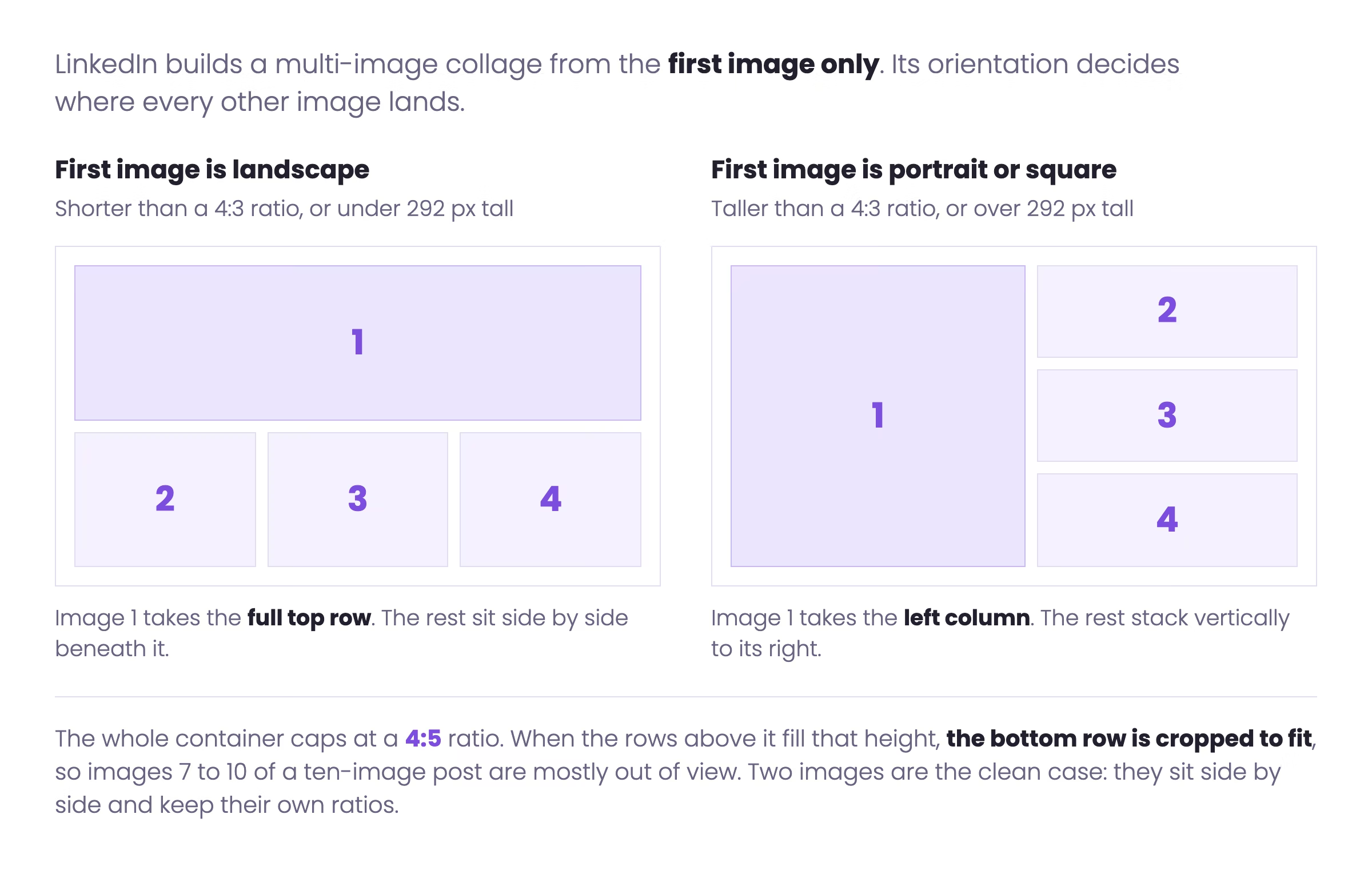
Two consequences follow. The first image is the only one with a guaranteed full-width or full-height slot, so it carries the hook. And because the container itself is capped at 4:5, LinkedIn's documentation is explicit that if the first and second rows fill that height, the bottom row is cropped to fit. A ten-image post buries images seven through ten.
Posts with exactly two images are the clean case. They appear side by side and keep their own aspect ratios, so a matched pair at 1200 x 1200 reads as a deliberate before and after rather than a collage.
Where are the safe zones inside a LinkedIn post image?
A post image has three zones that behave differently, and the loss happens at the edges you cannot see while designing.
The full frame is what a reader sees when the post is open in the feed on desktop at full width. Everything inside 1200 x 1200 renders. The square crop is what survives when the same image appears as a comment preview, a notification thumbnail or a reshare card. On a 4:5 vertical, that crop takes the middle and drops roughly 20 percent from the top and bottom combined. The text-clear zone is the area that stays legible after LinkedIn re-encodes the upload, which is a margin problem rather than a crop problem.
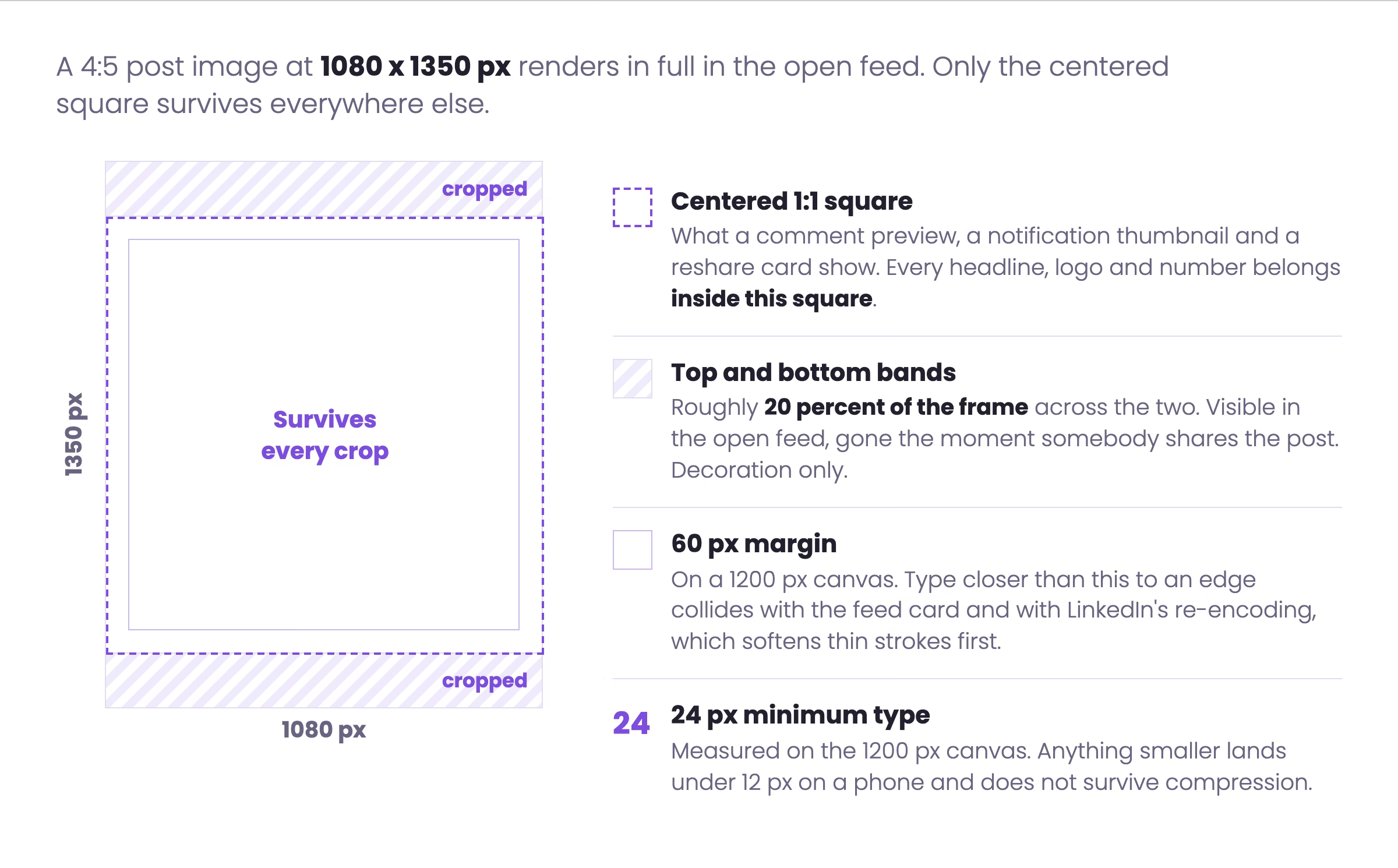
The rule we design client assets to: keep every headline, logo and number inside a centered 1:1 area, leave at least 60 pixels of margin on all four sides of a 1200 px canvas, and treat the top and bottom bands of a 4:5 vertical as decoration only. A chart axis label or a closing line placed in those bands disappears the moment somebody shares the post.
Why does LinkedIn blur or crop your post image?
Blur and crop are separate failures with separate causes, and each has a fix that takes one export.
Blur is a resolution and re-encoding problem. LinkedIn re-encodes every upload. Flat color and large type survive it. Fine gradients, thin strokes and 12 pixel captions do not. If the source file is smaller than the container, LinkedIn scales it up first and the detail is gone before compression starts. Export at the recommended pixel width, not at a fraction of it, and keep the smallest type above 24 pixels on a 1200 px canvas.
Crop is a ratio problem. The feed container tops out at 4:5. A 9:16 image hits that wall and loses the ends. LinkedIn's help documentation notes that images of other ratios appear at full size on mobile with subtle white padding rather than a crop, which is the better of the two outcomes and still leaves the post looking like a mistake. Export inside 4:5 and the question does not come up.
A third failure is the collapsed link preview. If the image LinkedIn pulls from a shared URL is under 200 pixels wide, the preview renders as a small thumbnail on the left of the post instead of a full-width card. That is an Open Graph problem on the destination page, not a LinkedIn setting, and it is worth checking before any post that carries a link. It also interacts with reach, because a collapsed preview occupies far less feed height. The LinkedIn algorithm guide covers what feed height is worth.
What image sizes do LinkedIn ad formats use?
Advertising specs are published as minimums and maximums rather than a single recommended number, which is more useful than it looks: the minimum tells you when LinkedIn will reject an asset, and the maximum tells you how much detail is worth exporting.
| Ad format | Recommended | Minimum | Maximum | Limits |
|---|---|---|---|---|
| Single image, landscape | 1200 x 628 px, 1.91:1 | 640 x 360 px | 7680 x 4320 px | 5 MB, jpg, png or gif, desktop and mobile |
| Single image, square | 1200 x 1200 px, 1:1 | 360 x 360 px | 4320 x 4320 px | 5 MB, recommended for cross-platform delivery |
| Single image, vertical | 720 x 900 px, 4:5 | 360 x 640 px | 2430 x 4320 px | Mobile only, borders appear unless the ratio is 4:5 |
| Carousel | 1080 x 1080 px, 1:1 | 1080 x 1080 px | not published | 2 to 10 cards, 10 MB total, JPG or PNG, no video |
| Video, vertical | 1080 x 1350 px, 4:5 | 360 x 450 px | 1080 x 1350 px | 75 KB to 500 MB, 3 seconds to 30 minutes, MP4 |
| Video, landscape | 1920 x 1080 px, 16:9 | 640 x 360 px | 1920 x 1080 px | 30 fps recommended, AAC or MPEG4 audio |
| Document | 1080 x 1350 px per page | not published | 300 pages | 100 MB, PDF, DOC, DOCX, PPT or PPTX, flattened layers |
| Message and Conversation banner | 300 x 250 px | 300 x 250 px | 300 x 250 px | Desktop only, optional |
| Spotlight logo | 100 x 100 px | 100 x 100 px | 100 x 100 px | Optional 300 x 250 px background image |
The character limits travel with the specs and are just as easy to miss. A single image ad headline is 70 characters and the introductory text is 150. A carousel card headline is 45 characters, with 255 for the introductory text. Copy written to the organic 3000 character limit gets truncated the moment it becomes an ad.
Creative specs are one part of the picture, and targeting and budget are covered in LinkedIn lead generation strategies.
Which numbers in most LinkedIn size guides are out of date?
Third-party size guides copy each other, so an old number survives for years after LinkedIn changes it. These are the four we see most often, checked against the current documentation in September 2026.
| Spec | Number still published widely | Current number | What it breaks |
|---|---|---|---|
| Page cover image | 1128 x 191 px | 1512 x 256 px | A cover built to the old size is upscaled and looks soft |
| Single image ad, vertical | 1080 x 1350 px only | 720 x 900 px at 4:5, up to 2430 x 4320 px | Assets built to one number miss the accepted range |
| Feed image ceiling | no ceiling named | maximum render ratio of 4:5 | 9:16 exports get cropped or padded |
| Organic video file size | 500 MB | 100 MB organic, 500 MB for ads | An upload that works from an ad account fails from a profile |
The Page cover change is the one that has done the most damage, because it moved from 1128 x 191 to 1512 x 256 and the old figure is still the first result on plenty of searches. The full set of profile and Page image specs, including the profile background photo at 1584 x 396, sits in the LinkedIn banner size guide.
What export settings should a LinkedIn content system use?
A content calendar that runs more than four posts a week needs a spec sheet a designer can work from without asking. This is the one we hand over at the start of a ghostwriting engagement. Set these as canvas presets once and the question never comes back.
LINKEDIN IMAGE EXPORT SPEC  ::  2026

SINGLE IMAGE POST
  Default            1200 x 1200 px     1:1
  Tall option        1080 x 1350 px     4:5   (feed ceiling)
  Wide option        1200 x  628 px     1.91:1
  Format             PNG or JPEG, under 5 MB
  Smallest type      24 px on a 1200 px canvas
  Margin             60 px on all four sides

MULTI-IMAGE POST
  Every image        1200 x 1200 px     1:1
  Max images         20
  First image        carries the hook. Landscape first goes on top,
                     portrait or square first goes in the left column.
  Warning            images in the bottom row get cropped

DOCUMENT POST (PDF carousel)
  Page size          1080 x 1350 px     4:5
  Pages              8 to 10  (limit is 300)
  Export             PDF, flattened layers, uniform page size, under 100 MB
  Page 1             title only. Page 2 is the first real slide.

NATIVE VIDEO
  Frame              1080 x 1350 px     4:5
  Length             30 to 90 seconds  (limit is 3 sec to 30 min)
  File               MP4, 30 fps, under 100 MB for organic
  Captions           burned in, inside the centered 1:1 area

LINK PREVIEW (Open Graph on the destination page)
  Image              1200 x  628 px     1.91:1
  Minimum width      200 px, below that the card collapses

PROFILE AND PAGE
  Profile photo      400 x  400 px
  Profile banner    1584 x  396 px
  Page logo          400 x  400 px
Page cover 1512 x 256 px Your posts should book meetings, not just clear the spec sheet.
Reachly writes and ships the LinkedIn content for founders and sales leaders, then runs the outbound that turns profile visits into booked meetings. One flat retainer, the whole system.
See how it works
Frequently asked questions about LinkedIn post image sizes
What is the best image size for a LinkedIn post?
1200 x 1200 pixels. LinkedIn recommends the 1:1 square for delivery across desktop and mobile, and a square is the only shape that survives the crop applied in comment previews, notification thumbnails and reshare cards.
What are the typical image sizes for LinkedIn posts in 2026?
Three sizes cover every organic post: 1200 x 1200 pixels for a square, 1080 x 1350 pixels for a vertical at the 4:5 feed ceiling, and 1200 x 628 pixels for a landscape or link preview at 1.91:1.
Is a LinkedIn post 16:9?
No. 16:9 is a video ad ratio, where LinkedIn accepts up to 1920 x 1080 pixels. A 16:9 still image in the feed renders as a short landscape card, and 1.91:1 at 1200 x 628 pixels is the closer match for that shape.
Which aspect ratio is best for LinkedIn posts?
1:1 for reliability and 4:5 when the design needs height. LinkedIn renders feed images at a maximum ratio of 4:5, so 4:5 takes the most vertical space in the feed without triggering a crop or white padding.
What is the maximum image size for a LinkedIn post?
5 MB per upload, with a resolution ceiling of 36 megapixels per image. A GIF is capped at 500 frames or 36,152,320 pixels, whichever it hits first.
How many images can you put in one LinkedIn post?
Up to 20 photos in a multi-image post. Practical limits arrive earlier: the image container caps at a 4:5 ratio, and LinkedIn crops the bottom row when the rows above it fill that height.
What size should a LinkedIn document post be?
1080 x 1350 pixels per page, at 4:5. The file can run to 300 pages and 100 MB, and LinkedIn recommends staying under 10 pages. Export as a PDF with flattened layers and a uniform page size.
What size is a LinkedIn link preview image?
1200 x 628 pixels at a 1.91:1 ratio, set through the Open Graph image on the destination page. If that image is under 200 pixels wide, LinkedIn renders a small thumbnail on the left of the post instead of a full-width card.
What size should a LinkedIn video be?
1080 x 1350 pixels at 4:5 for organic posts, which is the frame that fills the most feed height. Organic uploads are capped at 100 MB, against 500 MB for video ads, and length runs from 3 seconds to 30 minutes.
What image formats does LinkedIn accept?
GIF, HEIF and HEIC, JPEG, PNG and WEBP for images. Document posts accept DOC, DOCX, ODT, PPT, PPTX, PDF, PPSX and ODS. Video accepts MP4, MOV, AVI, WEBM, MKV, WMV and several others, with MP4 the safest.
How do you resize an image for a LinkedIn post?
Start a new canvas at the target size rather than scaling an existing export. Set 1200 x 1200 pixels, place the artwork inside a 60 pixel margin, and export as PNG. Scaling a finished 1920 x 1080 file to 4:5 crops the sides of the composition.
Why does LinkedIn crop the bottom of my image?
Because the image is taller than 4:5. The feed container caps at that ratio, so a 9:16 export is either trimmed at the ends or shown at full size with white padding on mobile. Exporting inside 4:5 removes the problem.
What size is a LinkedIn banner?
1584 x 396 pixels for a personal profile background photo and 1512 x 256 pixels for a Company Page cover image. Those sit on a separate spec sheet from post images, covered in the LinkedIn banner size guide.
Does image size affect LinkedIn reach?
LinkedIn publishes no ranking factor tied to pixel dimensions. The mechanism is indirect: a correctly sized 4:5 image occupies more vertical space in the feed than a cropped or padded one, and feed height is time on screen.
What canvas size should you use in Canva for a LinkedIn post?
A custom canvas at 1200 x 1200 px, or 1080 x 1350 px for a vertical. Canva's stock LinkedIn presets still include older sizes, so setting the canvas manually is the safer route.
Recommended service
LinkedIn Ghostwriting
Reachly writes the LinkedIn content for founders and sales leaders, then runs the outbound that turns profile visits into booked meetings.










