
To export leads from Sales Navigator you need an outside tool, because LinkedIn gives Sales Navigator no button that downloads a lead search to CSV. Most guides point you to a scraper. Reachly rebuilds the same search in a B2B database instead, finds the emails during the export and downloads the file, with no LinkedIn account at risk. In our walkthrough that took a pool of 875,305 sales leaders down to 13,596 at US software companies with 11 to 200 employees, and 4 of the 5 contacts we exported came back with an email.
Key Findings
- Sales Navigator has no native CSV export for lead searches. The only built-in route out is CRM sync on the Advanced Plus plan.
- Scraping Sales Navigator breaks LinkedIn's User Agreement, returns names and titles without emails, and caps you at the 2,500 results a search shows.
- Rebuilding the search in a B2B database such as AI Ark gets you the same people plus business emails in one export.
- Four filters (job title, location, industry, company size) took 875,305 sales leaders to 13,596 in our test search.
- Expect an email for roughly 60 to 70% of exported contacts. Our 5-person test export returned 4.
- Technology, funding and lookalike filters narrow a list by buying context, which is where outbound reply rates come from.
- Keep Sales Navigator for relationship work: recent activity, mutual connections, warm intros.
Thibault Garcia walks through the whole build on screen in the video below. The written steps, screenshots and our search numbers follow it.
Watch on YouTube: How to Scrape LinkedIn Sales Nav [AI Ark]
Can you export leads from Sales Navigator directly?
No. Sales Navigator lets you save leads to a list, but it has no button that downloads a search or a list as a CSV or Excel file. The one built-in exit is CRM sync on the Advanced Plus plan, which pushes saved leads into Salesforce, Microsoft Dynamics or HubSpot. It does not add email addresses, and it costs well above the Core and Advanced plans covered in our Sales Navigator pricing breakdown.
That leaves four ways people get a Sales Navigator list into a spreadsheet. They differ most on two things: whether you get emails, and whether your LinkedIn account is on the line.
| Method | What you get | Emails included | LinkedIn account risk | Source |
|---|---|---|---|---|
| Copy by hand | Whatever you paste | No | None | Sales Navigator interface |
| Browser extension scraper | Name, title, company, profile URL | Only with a separate finder | High: runs inside your logged-in session | LinkedIn User Agreement, section 8.2 |
| Cloud scraper or freelancer | Same fields, larger batches | Only with a separate finder | High: needs your session cookie | LinkedIn User Agreement, section 8.2 |
| B2B database (AI Ark) | Person, company, headcount, tech, funding | Yes, found during export | None: no LinkedIn login used | Reachly test search, Nov 2026 |
Why do we avoid scraping Sales Navigator?
Scraping Sales Navigator works, and plenty of teams do it. Reachly stopped building lists that way for three reasons, all of which cost time before a single email goes out.
The data stops at the profile
A scraper returns what the search page shows: name, title, company and LinkedIn URL. You still need an email finder for the addresses and a verifier on top of that, so one list means three tools and three exports to stitch together.
Big searches hit the result cap
Sales Navigator shows at most 2,500 results per search, 25 to a page. A market of 13,000 people has to be cut into five or more smaller searches by region or headcount, then deduplicated afterwards.
LinkedIn prohibits it
LinkedIn's User Agreement bans using bots, browser plugins or other software to scrape the service. Accounts that trip its automation checks get restricted, and the account at risk is usually the founder's or the top seller's. We would not trade that profile for a spreadsheet when the same people can be found elsewhere.

A Sales Navigator lead search: a Save button on every row and no way to download the list.
How do you rebuild a Sales Navigator search in AI Ark?
AI Ark is a B2B people and company database with filters that mirror Sales Navigator's: job title, location, industry and headcount. Disclosure: AI Ark is a Reachly partner, and we use it on client campaigns. For the walkthrough we built one persona: sales leaders at US software companies with 11 to 200 employees, the buyer for a service sold to SaaS sales teams.
Step 1: Add the job titles
Open People Search and add VP of Sales, Head of Sales and Sales Director under Job Title. Add the variants your buyers actually use, such as VP of Regional Sales or Global Head of Sales. Titles alone returned 875,305 people.

Step 2: Set person and company location
AI Ark filters on where the person lives and where the company is headquartered as two separate fields. Setting both to the United States keeps out people who work for a US company from another country, and people in the US working for a foreign one. That cut the pool to 246,146.
Step 3: Pick the industry
Choose Software and SaaS under Industry. If you sell into one slice, such as FinTech, add it as an extra industry or keyword filter. We kept it broad and landed at 45,586.
Step 4: Set company size
Select the 11 to 20, 21 to 50 and 51 to 100 ranges plus 101 to 200. AI Ark matches on the company's actual employee count, where Sales Navigator uses the headcount band the company picked on its LinkedIn page. Four filters in, the list stood at 13,596 people.

Step 5: Check fit before you export
Open five to eight profiles and read the company, the exact title and the headcount before spending a credit. Finding thousands of leads is easy. Finding a thousand who might buy is the work, and a two-minute scan catches a bad filter before it reaches your sequence.

The full narrowing, including the two extra filters covered further down, looks like this:
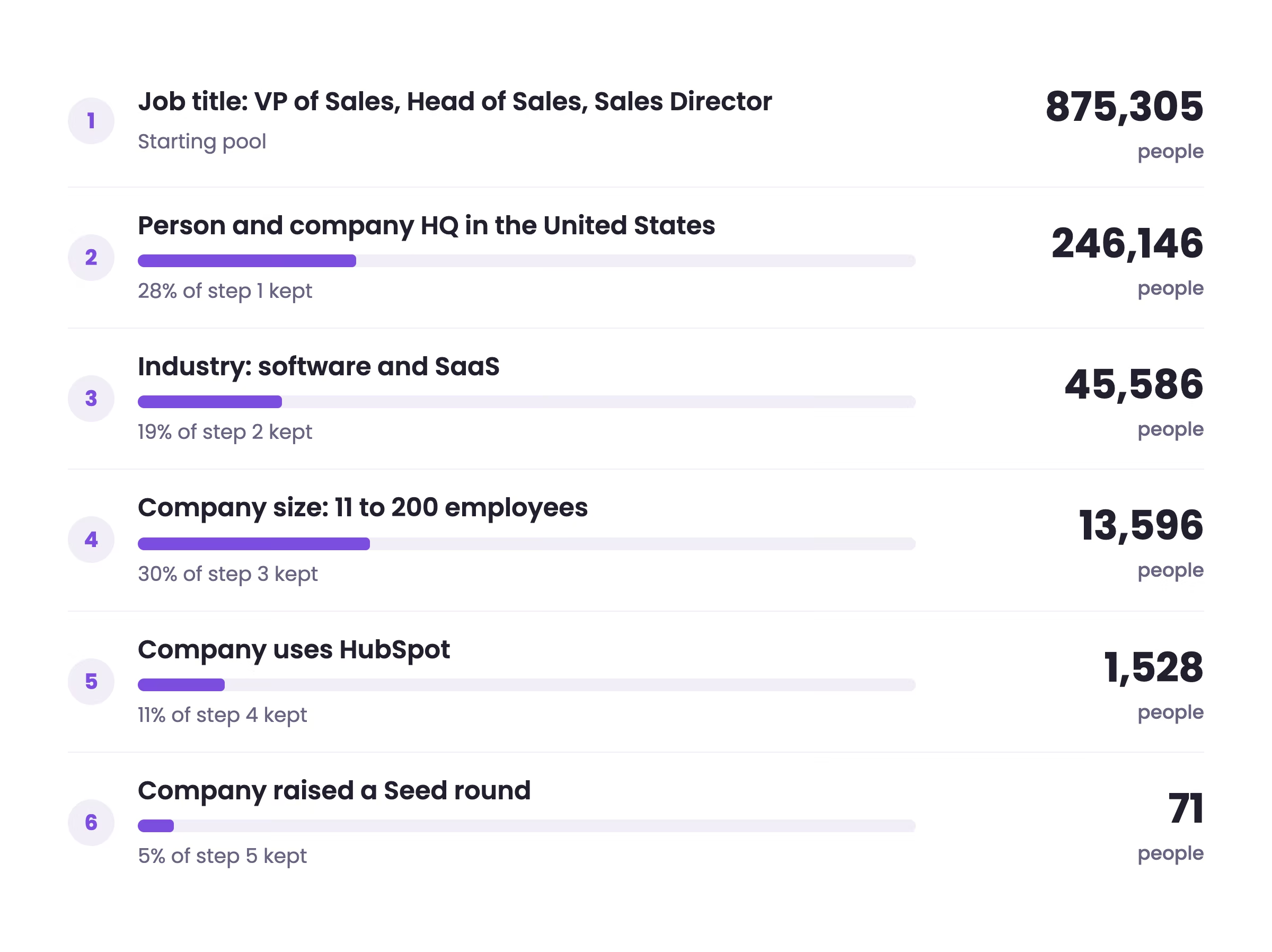
Each filter kept between 5% and 30% of the step before it. The steep drops come from the two context filters, technology and funding, which is why they belong at the end, once the core persona is fixed.
SEARCH
US sales leaders at small SaaS companies, AI Ark People Search

CORE PERSONA
Job title:        VP of Sales, Head of Sales, Sales Director
                  + your variants (VP of Regional Sales, Global Head of Sales)
Person location:  United States
Company HQ:       United States
Industry:         Software / SaaS   (add FinTech etc. only if you sell to one)
Employee size:    11 to 200   (actual headcount, not the LinkedIn range)

OPTIONAL NARROWING
Technologies:     HubSpot   (if your product plugs into it)
Funding type:     Seed, Series A, Series B
Lookalike:        paste the website of your best customer

EXPORT
Before export:    open 5 to 8 profiles, check company, title, headcount
Enrichment:       Email Enrichment ON, Email Re-Verify ON
After export:     run your own verification pass before the first send
How do you get email addresses with the export?
Select the people you want, click Export and switch on Email Enrichment and Email Re-Verify in the People Data Enrichment panel. AI Ark finds and checks the business email for each contact as part of the export, so there is no second upload into a separate email finder.
When the export finishes, download the CSV from the Exports page. Each row carries the email and the domain's MX records, which tells you whether the company runs Google Workspace or Outlook before you plan sending volume.
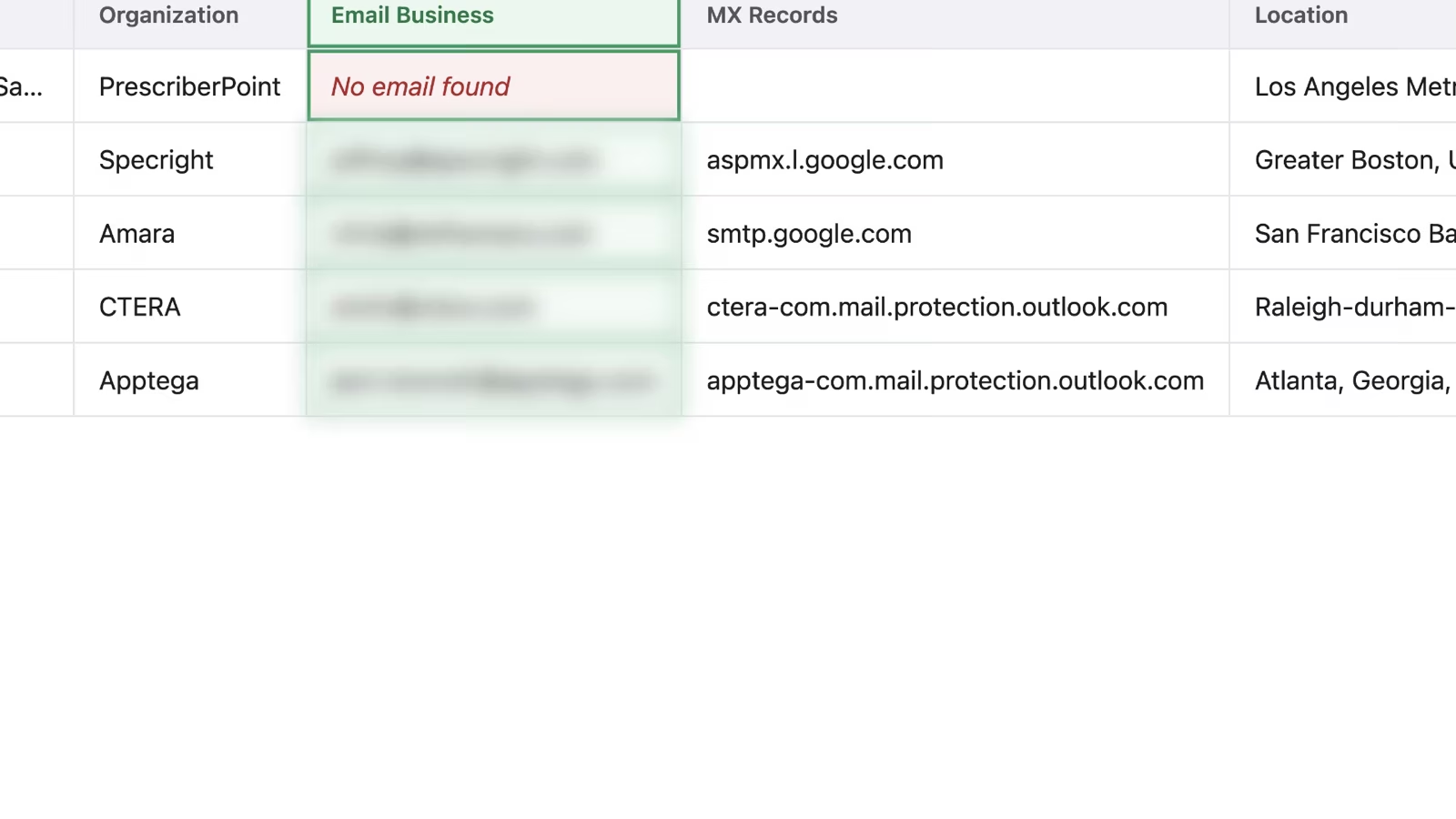
You will not get an email for everyone. On client lists we usually see 60 to 70% of contacts come back with one, and in the 5-person test above it was 4. Even with AI Ark's own verification, Reachly runs a second verification pass on every list before launch, because one bad batch can push bounce past the 2% line where we pull a mailbox out of rotation.
Which AI Ark filters are most useful for outbound?
The core persona gets you the right people. These three filters get you the right moment, and they are what turns a list into a reason to write.
Technology used
If your product plugs into HubSpot, filter for companies that run HubSpot instead of asking every prospect what CRM they use. Adding HubSpot to our search cut 13,596 people to 1,528, and every one of them can be opened with a line about their own stack.
Funding stage
Filter by funding type (Seed, Series A, Series B) and round amount if you sell to companies that just raised. Seed alone took the HubSpot list to 71. Funding does not prove fit, but it is a strong reason to reach out this quarter rather than next.

Lookalike companies
Paste the website of your best customer into the lookalike search and AI Ark returns companies that resemble it. Reachly uses this to widen a client's account list from the customers they already close well. One seed company in our test returned 29,959 lookalikes, ranked by similarity score.

Want the list built, verified and worked for you?
Reachly maps your TAM, builds the lead list from 10+ data sources, verifies every email and runs the campaigns across cold email, LinkedIn and cold calling. You take the meetings.
Book a call with ReachlyDoes a database replace Sales Navigator?
No. A database and Sales Navigator do different jobs, and Reachly keeps both. Before you cancel anything, three limits are worth knowing.
Database records go stale. AI Ark says it refreshes its data every 15 days, but people still change jobs and companies still grow between the refresh and your send. Local searches and brick-and-mortar businesses take more work, because those companies often have thin web footprints. And relationship prospecting (recent posts, mutual connections, warm intros) still lives on LinkedIn.
| Job | Better tool | Why |
|---|---|---|
| Build and export a lead list with emails | AI Ark | Emails found and verified inside the export |
| Filter by tech stack, funding or lookalikes | AI Ark | Company context filters sit in the same search |
| Check a prospect's recent activity | Sales Navigator | Posts and job changes show on the profile |
| Find mutual connections and warm intros | Sales Navigator | Uses your own network graph |
| Message prospects on LinkedIn | Sales Navigator | InMail and connection requests run from LinkedIn |
To get more from the Sales Navigator side, our guide to Sales Navigator search filters covers the Boolean and intent filters, and the B2B data providers comparison sets AI Ark against the other databases.
What should you do with the list after export?
A bigger list does not by itself bring more customers. The targeting, the offer and a message people want to answer do that, and the tool only makes the build faster. Here is how Reachly works a fresh export.
Every contact goes through a second verification pass. The sequence is two emails, five to six days apart, sent from warmed secondary domains at 12 to 15 emails per mailbox per day. People who do not reply get a LinkedIn touch after the email, from a profile that is not at risk because nothing was scraped with it. If you would rather hand all of that off, Reachly's outbound lead generation service covers the list, the infrastructure and the campaigns.
FAQ
Can you get email addresses from LinkedIn Sales Navigator?
Only in rare cases. Sales Navigator shows an email when a contact has chosen to share it with their connections, which most prospects have not. For everyone else you need a separate tool: either an email finder run on a scraped list, or a database such as AI Ark that finds emails during the export.
Is LinkedIn scraping allowed?
LinkedIn's User Agreement prohibits it. In the long-running hiQ Labs v. LinkedIn case, US courts found that scraping public profile data was unlikely to break federal anti-hacking law, but a 2022 ruling then held hiQ in breach of LinkedIn's User Agreement and the case closed with a settlement and an injunction against hiQ. The practical risk for most teams is account restriction, not a lawsuit.
How do I export data from LinkedIn Sales Navigator to Excel?
There is no direct route. Rebuild the search in a B2B database and download its CSV, which opens in Excel as is. If you are on Advanced Plus, CRM sync can push saved leads to your CRM, and you can export from there, without emails.
Can I export lead lists from Sales Navigator?
Lead lists can be saved and shared inside Sales Navigator but not downloaded. LinkedIn's data export under Settings covers your own connections, not Sales Navigator lists, as our guide to exporting LinkedIn contacts explains.
How do you find leads on LinkedIn Sales Navigator?
Start from a lead search with job title, geography, industry and company headcount, then save the search so new matches show up each week. The Sales Navigator lead generation guide covers the tactics that turn those saved searches into meetings.