


Findymail review based on live outbound tests: strong for verified B2B emails, but not a full outbound platform.
Findymail is a good tool if your problem is verified B2B emails, not a missing outbound system. The numbers that matter are simple: pricing starts at $49 a month for 1,000 credits, Findymail says it verifies emails in real time, and it backs the product with a stated bounce-rate guarantee under 5%.
That sounds useful because it is. It also gets misread all the time.
If you expect Findymail to build your TAM, score buying signals, warm domains, run cold email, LinkedIn, cold calling, and manage replies, you will outgrow it fast. If you want a deliverability-focused email finder that fits upstream of sending, it does the job.
This review looks at Findymail the way an outbound operator should. Not as a shiny homepage, but as one layer in a working stack.
What does Findymail actually do?
Findymail sits in the data and verification layer. Its job is to find work emails, verify them at the point of discovery, and keep weak records out of your send list.
That distinction matters.
Reachly’s own outbound tools stack places Findymail around list building and verification, not sending. Smartlead handles sending. Clay handles enrichment and workflows. Findymail is there to improve the quality of the record before it ever reaches a mailbox.
Here is the practical split:
[markdown] | Job | Does Findymail do it? | Why it matters in outbound | | --- | ---: | --- | | Find work emails from name plus company | Yes | Useful when your list starts with people, not email addresses | | Find emails from a LinkedIn URL | Yes | Helps when Sales Navigator is your source list | | Verify emails in real time | Yes | Reduces stale records before send | | Verify catch-all emails | Yes, by company claim | Helpful if your ICP sits behind catch-all domains | | Run sequences | No | You still need Smartlead or another sender | | Warm domains and mailboxes | No | Deliverability work sits elsewhere | | Handle replies and book the meeting | No | This is not a reply management tool | | Build a signal-based audience | No | You still need Clay, Apollo, Sales Navigator, or other inputs | [/markdown]If you frame it that way, the product makes sense. It is a verified-data tool, not a full outbound platform.
How does Findymail fit into live outbound campaigns?
In live campaigns, we do not judge a tool like Findymail by reply rate first. We judge it by whether it keeps bad data out of the system.
A reply rate tells you whether the offer and copy worked. A data tool earns its keep earlier than that. It helps you protect bounce rate, sender reputation, and list quality.
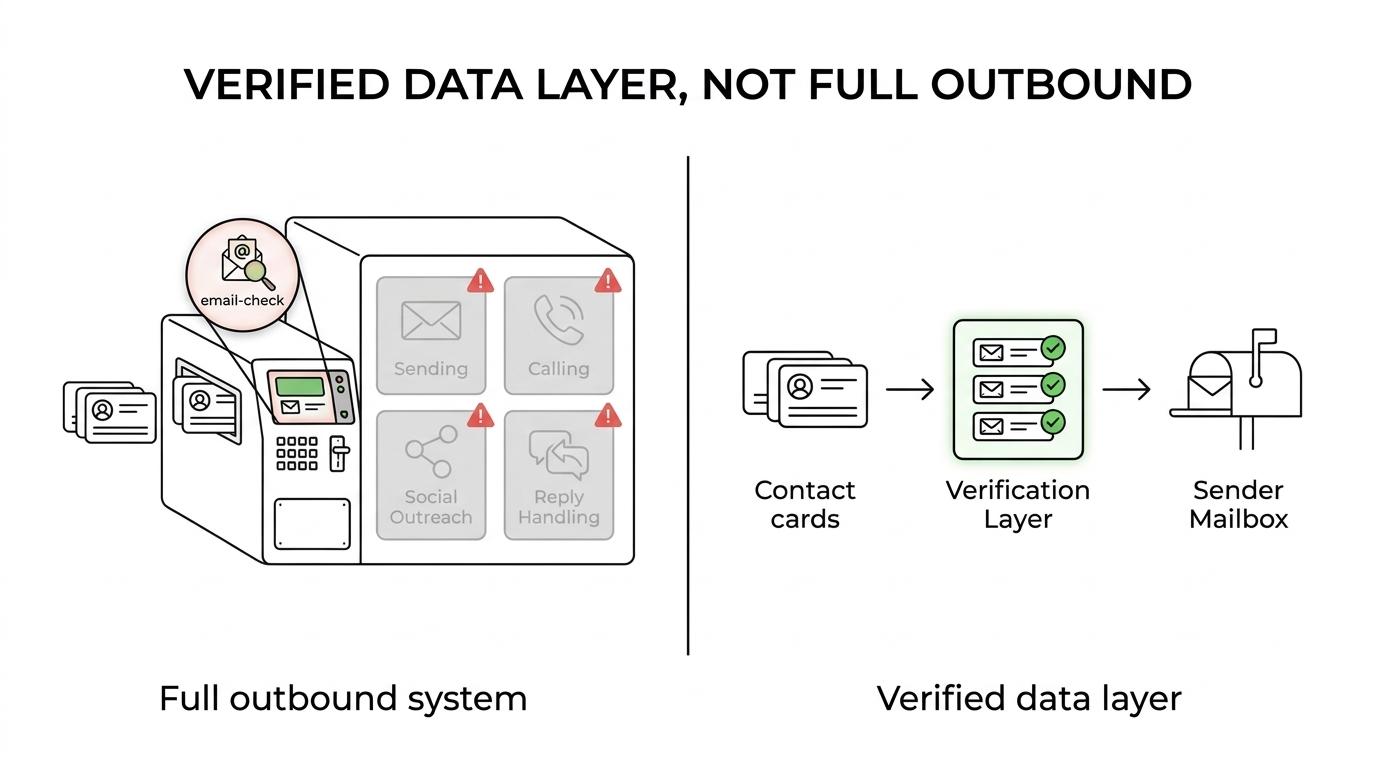
At Reachly, the stack is built in layers. Findymail fits before sending, inside the list-building workflow.
After you have the target accounts and contacts, the flow looks like this:
- Source the contacts: Clay, Apollo, LinkedIn Sales Navigator, and other data inputs
- Find and verify the email: Findymail checks the address before it reaches the sequence
- Send and manage replies: Smartlead handles cold email, then reply management picks up from there
That upstream role is exactly where a tool like this should live. You do not buy it to replace your sender. You buy it to lower the odds of loading junk into your sender.
Thibault Garcia, founder of Reachly, puts the standard clearly:
“Every list gets verified twice. Bounce rate is the one number we refuse to be surprised by, because by the time it surprises you the domain is already damaged.”
That is the real use case. Clean data first, then send.
How good are Findymail’s verification claims?
The claims are strong on paper. The operator question is whether those claims line up with what you need in a live setup.
Here are the numbers and statements that show up most often in Findymail coverage:
[markdown] | Claim | Source | Year | Operator read | | --- | --- | ---: | --- | | Real-time verification at the moment of request | Findymail pricing page | 2026 | Better than pulling from a stale database | | Catch-all verification | Findymail pricing page | 2026 | Useful if your ICP includes catch-all domains | | Under 5% bounce-rate guarantee, with credit refund if higher | Findymail pricing and FAQ, also summarized by Articuler | 2026 | Good protection, but still higher than what serious outbound teams target | | Customers sending to Findymail-sourced emails report bounce rates under 2% | Findymail homepage | 2026 | Good sign, but still a company claim, not an independent benchmark | | SOC 2 Type 2, GDPR compliant, hosted in the EU | Findymail homepage | 2026 | Helpful for security and procurement reviews | [/markdown]The under 5% promise sounds good, but it is not the bar most outbound teams want. Reachly’s working target is under 3% bounce rate. If you are serious about deliverability, 5% is the safety rail, not the goal.
That does not make the claim weak. It just means you should read it correctly.
If Findymail keeps you well below 3% in your actual list, great. If you are sitting near 5%, the rest of your process still needs work. You may be using weak source data, sending to an old list, or skipping re-validation before launch.
What does Findymail cost in 2026?
Pricing is simple enough, but the credit math changes fast depending on whether you are buying emails or phone numbers.
Based on October 2026 source coverage, these are the key pricing points:
[markdown] | Item | Source | Year | Price or rule | | --- | --- | ---: | --- | | Free trial credits | Articuler review | 2026 | 10 free credits | | Entry plan | Findymail pricing, also summarized by Articuler and Reachly | 2026 | $49 per month for 1,000 credits | | Upper monthly plan mentioned in review coverage | Articuler review | 2026 | Up to $849 per month | | Email credit cost | Findymail pricing | 2026 | 1 email = 1 credit | | Phone credit cost | Findymail pricing | 2026 | 1 phone = 10 credits | | Annual billing | Articuler review | 2026 | Two months free | [/markdown]If your motion is email-first, that credit model is reasonable. If you need phone data in volume, the spend climbs quickly.
That is the first place teams misread the pricing.
A 1,000-credit entry plan gives you 1,000 emails, or only 100 phone numbers, or some mix of both. If your SDR motion depends heavily on cold calling, you need to run the math before you buy.
After that, the real cost is workflow fit. If Findymail plugs into your Clay build and keeps records clean, it saves time. If your team still exports CSVs, cleans them by hand, and rechecks them elsewhere, the software cost is not the problem.
Where does Findymail fall short?
Findymail does one job well. It does not try to do five others.
That is good product design. It is also the main limitation.
You still need other tools and process for the parts that matter after verification. You need TAM mapping, signal-based targeting, copy, sender setup, inbox placement, reply handling, and meeting booking. That is why Reachly positions it inside a wider outbound system rather than as the center of the system itself.
There is another caveat. Verification quality is only part of deliverability.
You can buy clean emails and still hurt performance with bad infrastructure. If SPF, DKIM, DMARC, and a custom tracking domain are not set up, the data tool did not fail you. Your sending setup did.
Findymail also does not solve audience quality. If the offer is weak or the ICP is off, verified emails just let you reach the wrong people more cleanly.
A Series A client at Reachly sending 20,000 to 30,000 emails a month moved reply rate from 0.5% to 1%, then to 1.6% after switching to direct, question-based copy with a lead magnet and a stronger offer. That is a good reminder that data quality matters, but the offer is still the bigger lever.
Who should buy Findymail, and who should skip it?
If you already run outbound and want a better verified-data layer, Findymail makes sense. If you need a sender, a warmup engine, or a full done-for-you system, it does not.
The best fit is a team that already knows where this tool sits. The worst fit is a team hoping one data vendor will fix a broken outbound motion.
A simple filter helps:
- Buy it if: you already have list sourcing and sending, but want cleaner emails before launch
- Buy it if: your workflow lives in Clay and LinkedIn Sales Navigator
- small, verified email lists
- catch-all-heavy ICPs
- Skip it if: you need cold email, LinkedIn, cold calling coordinated in one system
- Skip it if: your real problem is offer, copy, or domain reputation
There is also a company-stage filter here.
If your average contract value is low, or your TAM is tiny, you may not need another paid data layer yet. Founder-led manual prospecting is often enough at that stage. Findymail makes more sense once you have repeatable outbound, enough volume to care about sender health, and a reason to be strict on verification.
What is the best way to use Findymail without hurting deliverability?
Use it early in the workflow, then treat the data as perishable.
That means you find and verify emails before they enter Smartlead, then re-validate any list older than 3 months before send. People change jobs. Domains change policies. Old data decays.
The rest of the deliverability work still sits outside Findymail. You need proper authentication, matched sender ESP where possible, and patient warmup. In 2026, Reachly treats 30 days as the safer warmup floor because Google adds a yellow banner to mail from domains younger than 30 days. Sending caps matter too. Google sits around 15 emails per mailbox per day, and Outlook around 10 to 12.
A tool like Findymail helps you start clean. It does not give you permission to get sloppy after that.
If you want the full system around verified data, not just the data layer, look at Reachly’s outbound lead generation services. That covers signal-based targeting, cold email, LinkedIn, cold calling, reply handling, and meeting booking. You can also use our outbound tools page to compare where each tool belongs, or book the meeting with Reachly if you want a direct audit of your current setup.
Short version: Findymail is worth it when your bottleneck is verified B2B email data. It is not a sender, not a TAM builder, and not a substitute for strong infrastructure or a real offer.










