

Cold email infrastructure is the set of secondary domains, mailboxes, DNS records, warm-up and sending software your cold emails go out through. Reachly runs 2 to 3 mailboxes per domain at 12 to 15 sends a day each, after 4 weeks of warm-up, so 1,000 emails a day takes about 132 mailboxes on 53 domains and roughly $689 a month before software and people.
Key Findings
- Plan every mailbox at 12 to 15 cold emails a day on Google Workspace and 10 to 12 on Outlook, and keep that cap after warm-up.
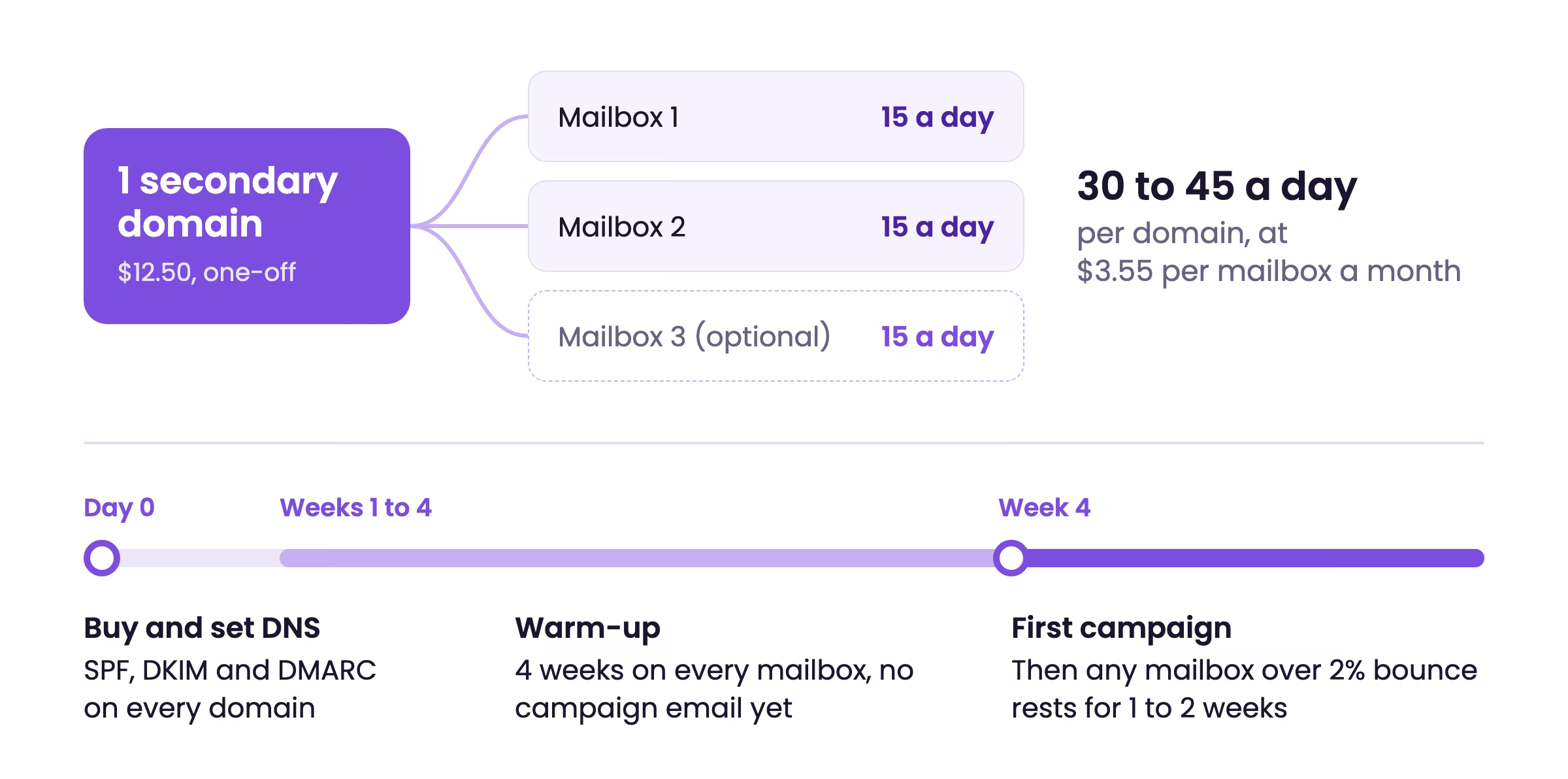
- Put 2 to 3 mailboxes on each secondary domain. Domain count follows sending volume and nothing else.
- Every new mailbox needs 4 weeks of warm-up, so campaigns on fresh domains start in week 4.
- Our live 30,000 a month account runs on 180 mailboxes and 72 domains: $640 a month in mailboxes and $900 in domains, bought once.
- Scaled from that account, 5,000 emails a day needs about 660 mailboxes on 264 domains and costs about $3,443 a month in mailboxes and data.
- A mailbox comes out of rotation for 1 to 2 weeks once its bounce rate passes 2% or its reply rate starts to fall.
- The tool stack alone runs $1,500 to $4,000 a month before anyone writes copy or answers replies.
What goes into a cold email infrastructure setup?
Seven parts, and each one has a setting that decides whether email lands in the inbox. The table shows what Reachly sets on client accounts and what each part costs us. For how these pieces fit into cold email as a whole, start with what cold email is and how it works.
| Part | What it does | Reachly's setting | What it costs us |
|---|---|---|---|
| Secondary domains | Keeps cold sending off your main domain | 2 to 3 mailboxes per domain | $12.50 per domain, one-off |
| Mailboxes | The sender addresses prospects see | 12 to 15 sends a day (Outlook 10 to 12) | $3.55 per mailbox a month |
| DNS records | SPF, DKIM and DMARC prove you are allowed to send | Set on every domain before warm-up | Free, set at the registrar |
| Warm-up | Builds a sending history before real campaigns | 4 weeks on every mailbox, always | Included in most sending tools |
| Sending platform | Runs sequences across all mailboxes | Smartlead, base plan | $50 to $150 a month at 30,000 sends |
| Data and verification | Contacts and a check that each email exists | Every list verified before launch | About 2 cents per contact, all in |
| Rotation and monitoring | Spreads volume and pulls damaged mailboxes | Bounce over 2% rests a mailbox 1 to 2 weeks | Built into the sending platform |
Source for every setting and cost in this article: Reachly's own operating numbers, approved by founder Thibault Garcia in October 2026.
How many mailboxes and domains do you need for your daily volume?
Divide your daily volume by 15 for the minimum mailbox count, then plan for about twice that so tired mailboxes can rest. The table scales our live 30,000 a month account to four common volumes.
| Daily volume | Mailboxes | Domains | Warm-up | Domains, one-off | Mailboxes and data a month |
|---|---|---|---|---|---|
| 1,000 a day | 132 (minimum 67) | 53 | 4 weeks | $662 | $689 |
| 2,500 a day | 330 (minimum 167) | 132 | 4 weeks | $1,650 | $1,722 |
| 5,000 a day | 660 (minimum 334) | 264 | 4 weeks | $3,300 | $3,443 |
| 10,000 a day | 1,320 (minimum 667) | 528 | 4 weeks | $6,600 | $6,886 |
| 1,364 a day (our live 30,000 a month account) | 180 (minimum 91) | 72 | 4 weeks | $900 | About $960 |
How the table is worked out
The bottom row is real: 180 mailboxes and 72 domains carry 30,000 emails a month for one client. That is about 7.6 sends per mailbox per working day, half the cap, and the slack is deliberate. It lets any mailbox showing early damage sit out for a week or two without the campaign slowing down. Every other row keeps that same ratio of mailboxes and domains to daily volume, over 22 working days a month.
The minimum in brackets is daily volume divided by 15. The monthly column is mailboxes at $3.55 each plus data at about 2 cents per new contact for the record and its verification, on a 2-email sequence, so each contact takes two sends. At 1,000 a day that is $469 in mailboxes and $220 in data. Domains are a one-off purchase, so they sit in their own column.
Why we plan at 15 a day when most guides say 30 to 50
Most of the pages ranking for this term plan at 30 to 50 sends per mailbox. We cap at 15 on Google and 10 to 12 on Outlook because a mailbox sending 15 a day looks like a person, and mailboxes are the cheapest line in the budget. Doubling the mailbox count adds about $234 a month at 1,000 a day. Losing a domain costs four weeks of warm-up. The full math for one volume, including how much of the market can absorb it, is in our breakdown of how to send 5,000 cold emails a day.
How much does cold email infrastructure cost per month?
At 1,000 emails a day, mailboxes and data come to about $689 a month, plus $662 once for domains. Software and the person running it sit on top, and at most volumes they cost more than the infrastructure itself. Here is what one real account costs Reachly, line by line.
| Line item | Cost | Note |
|---|---|---|
| Domains | $900 one-off | 72 domains |
| Mailboxes | $640 a month | 180 mailboxes |
| Data | $450 | 45,000 leads, 3 months of sending |
| Email verification | $500 | 45,000 credits |
| Sending software | $50 to $150 a month | Smartlead, base plan |
| People | $2,500 to $5,000 a month | One GTM engineer, or an operator plus a strategist |
The infrastructure lines are small next to the last one. Someone has to write the copy, build the lists, watch the mailboxes and answer replies, and that person is most of the cost.
Running it yourself or handing it off
By Reachly's count, the tool stack alone runs $1,500 to $4,000 a month once data, enrichment, verification and sending are all paid for. Reachly's cold email agency service starts at $3,500 a month and includes the domains, mailboxes, warm-up, data and the people. Running it in-house makes sense when you already have someone who can write and has time to watch deliverability every week.
How do you set up cold email infrastructure, step by step?
Eight steps, in this order. Steps 2 to 4 take an afternoon. Step 5 takes four weeks and cannot be shortened on new domains.
- Work out the counts from your daily volume
- Buy the secondary domains
- Create the mailboxes
- Set SPF, DKIM and DMARC
- Warm up every mailbox for 4 weeks
- Connect the sending platform and set the caps
- Verify the first list
- Launch, then rotate
Step 1: Work out the counts from your daily volume
Pick a daily number, divide by 15 for the minimum mailbox count, and plan about double that. Divide the mailboxes by 2.5 for the domain count. Use the table above if your volume is close to one of its rows.
Step 2: Buy the secondary domains
Buy .com variations of your brand name, such as getbrand.com or brandhq.com, and point each one to your main website so a prospect who types it in lands somewhere real. Never send cold email from your main domain. If a sending domain gets burned, your invoices and support email keep working.
Step 3: Create the mailboxes
Create 2 to 3 mailboxes per domain on Google Workspace or Microsoft 365, under real names from your team, with a profile photo and a signature. Infrastructure resellers such as Zapmail create the mailboxes and set the DNS for you, which saves most of a day at 50 domains or more. Disclosure: Zapmail and Smartlead are Reachly partners, and we may earn a commission through the links in this article.
Step 4: Set SPF, DKIM and DMARC
Add the three authentication records on every domain before warm-up starts. Google and Yahoo have required all three for bulk senders since February 2024. The record-by-record walkthrough is in our SPF, DKIM and DMARC setup guide.
Step 5: Warm up every mailbox for 4 weeks
Turn on warm-up the day the mailboxes exist and leave it running for 4 full weeks before any campaign email goes out. Keep it running at a low level afterwards. The ramp schedule is in how long to warm up a cold email domain.
Step 6: Connect the sending platform and set the caps
Connect every mailbox to one sending platform and set the daily cap per mailbox: 15 on Google, 10 to 12 on Outlook. We run client campaigns on Smartlead, and the base plan covers a 30,000 a month account. Instantly works the same way, and our Smartlead vs Instantly comparison covers the differences. We leave open tracking off, because the tracking pixel can hurt placement and the open rate it reports is unreliable.
Step 7: Verify the first list
Run every address through a verifier before it reaches a sequence. In our experience 10 to 25% of a raw list is catch-all addresses, depending on industry and country, and those are where most bounces come from. Send catch-alls in a separate, smaller campaign so they cannot drag a good mailbox past 2% bounce.
Step 8: Launch, then rotate
Start campaigns in week 4 with a 2-email sequence, 5 to 6 days apart. Check bounce and reply rate per mailbox every week, and rest any mailbox whose bounce passes 2% or whose reply rate starts dropping. How the platform spreads volume across the pool is covered in inbox rotation for cold email.
The same eight steps as a checklist you can tick and copy:
Should cold email mailboxes be on Google Workspace or Outlook?
Either works. Google mailboxes take up to 15 sends a day under our caps, and Outlook mailboxes 10 to 12, so an all-Outlook pool needs a quarter to a third more mailboxes for the same volume. Splitting the pool across the two providers also means one provider changing its filtering does not stop the whole campaign.
How long does new cold email infrastructure take before it can send?
Four weeks on new domains, because every mailbox warms up for 4 weeks before its first campaign email. Buying the domains and setting DNS takes a day or two at the start, so plan on campaigns starting in week 4 and steady volume by month 3.
The only shortcut is infrastructure that is already warm. On pre-warmed, non-branded domains, Reachly gets campaigns live in week 2 and first meetings within 10 days. Budget cannot buy the warm-up down on brand-new domains.
What breaks cold email infrastructure after launch?
Three things, and all three show up in the numbers before they show up in the inbox.
Bounces from unverified data
A bounce rate over 2% is the line where we rest a mailbox. Bad data causes most of it, which is why cheap data costs more in the end: replacing a domain means another 4 weeks of warm-up. How filters judge a damaged domain, and how one recovers, is in domain reputation for cold email.
Spam complaints
Google's sender guidelines ask bulk senders to keep the spam complaint rate reported in Postmaster Tools below 0.1% and never let it reach 0.3%. A clear opt-out line in every email costs a few replies and keeps complaints down.
Volume creep
When a campaign works, the temptation is to raise the per-mailbox cap. Add mailboxes instead. The cap is what keeps the setup looking like people sending email, and the broader picture of what keeps mail out of spam is in our email deliverability guide.
If you would rather not run any of this yourself, Reachly's cold email agency builds and runs the whole setup on dedicated domains, so your main domain is never touched.
FAQ
How do you send 10,000 emails per day?
Across about 1,320 mailboxes on 528 domains, never from one account. A single Google Workspace account stops at 2,000 messages a day by Google's own limit, and cold email needs far less per mailbox than that. At 10,000 a day you also cross Google's bulk sender line of 5,000 messages a day to personal Gmail addresses, which adds one-click unsubscribe to the authentication rules.
Is it legal to cold email?
In the US, yes, under the CAN-SPAM Act, as long as the subject line is honest, the email carries a real postal address and a working opt-out, and opt-outs are honored within 10 business days. The FTC can fine more than $50,000 per violating email. The EU and UK allow B2B cold email on legitimate interest under GDPR, while Canada's CASL generally requires consent first.
Do cold emails still work?
Yes. Across Reachly's client campaigns, 1 to 5% of emails get a reply and 10 to 30% of replies are positive, which works out to one positive reply for every 200 to 600 emails sent. Small, tightly targeted sends of 50 or fewer contacts reached a 5.8% reply rate against 2.1% for large sends, and our accounts produced about 4,500 positive replies in Q3 2026.