


Sending 5,000 cold emails a day takes about 334 mailboxes sending at 15 a day each, inside a pool of roughly 500 so a third can rest, spread across about 200 domains. That pool costs around $1,780 a month in mailboxes plus about $2,500 up front for domains, and every mailbox needs four weeks of warm-up before it sends a campaign email. The arithmetic is the easy part. The harder question is whether your market and your offer can absorb that volume.
Key Findings
- Reachly caps every mailbox at 15 cold emails a day on Google and 10 to 12 on Outlook, so 5,000 a day needs about 334 mailboxes actively sending.
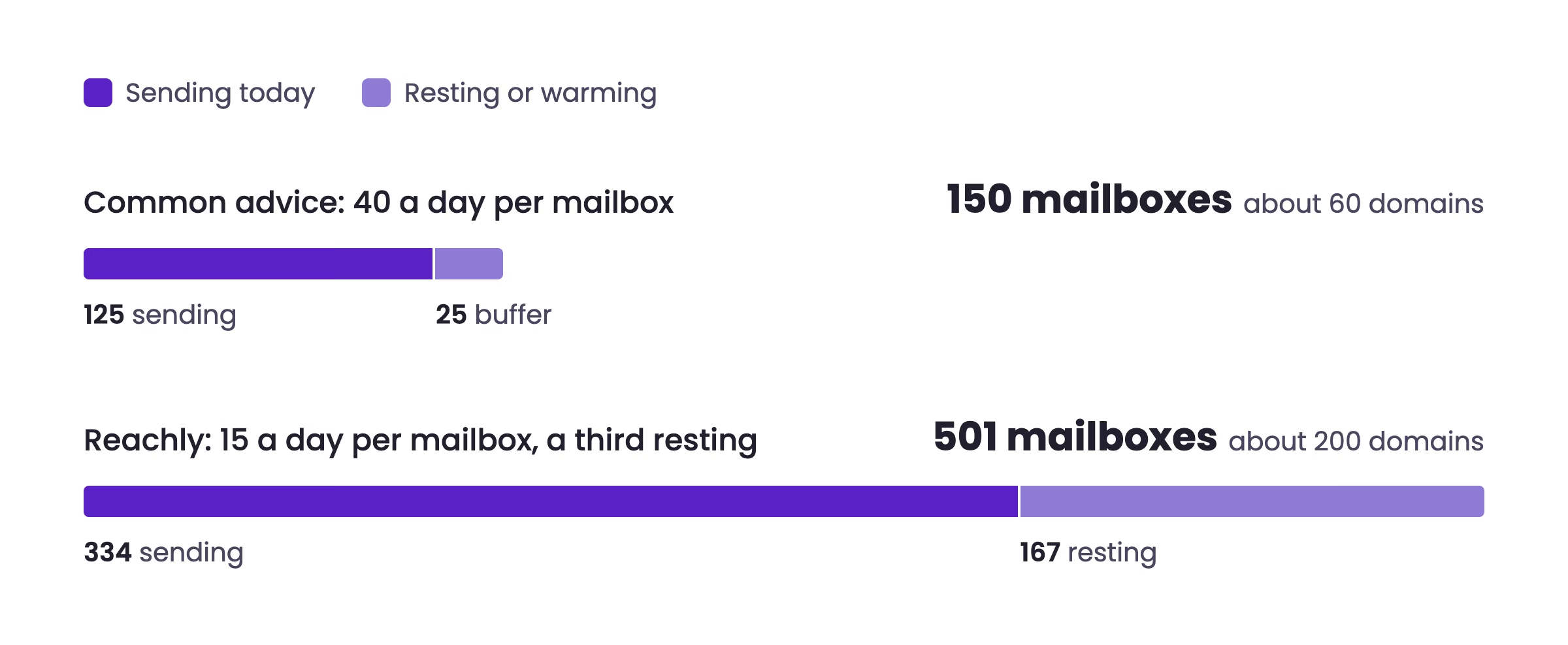
- A third of the pool always rests or warms, which takes the total to about 500 mailboxes. That is the same ratio Reachly runs for a 30,000 a month account: 180 mailboxes, 120 sending and 60 resting.
- At two to three mailboxes per domain, 500 mailboxes sit on about 200 domains, so one blacklisted domain costs you around 37 sends a day.
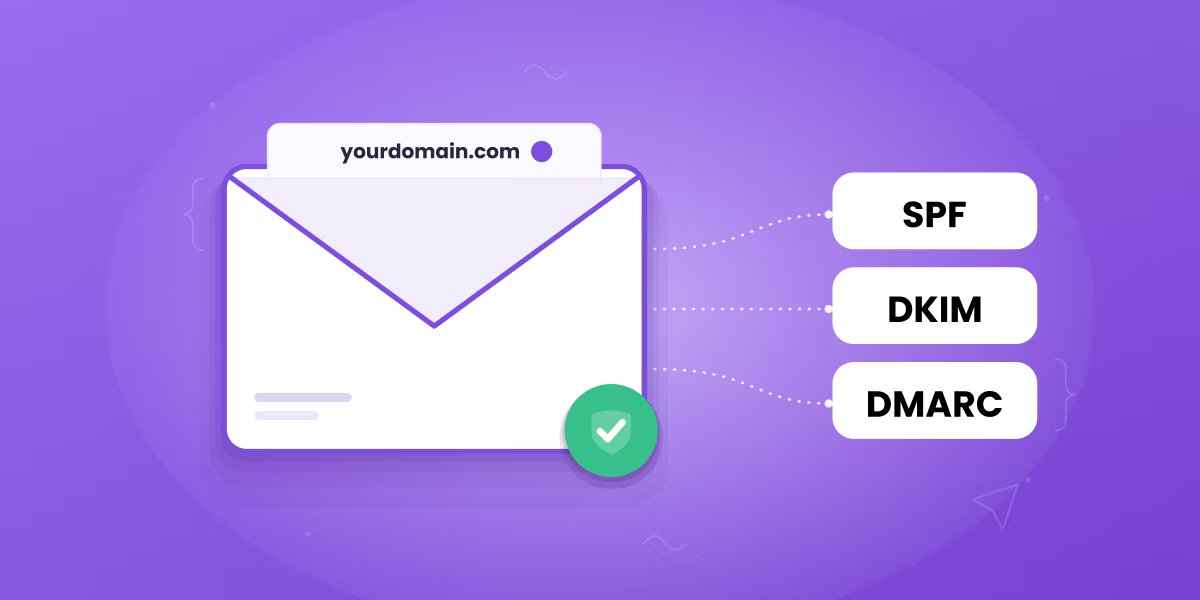
- Google treats any sender pushing 5,000 or more messages a day to Gmail addresses as a bulk sender, which makes SPF, DKIM, DMARC, one-click unsubscribe, and a spam complaint rate under 0.3% mandatory.
- On a two email sequence, 5,000 sends a day uses about 55,000 fresh contacts a month, so a single-vertical ICP is usually exhausted inside two months.
- At one positive reply per 400 to 600 emails, 5,000 a day produces roughly 8 to 12 positive replies a day, and most teams reach that number faster by fixing the offer at 1,000 a day.
The volume question usually arrives as an infrastructure question and turns into an economics question. Anyone can buy 500 mailboxes. Keeping all of them out of spam folders while feeding them enough in-market contacts to justify the spend is where the work sits.
| Daily target | Sending mailboxes | Total pool | Domains | Mailboxes / mo | Domains, up front |
|---|---|---|---|---|---|
| 1,000/day | 67 | ~100 | ~40 | ~$355 | ~$500 |
| 2,500/day | 167 | ~250 | ~100 | ~$890 | ~$1,250 |
| 5,000/day | 334 | ~500 | ~200 | ~$1,780 | ~$2,500 |
| 10,000/day | 667 | ~1,000 | ~400 | ~$3,560 | ~$5,000 |
How many mailboxes do you need to send 5,000 emails a day?
You need about 334 mailboxes sending at 15 a day, and about 500 in total once a third of the pool is resting. The per-mailbox limit is the binding constraint on the whole system, so every capacity plan starts there.
Why 15 a day, and why most guides say 40
Many guides plan at 40 or more sends per mailbox on a mature domain. Reachly plans at 15 on Google Workspace and 10 to 12 on Outlook, and that cap holds after warm-up too. A mailbox sending 40 a day looks like a broadcast tool to Gmail and Outlook filters. A mailbox sending 15 looks like a person. The cost of the lower cap is more mailboxes, and mailboxes are the cheapest line in the budget.
The difference compounds fast at 5,000 a day. Planned at 40, the same volume looks like 125 mailboxes plus a small buffer. Planned at 15, it is 334 sending mailboxes before any rest capacity.
Why a third of the pool rests
Reachly keeps roughly a third of every client's mailboxes out of rotation at any time. A mailbox comes out when its reply rate starts falling or its bounce rate passes 2%, rests for one to two weeks, and goes back in. Pulling on reply rate catches trouble before the warm-up score drops, which is the point. On a 30,000 a month account that means 180 mailboxes on 72 domains, with about 120 sending and 60 resting, which works out to roughly 11 sends per active mailbox per working day.
Apply the same ratio to 5,000 a day and the 334 sending mailboxes need about 167 resting alongside them, for a pool of roughly 500. Inbox rotation is what turns that pool into a single sending capacity. The platform spreads each campaign across the active mailboxes so none exceeds its cap, and a mailbox showing early damage can be pulled without stopping the campaign.
How many sending domains should 500 mailboxes sit on?
Plan on about 200 domains for 500 mailboxes, which is two or three mailboxes each. Domain reputation is scored per domain, so concentrating mailboxes multiplies the damage when one goes wrong.
The reason to spread mailboxes thin is containment. If 25 mailboxes share one domain and that domain lands on a blacklist, 375 sends a day vanish in one event. Spread at two to three per domain, the same blacklisting costs about 37. Reachly does not try to rescue a blacklisted domain. It is retired and replaced from the resting pool.
Use secondary domains for sending and keep your primary domain out of cold outreach entirely. A blacklisted primary domain stops your invoices, your support replies, and your recruiting emails alongside your campaigns.
Every one of those 200 domains needs SPF, DKIM, and DMARC configured before it sends anything. At this volume that is a provisioning project, and it is the step teams most often rush.
What does sending 5,000 emails a day actually cost?
Expect about $1,780 a month for 500 mailboxes, around $2,500 up front for 200 domains, and roughly $1,150 a month in contact data and verification. The mailbox count and the contact count account for almost all of it.
Reachly's own unit costs
These come from what Reachly pays to run 30,000 emails a month for one client: 180 mailboxes at about $640 a month, or roughly $3.55 each, and 72 domains for about $900, or roughly $12.50 each, bought once and renewed yearly. Contact data runs about a cent per lead all in, including enrichment and normalization, and email verification about another cent per address.
Scaled to 5,000 a day
5,000 a day across 22 working days is 110,000 emails a month. On a two email sequence that is 55,000 new contacts a month, so data and verification land near $1,150. Add the mailboxes and the domains spread over a year and a self-run 5,000 a day system costs a little over $3,100 a month before the sequencer plan, the copywriting, or anyone answering replies. On the 30,000 a month account, Reachly budgets one GTM engineer or operator at $2,500 to $5,000 a month to run it. For comparison against the managed route, see what a lead gen agency costs.
Cheap data is the false economy here. It causes the bounce rates that get domains retired, and bounce control is cheaper than replacing domains and waiting out another warm-up.
How long does it take to warm up to 5,000 emails a day?
Every mailbox needs four weeks of warm-up before it sends a single campaign email, so the earliest full-volume day is week five. Bringing 200 domains online in weekly cohorts pushes full volume to around week eight. Warm-up time is the real constraint on launch date, and budget cannot buy it down.
Provisioning all 500 mailboxes on day one and warming them together creates its own problem, because 200 brand new domains starting to send in the same week is a pattern filters notice. The workable approach is cohorts. Bring about 50 domains live per week across four weeks and let each cohort finish its own four weeks. Capacity then arrives in steps from week five onward. The day-by-day ramp is in the email warm-up guide.
The only real shortcut is infrastructure that is already warm. Reachly keeps pre-warmed infrastructure for clients who need cold email live sooner. On a standard engagement, LinkedIn replies arrive from week two to three while the mailboxes warm, cold email launches from week four, and first meetings come two to six weeks after launch. The sending curve does not compress, so the order of channels is what buys back time.
What do Google and Microsoft require at 5,000 emails a day?
At 5,000 messages a day to Gmail addresses you become a bulk sender under Google's email sender guidelines, which carries hard authentication and complaint-rate requirements. Microsoft applies comparable requirements to high-volume senders into Outlook.com.
The obligations are specific. SPF and DKIM on the sending domain, a published DMARC record, alignment between the visible From domain and the authenticated domain, a functioning one-click unsubscribe header on marketing mail, and a spam complaint rate held below 0.3%. Crossing 0.3% triggers throttling and then rejection.
The 0.3% figure deserves attention because of how small it is. At 5,000 sends a day, roughly 15 complaints in a day puts you at the threshold. Fifteen people out of five thousand marking a message as spam is an ordinary outcome for a poorly targeted list, which is why targeting quality becomes a deliverability control at this volume. Our Gmail bulk sender requirements breakdown covers the full checklist.
One more consequence of the 5,000 threshold: it counts messages to Gmail addresses, so a list heavy on Google Workspace domains puts you in scope sooner than the raw send count suggests.
Can your ICP actually absorb 5,000 emails a day?
For most B2B companies the answer is no, and this is the constraint that matters more than infrastructure. A two email sequence at 5,000 sends a day needs about 55,000 new contacts entering the system every month.
Work the arithmetic backwards. 5,000 sends a day across 22 working days is 110,000 emails a month. Reachly sends two emails per contact, five to six days apart, because the first email is where most of the replies come from. That makes 55,000 unique contacts a month. At three contacts per account you are touching roughly 18,000 new accounts every month. A four email sequence halves the contact count, and it still touches about 9,200 accounts a month.
Now compare that to a real total addressable market. A well-defined ICP in one vertical and one region often contains 5,000 to 30,000 accounts in total. At 18,000 accounts a month you exhaust the market in one to two months, and then you are either re-emailing people who already ignored you or widening the ICP until relevance collapses.
Widening is the more common failure. Targeting loosens to keep the machine fed, complaint rates climb past 0.3%, and the infrastructure you spent two months warming starts getting throttled. The volume caused the targeting problem, and the targeting problem killed the volume.
How many replies does 5,000 emails a day actually produce?
At one positive reply per 400 to 600 emails, 5,000 a day yields roughly 8 to 12 positive replies a day, or 180 to 275 a month. That number is the realistic ceiling, and it assumes the list and the offer hold up at full volume.
Those replies also need somewhere to go. Eight to twelve positive replies a day is a full-time reply-handling job on its own, and unanswered positive replies are the most expensive waste in outbound. Teams that grow sending without growing reply management convert a smaller share of a bigger number.
The comparison worth running is against lower volume with better targeting. A tightly targeted 1,000 a day at one positive reply per 200 emails produces five a day from a fifth of the infrastructure, a fifth of the data spend, and a fraction of the blacklist risk. Our reply rate benchmarks show how wide that spread gets in practice.
When is 5,000 emails a day the wrong target?
It is the wrong target when your contract value is low, your ICP is small, or your reply rate is under 1%. In each case the volume amplifies a problem instead of solving one.
Contract value sets the floor. If a closed deal is worth $3,000 and your outbound converts positive replies to deals at 5%, then 200 positive replies a month produces 10 deals and $30,000, against roughly $3,100 in tooling and data plus the labor to run it. That works. If the same motion is selling a $500 product, the arithmetic stops working regardless of how clean the infrastructure is.
Reply rate is the second filter. Scaling a 0.4% reply rate to 5,000 a day multiplies a broken offer by five. Fixing the offer at 1,000 a day and then scaling is the cheaper order of operations.
The third case is a market where phone or LinkedIn simply works better. High-ACV enterprise motions with small buying committees tend to reward focused human effort over volume, because the number of accounts worth contacting is small enough to work by hand.
How do you build a 5,000 a day system without burning your domains?
Build capacity in cohorts, verify every contact before it enters a sequence, watch reply rate and complaint rate as the health metrics, and keep a third of the pool resting. The order matters more than the tooling.
A working sequence looks like this:
- Provision about 200 secondary sending domains, never the primary domain, with SPF, DKIM, and DMARC verified on each before first send.
- Put two to three mailboxes on each domain, bring domains live in weekly cohorts of about 50, and give every mailbox four full weeks of warm-up.
- Cap every mailbox at 15 sends a day on Google and 10 to 12 on Outlook, and keep that cap after warm-up.
- Verify every contact twice, de-duplicate, and check for catch-all domains and spam traps before load. Before verification, 10 to 25% of a raw B2B list is commonly catch-all, depending on industry and country.
- Maintain a suppression list across every domain so the same person never receives the same sequence twice.
- Track reply rate, bounce type, and complaint rate daily per mailbox, and rest any mailbox whose reply rate falls or whose bounces pass 2% for one to two weeks.
- Staff reply handling before you reach full volume, not after.
The tooling to run this is not exotic. A sequencer with real rotation support, a verification provider, and a monitoring setup cover it, and our cold email software comparison covers the options. The part that decides the outcome is whether someone owns the daily health review.
If you would rather have the infrastructure, the warm-up, the verification, and the reply handling run for you, that is what Reachly's cold email service does. On the Primal account that system produced 85+ sales-qualified leads in six months, six closed deals, a 35% reduction in CAC, and 4.57x ROI.
Sending volume FAQ
How many cold emails can I send in a day?
Per mailbox, no more than 15 a day on Google Workspace and 10 to 12 on Outlook once the mailbox has finished its four weeks of warm-up. Your daily total is that number multiplied by the mailboxes actively sending, so the way to send more is more mailboxes on more domains. Pushing one mailbox to 50 or 100 a day is how a domain gets filtered.
How do you send 1,000 cold emails per day?
About 67 sending mailboxes at 15 a day, inside a pool of roughly 100 so a third can rest, spread across about 40 domains. Budget around $355 a month for the mailboxes and $500 up front for the domains, and plan for 500 new contacts a day on a two email sequence.
How do I send 10,000 emails a day from Gmail?
Never from one Gmail account. A single Google Workspace user is capped at 2,000 messages a day under Gmail sending limits, and cold email lands in spam long before that. 10,000 cold emails a day takes about 667 sending mailboxes in a pool of roughly 1,000 across around 400 domains, and it puts you firmly inside Google's bulk sender rules.
Is it legal to send 5,000 cold emails a day?
In the US, CAN-SPAM permits cold B2B email with accurate headers, a valid physical address, and a working opt-out. GDPR in the EU and UK requires a lawful basis, which for B2B outreach is usually legitimate interest, plus a genuine opt-out and a documented assessment. CASL in Canada is stricter and generally expects consent. Volume does not change the legal test, though it does raise your exposure if the basics are wrong.
Will 5,000 emails a day get my domain blacklisted?
Volume alone does not cause blacklisting. Complaint rate, hard bounces, and spam trap hits do. A domain carrying two or three mailboxes at 15 verified, well-targeted sends each stays healthy, while the same domain sending to an unverified list can be listed within weeks. A domain that shows up on a blacklist is thrown away and replaced, because arguing with a blocklist costs more than a new domain and four weeks of warm-up.
Should I use one sending platform or several?
One platform that supports rotation across 500 mailboxes is simpler to monitor and simpler to diagnose. Splitting across platforms fragments your complaint and placement data, which is the data you need daily at this volume. Pick a sequencer that handles the mailbox count and keep the reporting in one place.
Recommended service
Cold Email Agency
Reachly runs cold email end to end: dedicated infrastructure, signal-led copy, and replies handled until a meeting is booked.










