


Email bounce back messages are automated reports from a mail server that say why your email was not delivered. The part that matters is the three-number status code, such as 5.1.1: a code starting with 5 is a permanent failure, a code starting with 4 is temporary, and the middle number tells you whether the problem is the address, the mailbox, the network or your own sender setup.
Key Findings
- Read the status code before the human text. The first digit says permanent or temporary, the second says which part of the system failed. Providers word the text differently, the code stays the same.
- Every bounce falls into one of three lanes: suppress the address (5.1.x, 5.2.1), fix your sender setup (5.7.x and 4.7.x), or wait and retry (other 4.x.x codes).
- 5.2.2 means two different things. From Gmail it is the recipient's full inbox. From Microsoft 365 it is your own account passing its submission quota.
- Gmail now names the exact authentication failure in the code: 5.7.26 for no SPF or DKIM, 5.7.27 for SPF, 5.7.30 for DKIM, 5.7.32 for DMARC alignment.
- Reachly takes a mailbox out of rotation for 1 to 2 weeks once its bounce rate passes 2%, and expects 10 to 25% of a raw list to be catch-all before verification.
- A pattern across many mailboxes is an infrastructure problem. A pattern inside one list is a data problem. The Reachly cold email team reads it in that order.
What is an email bounce back message?
An email bounce back message is the automated reply a mail server sends when it cannot deliver your email. The formal name is a Delivery Status Notification (DSN), defined in RFC 3464. Microsoft calls it a non-delivery report, or NDR. Gmail sends it from "Mail Delivery Subsystem".
A DSN has up to three parts: a human-readable explanation, a machine-readable block of fields, and often a copy of your original message. Most people read the first part and stop. The second part is where the answer is.
Where the useful lines sit
Open the full bounce, or "show original" in Gmail, and look for these fields. Three of them tell you almost everything.
| Field | Example value | What it tells you | Source |
|---|---|---|---|
| Final-Recipient | rfc822; jane@example.com | Which address failed. Check it matches the one in your list. | RFC 3464 |
| Action | failed | failed is final. delayed means the server is still trying. | RFC 3464 |
| Status | 5.1.1 | The enhanced status code. This is the line to act on. | RFC 3463 |
| Diagnostic-Code | smtp; 550 5.1.1 The email account that you tried to reach does not exist | The receiving server's own words, which name the provider and often the exact rule. | RFC 3464 |
| Reporting-MTA | dns; mx.example.com | Which server rejected you. Gmail, Microsoft or a company's own server. | RFC 3464 |
How do you read the status code in a bounce back message?
Read the code one digit at a time. RFC 3463 defines the format as class, subject and detail, so 5.1.1 reads as permanent failure, addressing problem, bad mailbox address.
The first digit: can this ever work
A 2 means delivered. A 4 means a temporary failure, so the server may accept the same message later. A 5 means a permanent failure, and sending the same message again will get the same answer.
The second digit: which part failed
| Subject | Area | What usually caused it | Source |
|---|---|---|---|
| X.1.X | Addressing | The address or domain does not exist or is malformed | RFC 3463 |
| X.2.X | Mailbox | The mailbox exists but is disabled, full or refusing mail | RFC 3463 |
| X.3.X | Mail system | The receiving server is out of capacity or misconfigured | RFC 3463 |
| X.4.X | Network and routing | No answer from the host, a routing loop, or the message timed out | RFC 3463 |
| X.5.X | Mail protocol | A malformed SMTP command or too many recipients | RFC 3463 |
| X.7.X | Security and policy | Authentication failed, sender blocked, or a policy rule refused it | RFC 3463 |
The 550 or 421 that often sits in front of the code is the older three-digit SMTP reply. It carries less detail, so use the dotted code when both are present.
What do the most common email bounce back messages mean?
These are the codes that come back most often from Gmail and Microsoft 365, in each provider's own wording, with the lane each one belongs in. We checked every line against the provider documentation in October 2026.
| Code | What the server is saying | What to do | Source |
|---|---|---|---|
| 5.1.1 | The account you tried to reach does not exist | Suppress now | Gmail SMTP errors |
| 5.1.2 | The recipient domain could not be found | Suppress, then check the list source for typos | Gmail SMTP errors |
| 5.1.10 | Recipient not found in the organization | Suppress now | Microsoft NDR list |
| 5.2.1 | The account is inactive or disabled | Suppress now | Gmail SMTP errors |
| 5.2.2 (Gmail) | The recipient's inbox is out of storage and inactive | Suppress for this campaign | Gmail SMTP errors |
| 5.2.2 (Microsoft) | Your account passed its recipient or message rate limit | Stop sending from that mailbox | Microsoft NDR list |
| 5.4.1 | Relay access denied: the server does not accept mail for that domain | Suppress, recheck the domain's MX later | Microsoft NDR list |
| 5.7.1 | Delivery not authorized, often a custom admin rule | Read the text after the code | Microsoft NDR list |
| 5.7.26 | Unauthenticated: neither SPF nor DKIM passed | Fix DNS before sending again | Gmail SMTP errors |
| 5.7.27 / 4.7.27 | SPF did not pass | Fix your SPF record | Gmail SMTP errors |
| 5.7.30 | DKIM did not pass | Fix DKIM signing | Gmail SMTP errors |
| 5.7.32 | The From domain does not align with SPF or DKIM | Fix DMARC alignment | Gmail SMTP errors |
| 5.7.509 | Your domain fails DMARC and its policy is reject | Fix DMARC before any resend | Microsoft NDR list |
| 4.7.28 / 5.7.28 | An unusual rate of email from your IP or domain | Cut volume and rest the mailbox | Gmail SMTP errors |
| 4.2.2 | The recipient's inbox is out of storage | Retry on the next step | Gmail SMTP errors |
| 4.4.7 | The message expired in the queue before delivery | Retry on the next step | Microsoft NDR list |
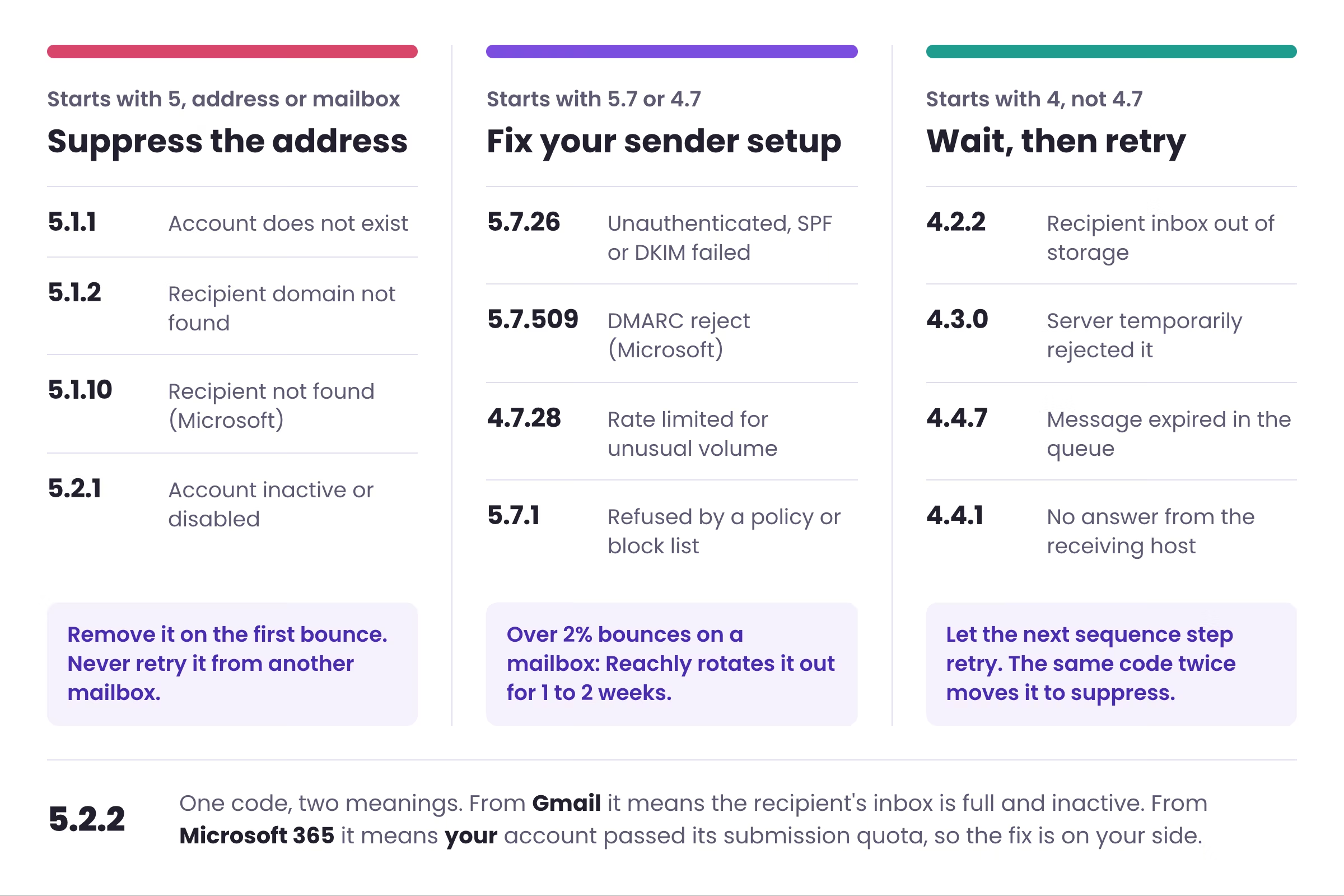
The figure below sorts the same codes into the three lanes, with the rule we apply in each one.
One code, two meanings: 5.2.2
RFC 3463 and Gmail use 5.2.2 for a full mailbox on the recipient side. Microsoft 365 uses 5.2.2 for "submission quota exceeded", which means your own account sent more than its limit. If you run Microsoft sending mailboxes and see 5.2.2 across many recipients at once, the problem is your volume. Suppressing those prospects would throw away good addresses and leave the real issue in place.
That is why the Reporting-MTA line matters. The same three numbers need a different fix depending on whose server wrote them.
Which bounce back messages mean you should suppress the address?
Suppress on the first bounce for any 5.1.x code and for 5.2.1. The server is saying the person or the domain does not exist, and retrying from a second mailbox only spreads the damage. Add the address to your suppression list so a future import cannot bring it back.
These bounces are a data problem, so the fix sits upstream. Reachly's raw lists run 10 to 25% catch-all before verification, depending on industry and country, which is why every list goes through email verification before it reaches a sequence.
For the difference between permanent and temporary bounces in general, read soft bounce vs hard bounce. For the threshold that tells you a whole campaign is in trouble, see the email bounce rate guide.
Which bounce back messages point at your own sender setup?
Any 5.7.x or 4.7.x code is about you, the sender. Rewriting copy will not change these. The receiving server has decided your domain, IP or volume does not meet its rules.
Authentication failures
Gmail now spells out which check failed. 5.7.26 means neither SPF nor DKIM passed, 5.7.27 points at SPF, 5.7.30 at DKIM, and 5.7.32 says the From domain does not line up with either. Microsoft's 5.7.509 is a DMARC reject. The fix for all of them is DNS, covered step by step in SPF, DKIM and DMARC setup for cold email.
These rules apply to every sender since Google's sender guidelines took effect on February 1, 2024, with stricter requirements above 5,000 messages a day to Gmail accounts.
Rate and reputation blocks
4.7.28 and 5.7.28 mean Gmail saw an unusual rate of mail from your IP or domain. A 4.7.28 is a warning you can still act on. A 5.7.28 means the block is in place. Lower the daily volume on that mailbox and give it time.
Reachly takes any mailbox whose bounce rate passes 2% out of rotation for 1 to 2 weeks, and does the same when its reply rate starts to fall, before the warm-up score drops. New mailboxes get 4 weeks of warm-up before they send a single campaign email.
Which bounce back messages are safe to retry?
Codes starting with 4, outside the 4.7 family, are usually safe to retry: 4.2.2 for a full inbox, 4.3.0 for a server that temporarily refused, 4.4.1 for no answer from the host, and 4.4.7 for a message that expired in the queue.
Let the next sequence step be the retry. Reachly sequences are 2 emails sent 5 to 6 days apart, so a soft bounce gets one more attempt at most. If the same address returns the same code on the follow-up, treat it as permanent and suppress it.
Watch the spread as well as the code. One 4.4.1 is a busy server. The same 4.x.x code across dozens of recipients on one domain on the same day usually means that company's mail server is down, so pause that domain and leave the rest of the campaign running.
How should you triage bounce back messages across a campaign?
Sort bounces by where the pattern sits before you fix anything. The question is whether the bounces follow the mailbox, the list, or the recipient domain.
| Pattern | Most likely cause | First move |
|---|---|---|
| Same 5.7.x code across many mailboxes | Sending infrastructure: DNS, authentication, domain reputation | Stop sends on the affected domains and check DNS |
| Bounces concentrated on one mailbox | That mailbox's volume or reputation | Take it out of rotation for 1 to 2 weeks |
| 5.1.x bounces concentrated in one list or segment | Bad or stale data from one source | Re-verify the segment, check the source |
| 4.x.x bounces from one recipient domain | That company's mail server | Pause that domain, retry on the next step |
| Mixed codes, no clear pattern | Usually infrastructure first | Check authentication, then volume, then the list |
Copy the rule set below into your team's playbook or your sequencer notes so whoever reads the bounce folder makes the same call every time.
SUPPRESS ON FIRST BOUNCE
5.1.1  account does not exist
5.1.2  domain not found
5.1.10 recipient not found (Microsoft)
5.2.1  account disabled
5.4.1  relay access denied
5.2.2  ONLY if the bounce came from Gmail

STOP AND FIX SENDER SETUP
5.7.26 / 5.7.27 / 5.7.30 / 5.7.32  SPF, DKIM or DMARC
5.7.509  DMARC reject (Microsoft)
4.7.28 / 5.7.28  rate limited, cut volume
5.2.2  if the bounce came from your own Microsoft tenant
Mailbox bounce rate over 2%: out of rotation 1 to 2 weeks

RETRY ON NEXT SEQUENCE STEP
4.2.2  inbox full
4.3.0  temporary server rejection
4.4.1  no answer from host
4.4.7  message expired
Same code twice on the same address: suppress
If the bounce folder is filling faster than anyone can read it, the Reachly cold email agency runs the domains, verification and rotation for you. For a wider look at what else hurts inbox placement, see how to fix cold email deliverability.
Want someone else watching the bounce codes?
Reachly sets up the sending domains, verifies every list, rotates mailboxes out before they burn, and runs signal-based campaigns across cold email, LinkedIn and cold calling. One flat retainer from $3,500 a month.
Book a call with Reachly →
Frequently asked questions
Why are my emails suddenly bouncing back?
A sudden jump across many recipients almost always starts on the sender side. Check whether a DNS record changed, whether the sending domain expired or lost its MX records, and whether your SPF record now needs more than the 10 DNS lookups the SPF standard allows. If only one recipient domain bounces, the problem is on their side.
What is a bounce back email called?
The technical name is a Delivery Status Notification. Microsoft calls it a non-delivery report. In Gmail it arrives from "Mail Delivery Subsystem" at mailer-daemon@googlemail.com, and many other servers send it from a postmaster or mailer-daemon address, which is why people also call it a mailer-daemon message.
What are the different types of email bounces?
Hard bounces are permanent and soft bounces are temporary. There is also a timing split: a synchronous bounce is refused during the SMTP conversation, while an asynchronous bounce is accepted first and returned minutes or hours later. Asynchronous bounces are easy to miss because your sending tool may already have logged the email as sent.
How do I find emails that bounced back?
In Gmail, search for from:mailer-daemon to list every bounce in the mailbox. In Outlook, search for "Undeliverable" in the subject line. Cold email tools log bounces per lead, so export that list weekly rather than reading the sending inboxes by hand.
How do I fix 550 5.4.1 recipient address rejected, access denied?
Microsoft returns 5.4.1 when the receiving server does not accept mail for that domain, often because the address does not exist in the company's Microsoft 365 directory or its mail routing is misconfigured. As the sender you cannot fix their setup, so suppress the address and check the domain's MX records before you try anyone else there.
What does error code 5.7.1 mean on an SMTP server?
5.7.1 means delivery was not authorized, and it is a catch-all for policy refusals. From Gmail it often points to a custom rule set by the recipient's admin. From Microsoft it can mean the recipient only accepts mail from approved senders, or that your IP is on a block list. The text after the code names which one.
Why is Gmail suddenly blocking my emails?
Google enforces its sender guidelines in the SMTP response. Every sender needs SPF or DKIM and valid reverse DNS, and above 5,000 messages a day to Gmail accounts you also need DMARC, one-click unsubscribe and a spam rate below 0.3% in Postmaster Tools. Google recommends staying under 0.10%.
Can you make an email bounce back on purpose?
Gmail and Outlook have no button that sends a fake bounce, and a hand-made DSN is easy for the sender's tools to spot as fake. If you want to stop mail from someone, block or filter the address instead, which quietly keeps them out of your inbox.










