To find someone's email address for free, guess it from the company's email format, starting with first.last@company.com, and run each guess through an email checker until one passes. All you need is the person's name and their company's domain. In Reachly's test on 50 sales leaders, that free method confirmed 20 work emails, about as many as three email finders managed on the same people (16 to 25).
Key Findings
- Guessing the format and checking each guess confirmed 20 of 50 work emails for free, in 125 checks, about 2.5 per person.
- On the same 50 people, Hunter's free plan confirmed 21, a Loopster trial 25 and AI Ark 16.
- Guessing first, then running the misses through Hunter's free plan, confirmed 25 of 50 for $0. Adding the paid tools only reached 26.
- 20 of the 50 companies accept mail to any address, so nothing could confirm those emails. That was 19 of 37 companies on Google Workspace and none of 12 on Microsoft 365.
- 4 of the 6 emails the tools found and guessing missed used another form of the first name, such as Tim for Timothy.
- 2 of AI Ark's addresses belonged to a different company. Loopster's and Hunter's off-domain addresses were the company's own second domain.
What is the free way to find someone's email address?
Most companies give every employee an address in the same format, so once you know a person's name and their company's website, there are only a handful of addresses they can have. An email checker then tells you which of those addresses accepts mail, without sending anything.
You need three things: the person's first and last name, the company's real email domain, and a checker with free credits. We used MillionVerifier in the test. Most checkers give new accounts a small free allowance, which covers a few dozen people.
If you are building a whole list rather than looking up one person, start with how to build a lead list, then use this method to fill the gaps. Where finding emails sits in the wider process is covered in our sales prospecting guide.
The order matters because it saves checks. In our test, first.last@ and first@ between them were right for 15 of the 20 people that guessing found.
Does free guessing find as many emails as a paid email finder?
Almost. We ran four methods on the same 50 people and graded every address with the same checker. Free guessing confirmed 20, Hunter's free plan 21, a Loopster trial 25 and AI Ark 16.
How we ran the test
We picked 50 sales leaders (VP, Head or Director of Sales), one per company, at software companies of 20 to 200 staff listed as US-headquartered. We chose them in Clay rather than in any of the finders, so no tool had a head start on people it already knew. Every method got the same input, the person's name and the company's website domain, and we found each email four ways:
- Free guessing: 6 common formats in a fixed order (first@, first.last@, firstlast@, flast@, first_last@, firstl@), checked one at a time with MillionVerifier, stopping at the first pass.
- Hunter, free plan: one search per person. The 50 searches used the plan's whole monthly allowance.
- AI Ark: one lookup per person at 1 credit each, 46 credits in total.
- Loopster, 14-day trial: its North America work-email waterfall, using the Findymail and Icypeas steps, for $0.76 of trial credit.
Every address from all four methods then went through MillionVerifier, so all four were graded by the same judge. A checker result is the strongest proof you can get without sending, but it is still a check of the mail server, not a delivered email, and the same address can grade differently on another day.
| Result | Guess the format | Hunter (free plan) | AI Ark | Loopster (trial) |
|---|---|---|---|---|
| Email confirmed by the checker | 20 (40%) | 21 (42%) | 16 (32%) | 25 (50%) |
| Catch-all, cannot confirm | 20 (40%) | 18 (36%) | 17 (34%) | 19 (38%) |
| Nothing found | 10 (20%) | 11 (22%) | 15 (30%) | 6 (12%) |
| Email at a different company | 0 | 0 | 2 (4%) | 0 |
| Cost for 50 people | 125 checker credits | $0, the month's 50 free searches | 46 credits | $0.76 of trial credit |
Where the finders went wrong
AI Ark returned 7 addresses on a different domain from the company's website. We checked each one by hand: 5 were the same company on another domain, such as a former brand name, and 2 belonged to a different company altogether, one of them a Zoho address for a sales leader who works somewhere else. Loopster's 3 off-domain addresses and Hunter's 1 were all the company's own second domain. No finder could confirm an address on a catch-all domain, and between them they returned 54 addresses there. A finder's own valid label is a starting point. Run its output through a separate checker before you send, as our email verification guide sets out.
What the finders found that guessing missed
Six people. Four of them used another form of their first name than the one on their LinkedIn profile, such as Tim for Timothy or Richard for Rich. One used first.l@, a format outside the six we tried, and one was on the company's second domain. So when every guess fails, try the short and long form of the first name, and check whether the company sends from another domain, before you pay for a lookup.
In what order should you try the methods?
Free first. Guess and check, then run the people you missed through a free email finder plan. In our test that order confirmed 25 of the 50 for $0. Adding a Loopster trial took it to 26, AI Ark added none, and nothing confirmed the other 24, 20 of whom sat on catch-all domains.
So expect a ceiling around half when you need proof before sending. Paying moves the number a little, and mostly by covering name variants and second domains that you can also try by hand.
Which method fits how many emails you need
- One person: guess and check, then try the short and long form of the first name.
- A few dozen: guess and check, then run the misses through a free finder plan such as Hunter's.
- Hundreds a week: a paid finder or Loopster, with every result checked separately before it reaches a campaign.
How do you find a company's email format?
Find one real address from anyone at the company and copy its pattern. If you cannot find one, start with first.last@company.com: of the 26 addresses we confirmed across all four methods, 9 used it, the most of any format, with first@ close behind at 7.
| Format | Example | Confirmed emails | Source |
|---|---|---|---|
| first.last | jane.doe@ | 9 | Reachly test |
| first | jane@ | 7 | Reachly test |
| flast | jdoe@ | 4 | Reachly test |
| Another form of the first name | tim.doe@ for Timothy Doe | 4 | Reachly test |
| firstl | janed@ | 1 | Reachly test |
| first.l | jane.d@ | 1 | Reachly test |
If you guess in volume, a spreadsheet works as a free email permutator and writes every format for you. Put first names in column A, last names in column B and the domain in column C, then fill these down:
=LOWER(CONCATENATE(A2, ".", B2, "@", C2))
=LOWER(CONCATENATE(A2, "@", C2))
=LOWER(CONCATENATE(LEFT(A2, 1), B2, "@", C2))
=LOWER(CONCATENATE(A2, B2, "@", C2))
=LOWER(CONCATENATE(A2, LEFT(B2, 1), "@", C2))
=LOWER(CONCATENATE(A2, ".", LEFT(B2, 1), "@", C2))
Columns D to G are the four most common formats. H and I add firstl@ and first.l@, which turned up in our test when the first four failed. If all six fail, try the short or long form of the first name.
What are the other free ways to find someone's email address?
There are eight more, and most of them work best as a way to learn the company's format, which you then confirm with the guess-and-check method above. One real address from anyone at the company tells you how every colleague's address is built.
1. The company website
Team pages, contact pages, press pages, careers pages and support docs all publish addresses. Smaller companies often list the whole leadership team on one About page. Even a recruiter's or a support agent's address is enough, because it shows the format.
2. Google search operators
Search engines index addresses that sit in PDFs, slide decks, event pages and old press releases. Quotation marks and the site: operator narrow the results to the company's own domain:
"@company.com"
"@company.com" site:company.com
"Jane Doe" "@company.com"
"Jane Doe" "email" "company.com"
"@company.com" filetype:pdf
The first search shows any address at the domain, which is usually enough to learn the format. The last one finds addresses inside PDFs such as reports, price lists and conference programs.
3. LinkedIn
The Contact info panel shows an address when the person chose to share one, which is more common with first-degree connections. The About section and Featured links sometimes carry one too. Our guide on how to find LinkedIn emails covers 12 LinkedIn methods in detail.
4. X, GitHub and personal websites
Founders, developers and marketers often list an address in their X bio, on a personal site or on a newsletter page. On GitHub, the author address of a public commit is visible to anyone who opens the commit, which makes it a reliable source for engineering leaders, though often a personal rather than a work address.
5. Bylines, podcasts and speaker pages
Guest articles, podcast show notes, webinar pages and conference speaker bios often end with a contact line. Sales and marketing leaders, who speak and publish more than most, show up here more often than other roles.
6. A free email finder
Most finders give a monthly allowance on a free plan. Hunter's free plan gave us 50 searches for the month and confirmed 21 of our 50 people, and several finders offer a Chrome extension that runs the lookup from a LinkedIn profile or a company website. Check what they return the same way you would check a guess, because finders return addresses on catch-all domains too: 18 of Hunter's 39 and 19 of Loopster's 44 could not be confirmed.
7. Ask the company
Write to a general address such as info@, hello@ or sales@ and ask who handles the topic. The reply often names the right person, and the signature on the reply shows the company's format. It is slower than the other methods, and it is the one with no risk of a wrong address.
8. Domain records
The WHOIS record of a domain used to list the owner's email address. Most registrars now hide that data for privacy, so it rarely helps with companies. It can still work for a small business or a personal site whose owner registered the domain with their own details.
People-search sites also come up for this query, but they mostly return personal addresses and phone numbers for consumer lookups, and they rarely hold current work email. For B2B prospecting they are the weakest option on this list.
| Method | Cost | What you usually get | Best for |
|---|---|---|---|
| Guess the format and check it | Free checker credits | A confirmed work address, or a catch-all you cannot confirm | Any company where you know the domain |
| Company website | Free | The format, sometimes the person's own address | Small companies with team pages |
| Google search operators | Free | The format from addresses in pages and PDFs | Companies with a public footprint |
| Free | The address the person chose to share | First-degree connections | |
| X, GitHub, personal sites | Free | Often a personal address | Founders and engineering leaders |
| Bylines and speaker pages | Free | A contact line or the format | Leaders who publish or speak |
| A free email finder | Free up to a monthly limit | A suggested address with the tool's own label | Small batches |
| Ask the company | Free, but slow | The right person and the format | Accounts that matter most |
| Domain records | Free | Rarely anything, as most records are hidden | Very small businesses |
What do you do when the company accepts every address?
Accept that you cannot prove the address and lower the risk instead. 20 of our 50 companies (40%) ran catch-all mail servers, which say yes to any address, real or made up. Our catch-all email guide explains how those servers work. On a raw prospect list Reachly usually sees 10 to 25% catch-all before verification, so 40% is on the high side, and small software companies may simply run more of them.
Check the mail service first
In our test the mail service predicted the result. 19 of the 37 companies on Google Workspace accepted every address, and none of the 12 on Microsoft 365 did. You can see a company's mail service for free with any MX lookup tool, or by typing nslookup -type=mx company.com in a terminal. Records that end in google.com or googlemail.com mean Google Workspace, and ones that end in outlook.com mean Microsoft 365. Knowing that up front tells you how likely a checker is to give you a real answer.
Three ways to handle a catch-all
- Send to the most common format only. first.last@ is right more often than any other guess, so it is the best bet when nothing can be confirmed.
- Keep catch-all addresses in a separate, small send. If they bounce, the damage stays away from your verified list.
- Use a second source. A paid finder that has seen the address used before, or the person's own LinkedIn profile, can tip a guess one way or the other.
The damage to watch for is bounces. Reachly rests a mailbox once its bounce rate passes 2%, and catch-all guesses are the usual cause. Our email bounce rate guide covers what each bounce type means.
How does an email checker know an address is real?
It asks the company's mail server without sending an email. The checker first looks up the domain's MX records to find which server accepts its mail, then opens a connection and asks whether that server would accept a message for the address. It hangs up before anything is sent.
The answer comes back as one of four results:
- Valid: the server accepts mail for that exact address and rejects made-up ones, so the address exists.
- Invalid: the server rejects it. Sending would bounce.
- Catch-all: the server accepts every address, real or made up, so the check proves nothing. This was 20 of our 50 companies, all but one of them on Google Workspace.
- Unknown: the server did not answer, timed out or blocked the check. Retrying later sometimes turns it into one of the other three.
Because a check only talks to the server, it is safe to run on every guess. Sending to a guess to see whether it bounces is the one way of testing an address that harms your sender reputation, and our email verification guide covers how to build checks into a list before any campaign.
When is a paid email finder worth it?
When you need more than a few dozen emails a week, or need them at the less common formats. For one person, guessing costs a minute and 2 to 3 checker credits. For 500, the checks add up and so does the time, while a finder does the lookup in one step at around a cent a person on AI Ark's entry pricing.
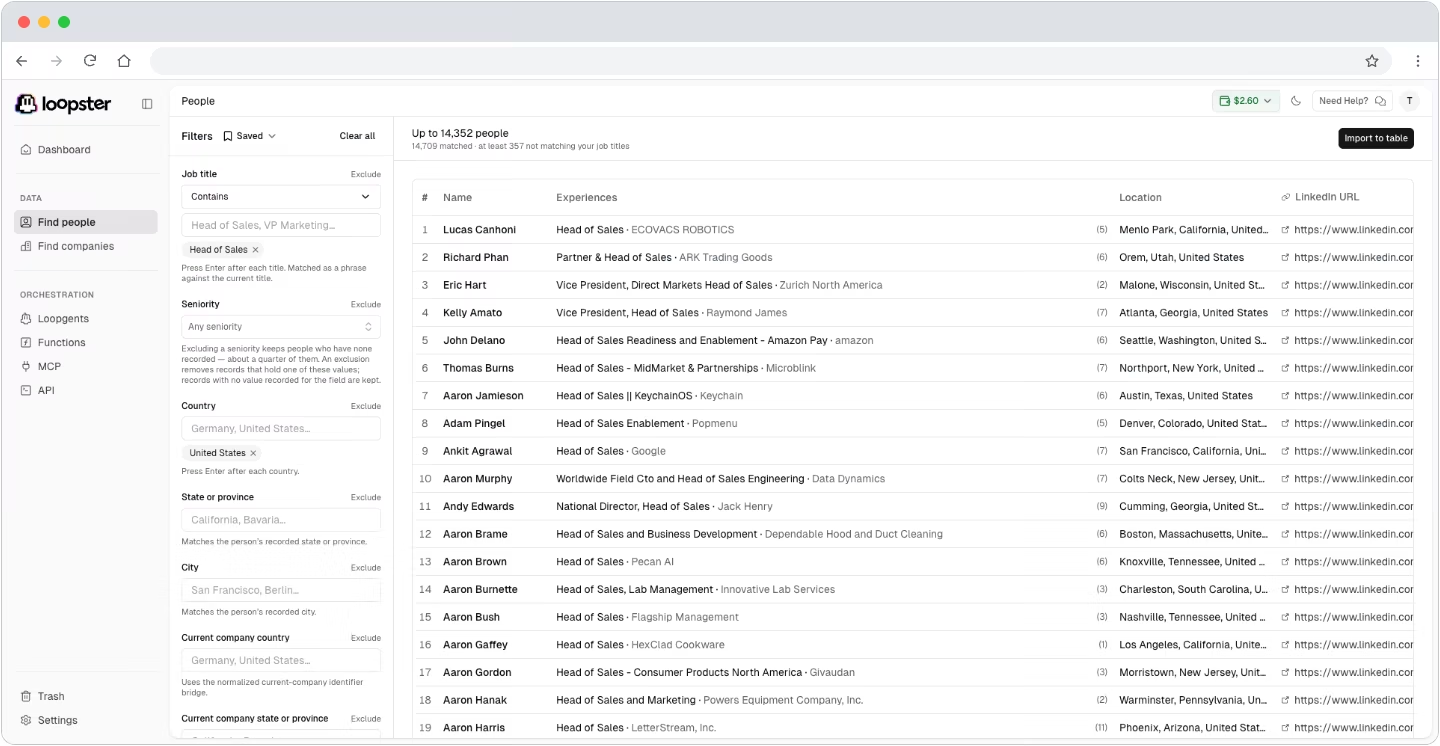
If you want the finding, checking and list building in one place, Loopster bundles them in a monthly subscription from $179, with a 14-day trial. It is a paid plan, so it suits a team that prospects every week rather than someone after one address. In our test its trial found the most of the four methods, 25 of 50, for $0.76 of trial credit.
Here is what its people search looks like, filtered to the same kind of person we tested: heads of sales in the United States.
Whichever you use, check the result separately. In our test that one habit would have caught both wrong-company addresses and every catch-all address the finders returned. Our guide to B2B data providers compares the paid options, our Findymail review tests one finder on live campaigns, and if the person is on LinkedIn, how to find LinkedIn emails covers 12 LinkedIn-specific methods, from the Contact info panel to Sales Navigator.
The finders and checkers we use on client campaigns, with their prices, are in Reachly's outbound tools directory.
Finding the address is the first step. Reachly's cold email agency runs the whole process for B2B teams, from building and verifying the list to sending from dedicated domains, so a bad address never touches your main domain.
FAQ
How do I find an email address with just a name?
Add the company first. A name alone matches thousands of people, while a name and a company domain narrows it to a handful of possible addresses you can check. If you only have the name, find the person's employer first on LinkedIn, then guess and check.
What is the best way to find email addresses?
It depends on how many you need. For a few people, guess the format and check it, as in this guide. For a list of hundreds, run the names through one email finder, send the ones it misses to a second finder, and check every result with one independent checker before anything is sent. Our guide to building a lead list shows that sequence end to end.
Can AI find email addresses?
AI tools can find the company, the domain and the likely format faster than you can by hand, but they cannot confirm that a mailbox exists. That still takes a mail-server check, and a chatbot that answers with an address from memory is guessing just as you would, often from out-of-date data.
Are email addresses public records?
No. In the US, email addresses are not part of public records in the way property deeds or court filings are. Work addresses are often public because people and companies publish them on websites, papers and social profiles, which is why most of the methods that work rely on what the person or company has published.
What is the best free email finder?
For a handful of people, an email checker's free credits plus the format guesses in this guide. Among free plans, Hunter's confirmed 21 of our 50 people, one more than guessing, and used the month's 50 free searches doing it, so the allowance is usually the limit rather than the accuracy. Whatever you use, run the result through a separate checker before sending.
Is it legal to email someone whose address you found?
In the US, sending a B2B cold email is legal under the CAN-SPAM Act if the subject line is honest, the email includes a real postal address and an opt-out, and opt-outs are honored within 10 business days. The EU and UK rely on legitimate interest under GDPR for B2B email, and Canada's CASL generally requires consent first.