



Inbox placement test results matter most when you compare multiple tools and validate them with Gmail and Microsoft sender data.
An inbox placement test is useful only when you treat it as one input, not the verdict. If you want to know where your mail is landing, the cleanest method is to run the same message through at least two or three inbox placement testing tools on the same day, from the same domain, then compare the disagreements against Google Postmaster Tools and Microsoft sender data. That takes longer than a free one-click grade, but it is the only way to tell whether the tester is seeing a real placement problem or just the limits of its own seed list.
Across 400+ campaigns, that is the part people skip. They run one vendor’s free email deliverability test, get a red score, and assume the domain is cooked. Or they get a green score, keep sending, and wonder why replies stay flat. This page is about testing placement, not fixing it. If your test shows spam or missing mail, use this email deliverability guide for the repair work.
What does an inbox placement test actually tell you?
A real inbox placement test sends your message to a controlled seed list and reports where it landed. Usually that means inbox, promotions, spam, or missing. That is useful, but it is still a panel result, not a direct readout from Gmail or Microsoft.
That distinction matters. Seed list testing tells you how a sample of monitored inboxes treated one send, at one moment, from one setup. It does not tell you how your whole market saw the campaign, and it does not tell you why the provider made that decision.
The clean way to think about an inbox placement test is this: it is a spot check on mailbox behavior, not a provider confession.
After you frame it that way, the signal gets easier to use.
- Inbox, spam, promotions, missing
- Directional signal, not ground truth
- Best for change detection
- Weak for absolute certainty
Why do inbox placement testers disagree?
Two inbox placement testing tools can look at the same message and return different answers because they are not using the same observer panel. Their seed inboxes differ. Their Gmail and Outlook mix differs. Their inboxes age differently, get different engagement, and can carry different reputation history.
Some disagreement is normal. A tool is only as good as the quality and freshness of its seed list. If the inboxes are stale, rarely used, or clustered too heavily in one provider family, the result can drift from what your real prospects see.
The second source of disagreement is test setup. A different sending minute, mailbox, tracking setting, link configuration, or authentication path can alter results. Even tiny changes matter when the sample is small.
When we compare tools, we look for these failure points first:
- Seed list quality: How broad the mailbox mix is, and how fresh those inboxes seem
- Provider mix: Whether Gmail dominates the panel and hides Outlook behavior
- Result labeling: How the tool defines inbox, tabs, spam, and missing
- Timing: Whether all tests ran in the same window from the same sender setup
If two tools disagree, that does not mean one is useless. It means the disagreement itself is data. You now know the result is fragile and needs a provider-side check.
Which inbox placement testing tools are worth using?
You do not need six tools. You need a small stack that answers different questions.
The mistake is expecting one tool to cover everything. A vendor free test may be fine for a quick read. A paid seed-list platform gives you more controlled placement data. Google Postmaster Tools and Microsoft sender data tell you what the providers themselves think of your sending. Those are different jobs.
Here is the comparison that matters more than brand names:
[markdown] | Tool type | What it measures | Best use | Main blind spot | Cost in time | | --- | --- | --- | --- | --- | | Vendor free inbox placement test | One-off seed list result, often paired with content or DNS checks | Quick spot check before or after a change | House seed list may be narrow, and vendor result is not independent | 10 to 20 minutes | | Paid seed-list platform | Larger seed panel and repeatable testing | Comparing messages, domains, or mailbox groups over time | Still a panel, not provider telemetry | 30 to 60 minutes per test cycle | | Google Postmaster Tools | Spam rate, Domain Reputation, message authentication, delivery errors for Gmail | Validating Gmail-side reputation and complaint patterns | Not real-time, and limited to personal Gmail account data | 15 minutes to review, plus data delay | | Microsoft sender tools | Reputation and sender support context for Microsoft 365 delivery | Checking block issues and Outlook-side reputation signals | Less visual than seed-list tools, and not a direct inbox tab report | 15 to 30 minutes | [/markdown]If a tool gives you a content score, a DNS grade, and a single placement percentage, that is not enough on its own. Content and setup checks are useful, but they are not the same as inbox placement.
How should you run a seed list test so the results mean anything?
The only comparison worth trusting is this one: run the same seed list test through each tester on the same day, from the same domain, with the same mailbox, the same message, the same tracking settings, and the same authentication. Then log where they disagree, and check which result lines up with what Google Postmaster actually reports for Gmail.
That is the Reachly view because anything looser turns into noise. If Tester A ran at 9:00 a.m. from one mailbox and Tester B ran at 4:00 p.m. from another, you did not compare tools. You compared conditions.
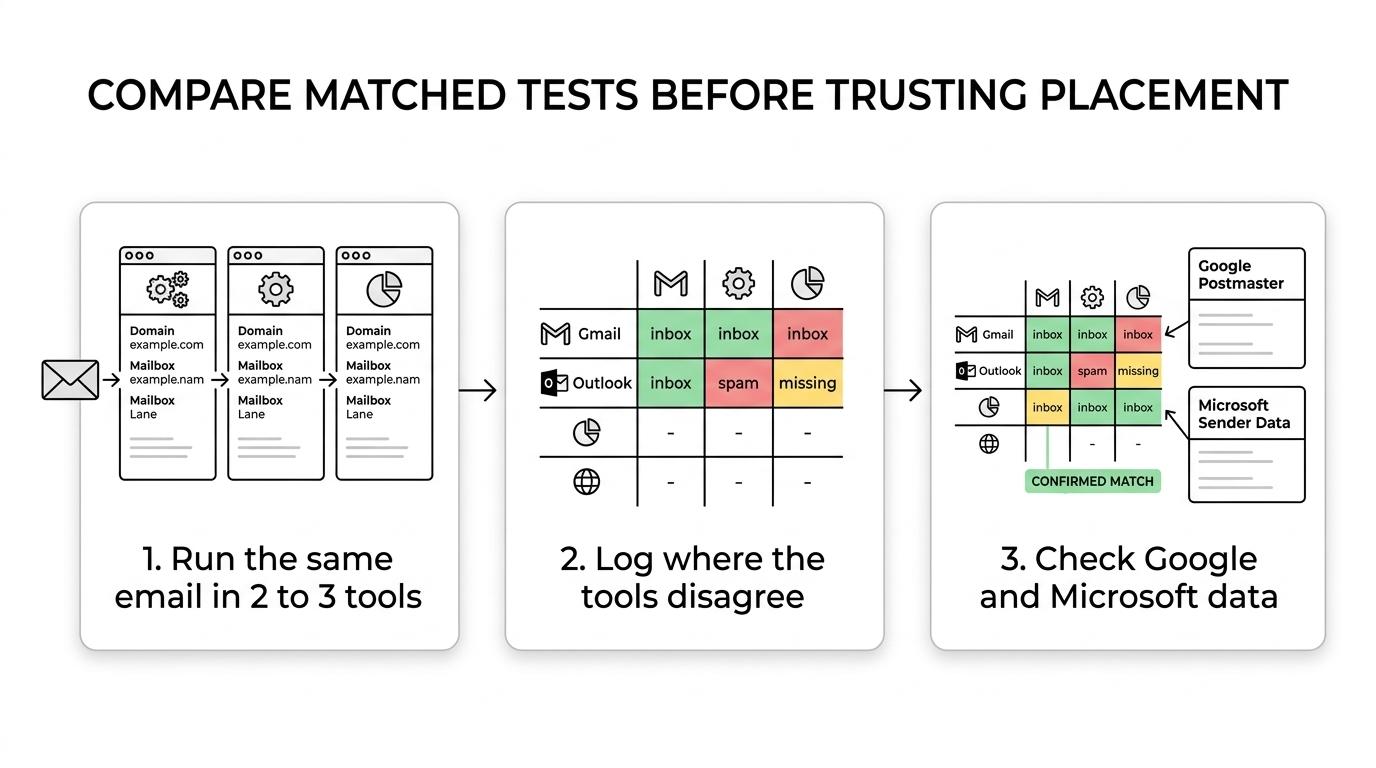
Here is the protocol we use when a team wants to know which tester to trust:
- Lock the sender: one domain, one mailbox, one ESP
- Lock the message: same subject line, same body, same links, same tracking
- Lock the window: same day, tight send window
- Log disagreements: inbox versus spam versus missing by provider
- Check provider data: compare the Gmail result with Postmaster, then review Microsoft sender status for Outlook questions
This takes roughly half a day if the tools are already set up. That cost is worth paying once. After that, you know which tester is closest to provider-side reality for your sending pattern.
There is one more rule here. Do not change warmup, mailbox rotation, or authentication between tests. If SPF, DKIM, DMARC, or your custom tracking domain changed this week, run the comparison after the setup is stable.
What should you compare against Google Postmaster and Microsoft data?
Seed-list testing without provider-side telemetry is guesswork with nicer charts. Gmail and Microsoft both expose signals that help explain why a seed test and real delivery can diverge.
Google’s side is stronger for daily checking. According to Gmail Help (2025), Postmaster Tools shows outgoing email data for personal Gmail accounts, including spam rate, Domain Reputation, message authentication, and delivery errors. Google also says the data is not real-time, and that Domain Reputation reflects only messages sent from the exact domain used for DKIM and SPF authentication.
Microsoft is less polished, but still useful. Microsoft Learn (2025) says external senders can use sender-support and delist tools for Microsoft 365 delivery, including the self-service portal at sender.office.com. That will not hand you a pretty inbox placement dashboard, but it does give you sender-side context when Outlook behavior looks off.
[markdown] | Provider source | What you can validate | Important limit | Why it matters for seed list testing | | --- | --- | --- | --- | | Google Postmaster Tools, Gmail Help 2025 | Spam rate, Domain Reputation, message authentication, delivery errors | Not real-time, personal Gmail account data only | Best check for whether a Gmail seed result matches actual sender reputation | | Gmail Help 2025 sender guidelines | Google says reported spam rate should stay below 0.10% and avoid 0.30% or higher | Spam complaint data is delayed and incomplete in small volume cases | Explains why a clean seed result can still underperform in live sending | | Microsoft sender support, Microsoft Learn 2025 | Sender reputation and blocked-sender remediation for Microsoft 365 recipients | Not a direct inbox tab or spam folder percentage | Useful when Outlook seed results drift or mail goes missing | [/markdown]When Gmail says reputation is poor, believe Gmail over the seed tool. When Gmail looks healthy and one tester alone says spam, you need more evidence before you scrap a domain.
When should you trust the tester and when should you ignore it?
Trust the tester when two things happen at once. First, multiple seed-list tools agree by provider. Second, the provider-side telemetry supports the pattern. That is as close as you will get to a clean read without access to recipient-side logs.
Ignore the tester when it is the only place showing a problem. One red report is not enough. If Google Postmaster looks fine, authentication is clean, live prospects are replying, and one seed tool alone shows spam, the safer reading is that the panel is noisy.
Thibault Garcia, founder of Reachly, puts one live-campaign signal above most dashboards: “Out of office replies are the most underrated metric in cold email. They prove you are landing in the inbox on days when nobody wants what you are selling.”
That point matters because an inbox placement test checks lab conditions. Your campaign checks market conditions. If your seed test says 95% inbox but nobody replies after enough volume, placement might not be the blocker. The offer, angle, list quality, or subject line could be the real issue.
Use this rough order when the picture is messy:
- Tester agreement: Two or more tools show the same pattern
- Provider confirmation: Google or Microsoft data points in the same direction
- Live campaign evidence: out of office replies, neutral replies, and real human responses
- Only then: make a domain or mailbox decision
Who should not rely on seed list testing alone?
If you send tiny volume, founder-led one-to-one outreach, or highly custom emails to a list of fifty dream accounts, seed list testing has less value. The sample is too synthetic, and provider dashboards may not show enough data to be useful.
The same goes for brand-new domains. If the domain is still in its first 30 days, your inbox placement test may reflect setup age more than stable reputation. That is a timing problem, not a tester problem.
And if your campaign gets zero replies, do not assume the inbox placement test has the answer. The goal of cold email is a reply, not a meeting. A seed test can tell you where the mail landed. It cannot tell you whether the market wants what you sent.
If you want a second set of eyes on testing setup, sending infrastructure, or a campaign that looks fine in a tool but flat in the market, you can book a meeting with Reachly. We run signal-based outbound across cold email, LinkedIn, cold calling, and the testing only matters when it ties back to real replies and booked meetings.
An inbox placement test is most reliable when you compare multiple seed-list tools against provider-side telemetry, not when you trust a single vendor score. Key findings: use at least two or three testers on the same day, log where they disagree, and validate Gmail and Outlook behavior with official sender data before you make a sending decision.










