

Google Postmaster Tools helps cold email senders monitor Gmail health, but it’s delayed—use spam, reputation, and auth as warnings.
Google Postmaster Tools is useful for cold email senders, but only if you treat it as a lagging Gmail health check, not your main control panel. At Reachly, we pause a Gmail-facing sending domain when user-reported spam complaints hit 0.1%, and we treat High as the only healthy state in the Domain Reputation dashboard. If reputation drops to Medium, we cut volume and prep rotation. If it drops to Low or Bad, we pause the domain. We also rotate earlier at the mailbox layer when reply rate falls below 0.5%, warm-up score falls below 95, or bounce rate goes above 2%.
That last part matters more than most dashboard walkthroughs admit. Google says Postmaster data is usually updated within 24 hours, not in real time, and the reputation view only reflects the exact domain used for DKIM and SPF authentication. So if you wait for Postmaster Tools to tell you something is wrong, you are already late. If you want the Gmail sender rules themselves, read our Gmail bulk sender requirements guide. If you want the deeper mechanics behind sender trust, read our domain reputation guide for cold email.
What is Google Postmaster Tools actually telling a cold-email sender?
Google Postmaster Tools is Gmail’s reporting layer for outgoing email sent to personal Gmail accounts. Per Google’s Postmaster Tools dashboards documentation, it shows spam rate, reputation, authentication, and delivery errors.
For a cold-email operator, that means one thing: Gmail is giving you a delayed read on how your sending identity looks from its side.
That is useful, but it is not enough on its own.
A good Postmaster read does not mean your offer is working. A bad Postmaster read does not always mean your copy is the problem. It usually means Gmail has started to distrust the combination of domain, mailbox behavior, list quality, and recipient reaction.
Google also makes one operational point that trips up a lot of teams. The Domain Reputation dashboard only reflects the exact domain used for DKIM and SPF authentication. If you send from three lookalike domains, each one needs its own read. If your authentication is misaligned, the reputation view you are staring at may not even match the domain you think you are testing.
Which Google Postmaster Tools dashboards matter most for cold email?
If you run cold email, LinkedIn, cold calling as one outbound system, Postmaster is only about the first channel. Inside that first channel, not every dashboard carries the same weight.
The four views that matter most are spam rate, domain reputation, authentication, and delivery errors. IP reputation matters less for many cold-email setups because you often do not control the full IP layer in the same way a bulk sender does.
[markdown] | Dashboard | What Google shows | What it means for cold email | Reachly action | | --- | --- | --- | --- | | Spam Rate dashboard | User-reported spam rate from personal Gmail recipients | Direct complaint signal. Lagging, but serious. | Pause the sending domain at 0.1% and audit recent list, copy, and volume changes | | Domain Reputation dashboard | Gmail’s reputation category for the exact authenticated domain | Your domain-level sender trust with Gmail | High is healthy. Medium means reduce volume and prep rotation. Low or Bad means pause | | Authentication | Whether SPF, DKIM, and DMARC are passing | Basic sender legitimacy | Stop and fix before you blame targeting or copy | | Delivery errors | Temp fails and other rejection patterns | Gmail pushing back on volume, trust, or setup | Cut volume fast and inspect mailbox, domain, and list inputs | [/markdown]This is why we tell operators not to treat Google Postmaster Tools as a reporting toy. It is part of your sending decision tree. If the authentication view slips or temp fails rise, you do not need a brainstorm. You need to stop sending and inspect the plumbing.
What postmaster tools spam rate is too high for cold email?
For cold email, the answer is simple. 0.1% is too high.
That is Reachly’s pause point for a Gmail-facing sending domain. It is stricter than Google’s published complaint ceiling for bulk senders, and that is the point. Cold email does not get the same margin for error because your send volume is smaller, your list quality varies more, and complaint damage shows up before a big dashboard category turns ugly.
Google says the Spam Rate dashboard is where you monitor user-reported spam rate, and Google’s sender documentation points senders to Feedback-ID and the Feedback Loop if they want complaint monitoring at a finer level. Postmaster tells you what Gmail users did. It does not tell you why they did it.
Here is the operator read we use:
- Near zero: Keep sending if replies and bounces also look healthy
- Creeping upward for several days: Review the last list segment, last copy change, and Gmail share of volume
- 0.1% or higher: Pause that sending domain and pull it out of active rotation
Thibault Garcia, founder of Reachly, puts the earlier warning sign this way: “We watch reply rate before we watch bounce rate. Under half a percent on a mailbox and it comes out of rotation, because reply rate warns you weeks before the bounces do.”
That line matters because spam complaints rarely appear out of nowhere. Before complaints spike, you often see weaker replies, fewer out-of-office responses, or a mailbox that suddenly feels tired. Postmaster confirms the damage. It does not save you from it.
What does domain reputation Gmail actually mean for a sending domain?
The Domain Reputation dashboard is Gmail’s category-level trust score for the authenticated domain. You are not getting a neat percentage. You are getting a state.
For cold email, we treat those states like operating instructions, not labels.
[markdown] | Domain Reputation state | What we assume | What we do | | --- | --- | --- | | High | Gmail is still comfortable with this domain | Keep sending within normal caps | | Medium | Trust is softening. Complaints, fatigue, or list issues may be forming | Reduce volume, check recent changes, prep replacement capacity | | Low | Gmail distrust is visible now | Pause the domain | | Bad | The domain is burned for current Gmail traffic | Keep it out of rotation and assess whether it should be retired | [/markdown]One more nuance. Postmaster’s reputation view is tied to the exact authenticated domain, not your brand in general. If one sibling domain goes soft, that does not mean every other domain is fine. It also does not mean every other domain is doomed. You need domain-by-domain reads.
That is why sender identity alignment matters so much in practice. If the DKIM and SPF domain is not the one you think you are measuring, your diagnosis is noise.
Why do we rotate mailboxes before Postmaster looks bad?
Because Postmaster is late by design.
Google says the dashboard is usually updated within 24 hours, though it can take longer. In a cold-email setup, 24 hours is enough time to keep sending from a mailbox that is already losing trust. Once you add multiple domains and mailbox pools, you need earlier tripwires.
At Reachly, the earlier tripwires are mailbox-level:
- reply rate below 0.5%
- warm-up score below 95
- bounce rate above 2%
Those are not Gmail policy numbers. They are operating thresholds from real mailbox rotation.
They catch fatigue sooner, and they are easier to act on without waiting for Gmail’s lagging read. They also keep one weak mailbox from dragging a whole domain toward a reputation problem.
A few more parts of the control system matter here:
- Warm-up window: 14 to 30 days is the floor, and 30 days is the safer number
- List age: Any list older than 3 months gets re-validated before send
- Reserve capacity: Roughly 30% of sending infrastructure stays idle so a rotation does not stall the campaign
- Blacklist hit: The domain is retired, not repaired
If you want the full setup side of this, our email deliverability services page lays out how we handle authentication, warm-up, verification, monitoring, and rotation.
What does Google Postmaster Tools miss in a cold-email workflow?
A lot, which is why cold-email operators get into trouble when they stare at Postmaster and nothing else.
Postmaster does not tell you whether the offer is weak. It does not tell you if the list is stale. It does not tell you if your subject line is pushing the wrong people to open and mark spam. It does not tell you whether your Gmail data is fine while Outlook is getting worse.
The main blind spots are:
- mailbox-level reply fatigue
- list freshness
- offer quality
- segment mismatch
- non-Gmail deliverability
- poor sequencing decisions
This is also where teams overreact and rewrite copy too fast. Our diagnostic order for a 0% reply campaign is still infrastructure, subject line, length, tone, offer. If recipients are replying “not interested,” the technical layer is probably fine. The offer is what needs work.
That matches what we have seen in live campaigns. A Series A client sending 20,000 to 30,000 emails a month moved reply rate from 0.5% to 1%, then up to 1.6%, after shifting to direct, question-based copy with a lead magnet and a stronger offer. Same general channel. Better market read.
How should you read Postmaster Tools without blaming the wrong thing?
Read it alongside your own sender data, not instead of it.
When a domain starts slipping, the pattern usually shows up in layers. First, mailbox reply rate gets weaker. Then Gmail acceptance softens or temp fails rise. Then Postmaster spam rate or reputation confirms that Gmail noticed too.
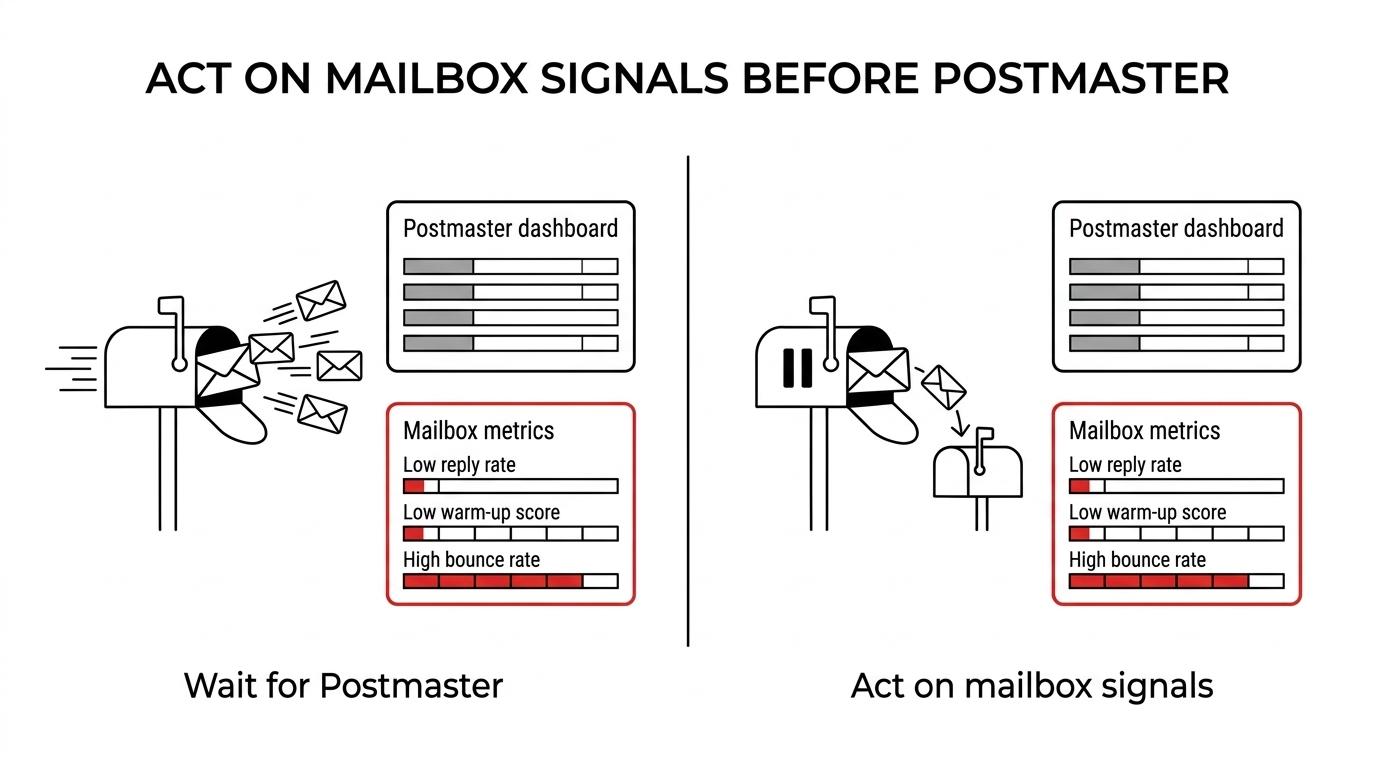
That sequence is why the wrong first move is often “rewrite the email.”
Use this order instead:
- First: Check mailbox reply rate, including out-of-office replies
- Second: Check bounce rate and list age
- Third: Check authentication and recent infrastructure changes
- Fourth: Read Postmaster spam rate and domain reputation
- Fifth: If the tech layer is fine, rewrite the offer before you rewrite everything else
A short cold email with a bad offer still gets ignored. A clean domain with stale data still gets complaints. Postmaster tells you Gmail’s verdict. It does not replace operator judgment.
Do you want another operator to read your Gmail sender data?
If your Google Postmaster Tools numbers are sliding and you are not sure whether to pause, rotate, or keep sending, that is usually a sign the system needs a tighter control loop. Reachly runs signal-based outbound across cold email, LinkedIn, cold calling, and builds in the domain protection layer that keeps one bad week from burning your infrastructure. You can see more on our email deliverability services, or book the meeting if you want a second set of eyes on the numbers.
The short version is this: Google Postmaster Tools is worth using, but it is a delayed Gmail read, not a live cockpit. For cold email, spam complaints at 0.1% are already too high, Medium domain reputation is a warning, and Low or Bad means stop sending from that domain.
Key takeaways:
- Spam rate: Pause at 0.1%
- Domain reputation: High is healthy, Medium means reduce volume, Low or Bad means pause
- Postmaster timing: Usually within 24 hours, so do not wait for it to save a weak mailbox
- Earlier tripwires: Reply rate under 0.5%, warm-up score under 95, bounce rate above 2%