
 Key Findings
A paid message that reaches people outside your network, with its own subject line and an email notification. A standard LinkedIn message is free and reaches 1st-degree connections only.
1st-degree messages see 25 to 35% reply rates versus 10 to 15% for cold InMail. If you are already connected, sending an InMail just costs money and looks sloppy.
Reserve it for locked-down senior profiles, cross-border first contact, time-sensitive asks, and named accounts. At $119.99 a month for 50 credits, selectivity is the point.
Start with a personalized connection request, wait 4 to 7 days, message on accept, and fall back to InMail only for non-responders that still matter. The two-step order out-replies InMail-first.
Keep every touch short with one reason and one easy next step. When a prospect has Open Profile, you can InMail them without spending a credit.
LinkedIn InMail is a paid direct message that reaches someone you are not connected to, delivered to their LinkedIn inbox and to their email at the same time. Credits come bundled with Premium, Business, and Sales Navigator plans, at $119.99 a month for the 50 credits a Sales Navigator Core seat carries, and cold InMail replies land around 10 to 15% against 25 to 35% for a free message to a 1st-degree connection.
That price tag is the whole decision. An InMail buys access you cannot get any other way, so it belongs on the accounts where access is the actual problem. This guide covers what InMail is, what it costs in 2026, when it beats a connection request, and how it sits next to a standard message in the same sequence, the way LinkedIn sits next to cold email best practices in a wider modern outbound sales strategy.
TL;DR: Summary
- LinkedIn InMail is a paid message to a member outside your network. A standard LinkedIn message is free and only reaches 1st-degree connections.
- Credits arrive monthly with the plan: 5 on Premium Career, 15 on Premium Business, 50 on Sales Navigator, 150 on Recruiter.
- A Sales Navigator Core seat at $119.99 a month works out at about $2.40 per send, and roughly $15 to $24 per reply once the silent sends are counted.
- Cold InMail returns 10 to 15% replies. Warm messages to existing connections return 25 to 35%.
- LinkedIn credits the InMail back when the recipient responds within 90 days, so replies effectively cost nothing and silence is what you pay for.
- Open Profile members can be reached without spending a credit, provided you hold a Premium plan yourself.
- Send the connection request first and hold the credit for accounts that ignore it. That order is what most LinkedIn outreach programs get backwards.
What is LinkedIn InMail?
InMail is LinkedIn's paid channel for messaging people you have no connection to. A standard message needs a 1st-degree relationship. An InMail skips that requirement and spends a credit instead, which is why it exists at all: it is the only native way to put a message in front of a 2nd or 3rd degree member without waiting on a connection request.
Three mechanics separate it from a normal message. It carries a subject line, up to 200 characters, with a body of up to 1,900 characters. It fires an email notification as well as landing in the LinkedIn inbox, so it gets two chances at attention. And it is metered, so every send has a price attached whether it works or not.
There is one hard limit worth knowing before you build a list around it. LinkedIn will not deliver an InMail to a member who has turned InMail off in their message preferences, according to LinkedIn's own help documentation. Those members simply will not appear as reachable, which is a good reason to treat InMail volume as a ceiling you discover rather than a number you plan.
The tool choice also sends a signal. A message says you are already connected, so you are continuing a conversation. An InMail says you are reaching across the fence because there is no other door. That difference shapes how the outreach lands before the prospect reads a word.
How much does LinkedIn InMail cost in 2026?
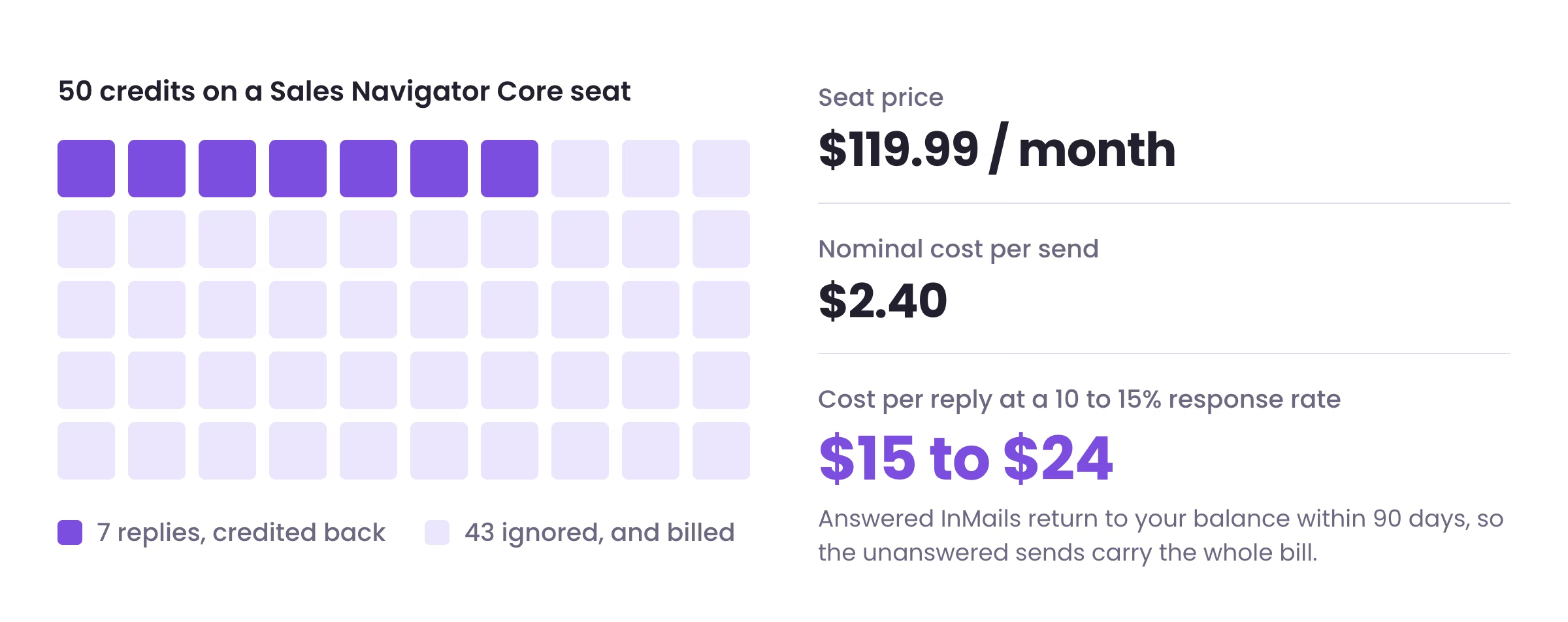
InMail has no standalone price. You buy a plan, the plan carries a monthly credit allowance, and the cost per message falls out of that. A Sales Navigator Core seat at $119.99 a month carries 50 credits, which puts a single send at about $2.40.
| Plan | InMail credits | Rough cost per send | Who it suits |
|---|---|---|---|
| Premium Career | 5 | Not an outbound plan | Job seekers messaging hiring managers |
| Premium Business | 15 | Low volume | Founders sending a handful of targeted messages |
| Sales Navigator Core | 50 | $119.99, about $2.40 per send | SDRs and account executives running named accounts |
| Sales Navigator Advanced | 50 | $159.99, about $3.20 per send | Teams that need shared lists and CRM sync |
| Recruiter | 150 | Volume plan | Talent teams, not sales teams |
Seat prices and the 50-credit allowance come from LinkedIn's own Sales Navigator plan comparison, and an annual commitment brings Core down to about $89.99 a month. Credit allowances on the Premium tiers and the rollover rules come from Evaboot's InMail breakdown: unused credits roll over, but only up to three months' worth, after which they stop accumulating. A rep who hoards credits for a quarter is throwing away the fourth month.
The refund rule is the part that changes the math. LinkedIn credits the message back when the recipient responds, and LinkedIn's help page confirms credits return on acceptance. Every InMail answered within 90 days comes back to your balance, so you are only ever paying for the ones that get ignored.
Run that through a realistic reply rate and the true number appears. Fifty credits at a 10 to 15% response rate return 5 to 8 replies. The 42 to 45 silent sends are the ones you actually paid for, which prices a single conversation at roughly $15 to $24.
Compare that to a message to a 1st-degree connection, which costs nothing and replies at 25 to 35%, and the strategy writes itself. Free capacity goes first. Paid capacity goes to the accounts free capacity cannot touch.
When does an InMail beat a connection request?
InMail is an access channel rather than a volume channel. It earns its credit when the prospect is outside your network, hard to reach, senior enough to ignore random invites, or sitting behind settings that make the normal connection path unreliable.
Four situations justify the spend. Senior executives with locked-down profiles who do not accept invites from strangers. Cross-border prospects in a market where your network is thin and first contact has to happen this week. Time-sensitive outreach tied to a launch, a funding round, or a hiring trigger that cannot wait on an accept. And single named accounts, one buyer with one specific reason to hear from you, where the whole quarter can turn on a reply.
Open Profile is the fifth, and it is free. Premium members with Open Profile turned on can be InMailed without spending a credit, though the sender needs a Premium plan for that to apply. Checking Open Profile status before you spend is a two-second habit that most reps never build.
This is also where Sales Navigator earns its seat. Better filtering means credits land on people who match the brief rather than whoever a scraped list produced. If your reps are still building broad lists, have them narrow accounts and personas with Sales Navigator search filters first.
What is the difference between an InMail and a LinkedIn message?
Reach and price are the two real differences. Everything else follows from them.
| LinkedIn message | LinkedIn InMail | |
|---|---|---|
| Who you reach | 1st-degree connections only | 2nd and 3rd degree, plus people outside your network |
| Cost | Free | Credits via a Premium, Business, or Sales Navigator plan |
| Length | No practical subject line, conversational | 200-character subject line, 1,900-character body |
| How it feels | A direct conversation | Closer to cold outreach |
| Visibility | Sits inside the LinkedIn inbox | Dedicated subject line, lands in the inbox and as an email |
| Typical reply rate | 25 to 35% warm | 10 to 15% cold |
| Best use | Follow-ups, relationship building, warm outreach | Hard-to-reach prospects, first touch to strangers |
The reply-rate gap is not a quality gap. Warm messages perform because trust is already on the page, and regular messages to 1st-degree connections see 25 to 35% replies against cold InMail's 10 to 15%, according to ConnectSafely's 2026 breakdown. Across Reachly campaigns, adding LinkedIn to an email-only motion lifts reply rate from 5% to 15%, because the warm lane reaches people the cold lane keeps missing.
When does a standard LinkedIn message win?
If you are already connected, stop overthinking it. Send the message.
A standard message works best when the relationship already exists: right after a connection request is accepted, as a post-call follow-up, when you are re-engaging an old lead, or when you are nurturing your network. In each case the prospect already knows your name, so the message does not feel random.
Many SDR teams still waste credits by connecting with someone and then sending an InMail anyway because it feels more official. That habit costs money and reads as sloppy to the buyer.
Warm messages fail for one recurring reason: reps turn them into mini brochures. Keep them tight. Mention the context, give one reason for reaching out, ask one easy question. If your team needs models for first messages, these LinkedIn connection message examples stay short and role-aware instead of sounding templated.
There is a sequencing point people miss. A connection request is a permission step, and once it is granted your next move should feel like a continuation rather than a pitch. This guide to writing a LinkedIn connection request message helps if your accepts are decent but the post-accept replies are weak.
Should you send a connection request or an InMail first?
Start with the request. A rep who fires an InMail on day one to a prospect with no prior signal is paying for a cold conversation that did not need to start cold.
Each step asks for a different level of attention. A connection request is a light ask. An InMail is an interruption. Use the lighter ask first, and save the paid interruption for the people who ignore it. Cleverly found this two-step sequence outperformed sending an InMail first, which tracks with what outbound teams see in practice, because lowering friction on touch one gives you more chances to start the conversation without spending a credit.

The hybrid sequence for more replies
Keep both touches short. Long copy creates work for the prospect, and busy buyers avoid work. Some prospects accept a relevant request and never respond to a paid message from a stranger. Others ignore the request and reply once they see a clear InMail tied to a real reason. The hybrid sequence catches both groups, and it keeps the expensive touch pointed at the accounts that still matter after step one.
How do you decide which one to send?
A rep with ten credits left, a full target list, and pressure to book meetings this week makes the wrong call fast. Either they burn credits across the board, or they wait for accepts and miss the window. A rule set removes the guesswork.
| Question | Best move | Why |
|---|---|---|
| Already a 1st-degree connection? | Send a standard LinkedIn message | Access is already there, so paying for InMail adds nothing |
| Not connected, but can send a request? | Start with the hybrid path | A connection request is a warmer first touch, and InMail stays in reserve for accounts that matter and do not engage |
| Profile locked down or hard to reach? | Send a direct InMail | Waiting for a connection slows you down when access is the real problem |
| Profile has Open Profile access? | Message without spending a credit | Open Profile members are reachable free if you hold a Premium plan |
| Down to your last few credits? | Spend them on named accounts only | Unused credits roll over for three months, so hoarding past that wastes them |
The short version your team can run: already connected, message. Can send a request, start there. No reply after a few days and the account is still a priority, send the InMail. Senior buyer, restricted profile, or a low chance of an accept, go to InMail earlier. Open Profile, use the free access.
Empty connection note. Wait one to three days after acceptance. Then a short, lowercase, question-based message. There is no out-of-office on LinkedIn, so cadence has to be deliberate. The debate is never message or InMail. It is which one comes first, and for which account.

Expected returns for each are in Reachly's LinkedIn outreach.
What should a LinkedIn InMail actually say?
Visibility is the first battle in cold outreach, and InMail wins it by landing as both an email notification and a LinkedIn message, as Evaboot's InMail guide describes. Visibility does not save bad copy.
An InMail that reads like a brochure gets ignored, and so does one that assumes the recipient owes you attention because you paid to appear in their inbox. The ones that work are short, specific, and written like the sender knows this is a one-shot interruption.
Use the 200-character subject line as a relevance filter rather than a hook. Name the trigger, the role, or the market. A subject that tells the recipient why they in particular are getting this outperforms anything clever, because the alternative is a stranger's sales pitch with a fake curiosity gap on top.
Keep the body far under the 1,900-character ceiling. One reason for reaching out, one easy question, and a next step small enough to say yes to. The first reply is the goal, not the whole meeting agenda. This works best when LinkedIn is one lane inside a wider sequence, lined up with cold email and cold calling around the same message, and the 2026 LinkedIn lead generation playbook ties those channels together.
Stop letting reps guess which LinkedIn touch to send
Reachly builds signal-based outbound systems across cold email, LinkedIn, and cold calling, with targeting, copy, sequencing, and reply management handled as one motion. First meetings come within 10 days on pre-warmed domains, or 5 to 6 weeks from kickoff on branded domains.
Book the meeting
LinkedIn InMail FAQ
What is LinkedIn InMail?
LinkedIn InMail is a paid direct message that reaches a member you are not connected to. It arrives in their LinkedIn inbox and as an email notification, carries a subject line of up to 200 characters and a body of up to 1,900, and costs one credit from your plan's monthly allowance.
How much does LinkedIn InMail cost in 2026?
There is no standalone InMail price. Credits come with a plan, and a Sales Navigator Core seat at $119.99 a month carries 50 of them, which works out at about $2.40 per send, or roughly $15 to $24 per reply once unanswered sends are counted. Standard messages to 1st-degree connections stay free.
How many InMail credits does each LinkedIn plan give?
Premium Career gives 5 a month, Premium Business gives 15, Sales Navigator gives 50, and Recruiter gives 150. Unused credits roll over for up to three months, after which they stop accumulating.
Do you get InMail credits back if someone replies?
Yes. LinkedIn returns the credit when the recipient responds, and every InMail answered within 90 days of being sent comes back to your balance. In practice you only pay for the messages that get ignored.
What is the difference between an InMail and a LinkedIn message?
A LinkedIn message is free and only reaches 1st-degree connections. An InMail is paid and reaches people outside your network, adds a subject line, and triggers an email notification. Reach and price are the differences that matter; everything else follows from them.
Is LinkedIn InMail better than a regular message?
Neither is better in the abstract. A regular message replies at 25 to 35% and wins whenever you are already connected. An InMail replies at 10 to 15% and wins when access is the problem. Match the tool to the situation.
Should I send an InMail or a connection request first?
For most reachable prospects, start with a personalized connection request and fall back to InMail only if they do not engage. The two-step sequence beats a cold InMail on day one because the lighter ask gives you more chances to open the conversation without spending a credit.
What is a LinkedIn Open Profile?
An Open Profile lets other Premium members send an InMail without spending a credit. When a prospect has it enabled, the cost trade-off disappears, so you can reach them directly without burning a credit or waiting on a connection request.
Can everyone on LinkedIn receive an InMail?
No. Members can switch InMail off in their message preferences, and LinkedIn will not deliver to them. Treat your reachable InMail volume as something you discover per list rather than a number you can plan around.
What is a good InMail response rate?
Cold InMail lands around 10 to 15%. Anything above that usually comes from tight targeting rather than better copy, and anything well below it points at a list problem, not a writing problem.
How long should a LinkedIn InMail be?
Far shorter than the 1,900-character limit allows. One reason for reaching out, one easy question, and a small next step. Buyers scan LinkedIn quickly and skip anything that reads like work.
Does an InMail show up as an email?
Yes. An InMail lands in the recipient's LinkedIn inbox and triggers an email notification, which is one reason it gets more visibility than a standard message that only appears inside LinkedIn.
Why did I receive an InMail from a stranger?
Because the sender holds a Premium, Sales Navigator, or Recruiter plan and spent a credit to reach outside their network, usually because your role, company, or a recent signal matched their target list. Recruiters and salespeople are the two most common senders.
Is it worth paying for InMail if I already run cold email?
It is worth it for the accounts email cannot reach or where LinkedIn is where the buyer actually lives. Running both in one sequence, with the same message across cold email, LinkedIn, and cold calling, beats treating either as a standalone channel.
Recommended service
LinkedIn Outreach Agency
Reachly runs signal-led LinkedIn campaigns that open conversations with your ICP, from targeting through follow-up.










