
Learn how to build a b2b sales pipeline from scratch in 5–7 weeks with the right offer, targeting, email setup, and outbound ramp.
If you want to know how to build a sales pipeline from scratch, plan for 5 to 7 weeks to first qualified meetings if you are starting with no outbound system. Weeks 1 and 2 go to ICP, offer, data, domains, mailboxes, and routing. Week 3 is controlled sending if the setup is already in place. Week 4 is where volume starts to open up. Weeks 5 to 7 are where the first booked meetings usually show up.
Most founders get this backward.
They start by creating CRM columns, naming a few stages, and writing a script. The pipeline still does not exist, because there is nothing feeding it. A real B2B sales pipeline starts earlier than the CRM. It starts with an offer people will reply to, a list that matches the offer, and sending infrastructure that can survive the first month.
At Reachly, that ramp is not theory. It is the timing model behind 400+ campaigns, 2,500+ calls booked, and $3M+ in pipeline generated.
What counts as a B2B sales pipeline when you are starting from zero?
A B2B sales pipeline is not the set of opportunity stages in HubSpot or Salesforce. It is the system that turns a cold account into a booked meeting often enough that you can forecast what next month should look like.
If you are building from nothing, your first job is not “close more deals.” Your first job is to make the first stage repeatable. That means you can consistently get the right people to see the message, reply, and move into a sales conversation.
Think of the pipeline as three linked parts. If one breaks, the whole thing looks dead.
[markdown] | Part of the pipeline | What it does | What usually breaks first | | --- | --- | --- | | Offer | Gives a prospect a reason to reply | The ask is too vague or too expensive | | Audience and signals | Puts the message in front of accounts with a reason to care now | The list is broad, stale, or mistimed | | Infrastructure and routing | Gets the message delivered and the reply handled fast | New domains, bad authentication, slow follow-up | [/markdown]That is why a “sales pipeline build” is really an operating build first.
What has to exist before you send a single outbound message?
You need four things before the first send. Not six tools. Not a finished deck. Four things.
Thibault Garcia, founder of Reachly, puts the first one plainly: “Every client gets the same question before we write a single email. If you had thirty seconds with your dream client, what would you offer them? If the answer takes longer than thirty seconds, we do not have an offer yet.”
That offer is the center of the whole build. One of Reachly’s anonymized Series A campaigns was sending 20,000 to 30,000 emails a month and sitting at a 0.5% reply rate. After switching to direct, question-based copy, a lead magnet, and a stronger offer, reply rate moved to 1% and then 1.6%. Same channel. Better offer.
After the offer, the rest is operational.
- Offer: one concrete reason to reply
- ICP and exclusions
- Infrastructure: secondary domains, mailboxes, SPF, DKIM, DMARC, custom tracking domain
- Data: verified contacts only
- reply ownership
- Routing: who handles positive replies, objections, and wrong-person responses
If you skip any of those, you do not have a pipeline. You have activity.
For the build itself, Reachly typically uses Clay, Apollo, LinkedIn Sales Navigator, Icypeas or BetterContact for finding emails, ZeroBounce or MillionVerifier for verification, Smartlead for sending, ZapMail for domain setup, and HeyReach for LinkedIn outreach. The tool choice matters less than the order of operations. The cost of getting this wrong is not software spend. It is 3 to 4 lost weeks and burned domains.
How long does a sales pipeline take to show the first booked meetings?
This is the part most first-time teams underestimate.
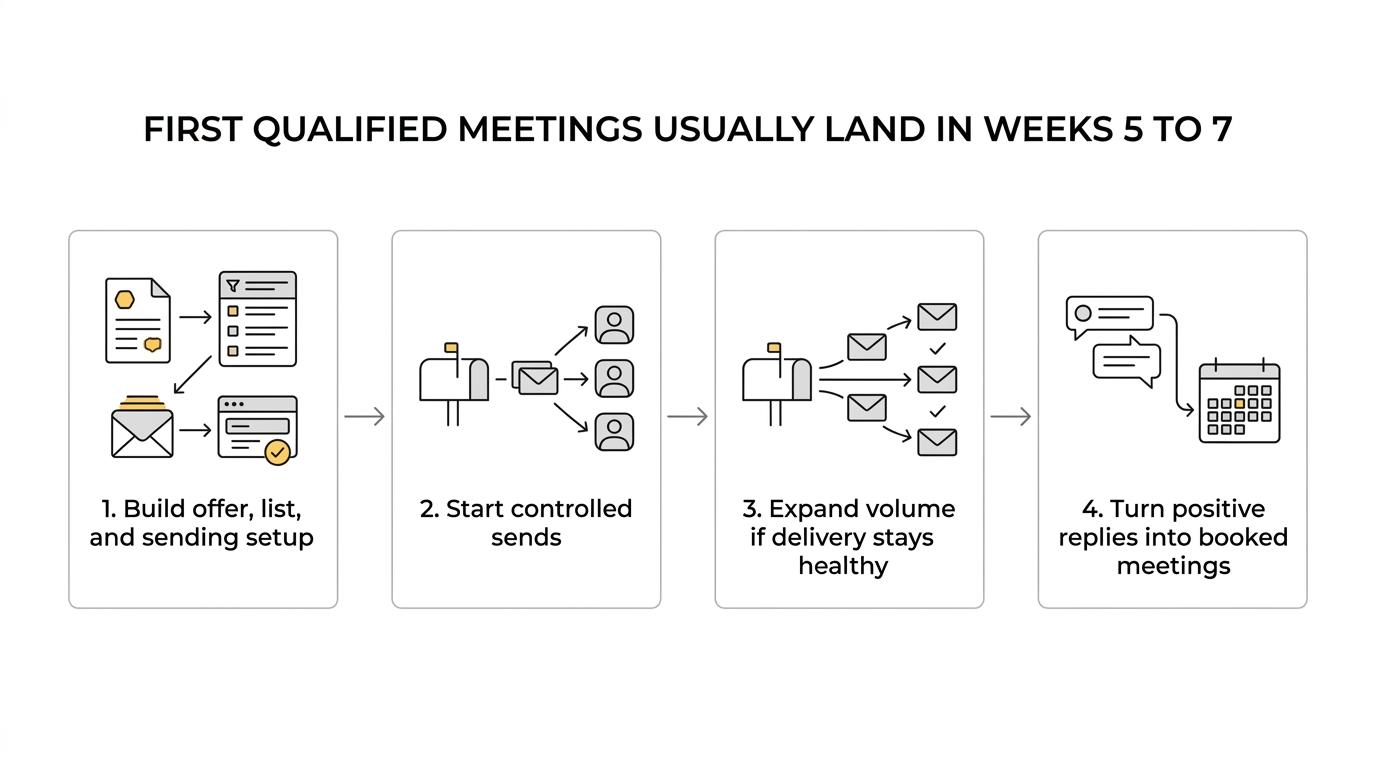
If you are asking how to build a sales pipeline from scratch, the honest answer is that the pipeline ramps in phases. Reachly’s ROI model is built on this week-by-week curve, because outbound does not go from zero to meetings overnight.
[markdown] | Week | What happens | What you should expect | | --- | --- | --- | | Week 1 | ICP, TAM, offer, list logic, domains, inboxes, authentication | No meetings yet. You are building the machine. | | Week 2 | Warm-up running, enrichment, verification, copy, routing, reply handling | Still no meetings. LinkedIn list prep can start. | | Week 3 | Controlled sends begin, first LinkedIn touches begin | Early replies, out-of-office proof, first data on message fit | | Week 4 | Volume expands only if bounce rate, inbox placement, and reply quality stay healthy | Cleaner read on audience and offer | | Weeks 5 to 7 | Positive replies convert into conversations and booked meetings | First qualified meetings usually land here | [/markdown]That is the normal ramp. It gets longer when you are starting with brand-new domains and no aged sending setup.
Garcia has a hard line on this: “Four weeks of warmup before a single real email goes out. There is no version of this that goes faster, and everyone who tries to find one pays for it within a month.”
The reason is not agency superstition. It is sender reputation. Official guidance from Microsoft, Google, and Outlook all points in the same direction.
[markdown] | Source | 2026 takeaway | What it means for your ramp | | --- | --- | --- | | Microsoft Learn | Maximum deliverability can take 4 to 8 weeks depending on volume and engagement | New sending should rise gradually, not jump to volume | | Gmail Help | DMARC is required for the sending domain, with proper DNS setup | Authentication is not optional | | Microsoft Support | Complaint rate and lack of prior reputation hurt deliverability | Bad early sends follow you for weeks | [/markdown]If your domains are under 30 days old, week 4 is the safer start for real sending. Google now adds a yellow banner to mail from domains younger than 30 days of warm-up, so 30 days of warm-up is the safer floor.
Which B2B sales pipeline stages matter before you even have opportunities?
Most articles on B2B sales pipeline stages jump straight to lead, MQL, SQL, proposal, close. That is too late for a zero-pipeline team. You need stages that tell you where the machine is breaking.
Use stages with an exit rule you can check in a day.
[markdown] | Pipeline stage | Exit rule | Why it matters | | --- | --- | --- | | Account selected | The account matches ICP and has a current reason to care | Prevents broad targeting | | Contact verified | Email verified, role confirmed, LinkedIn profile matched | Protects domain reputation | | First touch delivered | Message lands and does not bounce | Separates deliverability from copy problems | | Reply received | Any human reply, including out-of-office or not interested | Proves inbox placement | | Qualified interest | Prospect confirms pain, timing, ownership, or asks for details | Shows the offer is working | | Meeting booked | A real meeting is scheduled with the right person | The first outcome that belongs in your sales forecast | [/markdown]This stage model is better early on because it tells you what to fix. If you never get past delivered, the problem is infrastructure or list quality. If you get replies but no qualified interest, the problem is usually the offer.
That diagnostic order saves weeks.
How do you pick accounts when you do not have inbound demand?
You do not fix an empty pipeline by widening the list. You fix it by getting closer to buying moments.
Reachly runs signal-based outbound because timing matters more than people admit. A buying signal usually has 2 to 4 weeks of shelf life before competitors see it too, priorities change, or the account moves on.
Garcia’s view on signals is clear: “Hiring is the signal I trust most. A company spending money on headcount is a company that is growing, and growth is what creates the problem we solve.”
The signals that tend to hold up are the ones tied to change:
- hiring
- leadership changes
- tech stack changes
- headcount growth
- website visitor activity
- LinkedIn engagement
- Funding, used carefully
Funding is useful for targeting, but it is often a weak opener because everyone else uses it too. Hiring tends to be stronger. Tech stack changes are strong too, but only when you are sure the tool is actually in use. Guessing destroys trust fast.
A practical signal model inside Clay often looks like this:
- Funding: useful weight in scoring, weak email opener
- Headcount growth: stronger sign of active demand
- Tech stack change: strong if verified, risky if guessed
- Website intent: high urgency, short shelf life
- LinkedIn engagement: strong for smaller dream-account lists
If your TAM is tiny, founder-led outreach still beats automation. Garcia says it plainly: “A tiny, very specific market is a job for the founder and a keyboard. Automation just burns through the list faster.”
What should the first outbound motion look like?
For a new pipeline, keep the motion tight. Long sequences usually hide a weak first message.
Reachly’s default stack is cold email, LinkedIn, Cold calling, in that order. Email creates the first reply. LinkedIn gives you a second surface. Cold calling comes in later, usually after a strong signal, a recent email open pattern, or a reply from the wrong person.
The first email should be short. Garcia’s rule is simple: “Sixty to eighty words. If it does not fit on an iPhone screen in one go, it gets cut before it goes out.”
That first motion usually looks like this:
[markdown] | Channel | Timing | Job of the touch | | --- | --- | --- | | Cold email | Day 1 | Start the conversation with a signal or honest reason for reaching out | | LinkedIn connection | Day 1 | Put your name in front of the account without forcing a pitch | | Cold email follow-up | Day 6 or 7 | Try one new angle, not a bump | | LinkedIn message | 1 to 3 days after acceptance | Send a short lowercase question-based note | | Cold calling | After engagement or strong signal | Convert warm interest into a booked meeting | [/markdown]A few copy rules matter more than templates:
- Goal of email one: get a reply, not a meeting
- zero links in the first email
- CTA style: ask for permission or route to the right person
- AI snippets only, never AI-written full emails
That last point matters. AI is useful for signal-driven lines like “saw you just opened a London office” or “noticed you are hiring three SDRs.” It is not good enough to write the whole message and ship it without review.
If you want the broader system around this motion, read Reachly’s guide to a modern outbound sales strategy. This article is about the pipeline build itself, not the full channel playbook.
How do you know whether the pipeline is working by week 3?
Week 3 is not for panic. It is for diagnosis.
You should not expect a full meeting calendar yet. You should expect evidence that the system is healthy. That means inbox placement, human replies, and clean early signal from the audience.
Look at these numbers first:
[markdown] | Metric | Healthy early benchmark | What it tells you | | --- | --- | --- | | Bounce rate | Under 3% | Your data and verification are good enough | | Deliverability score | Above 97% | Your setup is landing where it should | | Connection acceptance | Around 25% | Your targeting is close enough | | Positive reply rate | 10 to 20% is normal, 35 to 40% is very good | Your offer and timing are working | | Out-of-office replies | Any steady flow is useful | You are reaching real inboxes | [/markdown]Garcia’s troubleshooting order is the right one to steal: “Three weeks in with nothing to show, we go in a fixed order. Overall reply rate including out of office, then inbox placement tests, then bounce rate. If people are actively replying ‘not interested’, everything technical is fine and the offer is what needs work.”
That point matters more than subject line tinkering. If you get human replies and zero positive interest after around 1,000 emails, the market is answering you. Rewrite the offer first.
When should you not build the pipeline this way?
Not every company should start with a full outbound pipeline.
If your average contract value is under $5,000, the math usually points to founder-led outreach first. If you do not have product-market fit, outbound is a gamble. If your TAM is tiny, automation can burn the list before you learn anything useful.
You should also skip a full build if nobody can take the meeting once it is booked. Outbound multiplies the sales process you already have. If there is no process, there is nothing to multiply.
This is where some teams are better served by a smaller test. One offer. Fifty to one hundred accounts. Tight signal logic. Founder in the replies. You will learn more from that than from sending 10,000 emails into a weak market.
What should you do next if you need pipeline in the next 30 days?
If you need pipeline fast, keep the build order strict. Start with the offer. Build the list around current signals. Set up the sending environment correctly. Then ship controlled volume and judge the campaign by replies before you judge it by meetings.
If you want help building the system, Reachly runs done-for-you outbound lead generation services, cold email campaigns, and appointment setting for B2B teams that need qualified meetings without hiring SDRs first. You can also look at the results from Primal, where outbound produced 85+ SQLs in 6 months with 4.57x ROI.
Key findings: a B2B sales pipeline from scratch usually takes 5 to 7 weeks to reach the first qualified meetings, and longer if your domains are brand new. The work order is offer, audience, infrastructure, controlled sends, then volume. If you get replies but not interest, the offer is the first thing to rewrite.