



Learn the right domain blacklist check: test root domain, subdomain, IP, SPF/DKIM/DMARC, and PTR to fix spam and protect deliverability.
Run 5 checks in order: the root domain, the sending subdomain, the sending IP, email authentication, and the PTR record. That is the fastest way to tell whether you have a blacklist problem or a wider deliverability problem. A clean email blacklist check does not mean your mail is healthy. It only means the domain or IP is not on the lists you checked, while Google and Microsoft still look at SPF, DKIM, DMARC, reverse DNS, and sender reputation before deciding where your message lands.
What does an email blacklist check actually tell you?
An email blacklist check answers one narrow question: has your domain or IP built a bad enough reputation to get listed by a blocklist provider?
That matters, but it is only one layer. Spamhaus says its DBL is domain-only, not IP-based, and if the main domain is listed, the subdomains under it return listed too. So if you send from mail.yourdomain.com, you cannot assume the problem stops there if the root is the thing that got hit.
Mailbox providers care about more than public blocklists. Google’s 2026 sender rules spell this out pretty clearly. Bulk senders need SPF, DKIM, DMARC. Google also checks whether the sending IP matches the PTR hostname and whether that hostname resolves back to the same IP.
[markdown] | Check layer | What it tells you | What it does not tell you | Cost if you skip it | | --- | --- | --- | --- | | Root domain blacklist check | Whether the main domain is listed on a domain blocklist | Whether SPF, DKIM, DMARC, or inbox placement are failing | High. A listed root domain can affect every subdomain under it | | Sending subdomain blacklist check | Whether the exact outbound domain has been listed | Whether the root domain already has deeper reputation issues | Medium. You can miss a local send issue | | Sending IP blacklist check | Whether the mailbox or ESP IP has a public blocklist problem | Whether mailbox-level engagement is still weak | High if you use shared IPs | | SPF, DKIM, DMARC check | Whether authentication passes | Whether the sending pattern is still causing spam placement | High. Unauthenticated mail can be rejected | | PTR or reverse DNS check | Whether the sending IP maps cleanly to the hostname | Whether copy, offer, or targeting are causing low replies | Medium. Some providers treat missing PTR as a trust failure | [/markdown]A lot of teams stop after the first row. That is where they lose a week.
How do you run a domain blacklist check the right way?
Start with the exact domain that sends outbound, not your homepage domain by itself. If you use a secondary domain for cold email, check that domain first. Then check the root domain, then the IP behind the mailbox provider, then authentication.
The order matters because each result changes the next move. If the domain is clean but the mail still goes to spam, you should not waste time writing delist requests. If the root domain is listed, you have a bigger problem than one tired mailbox.
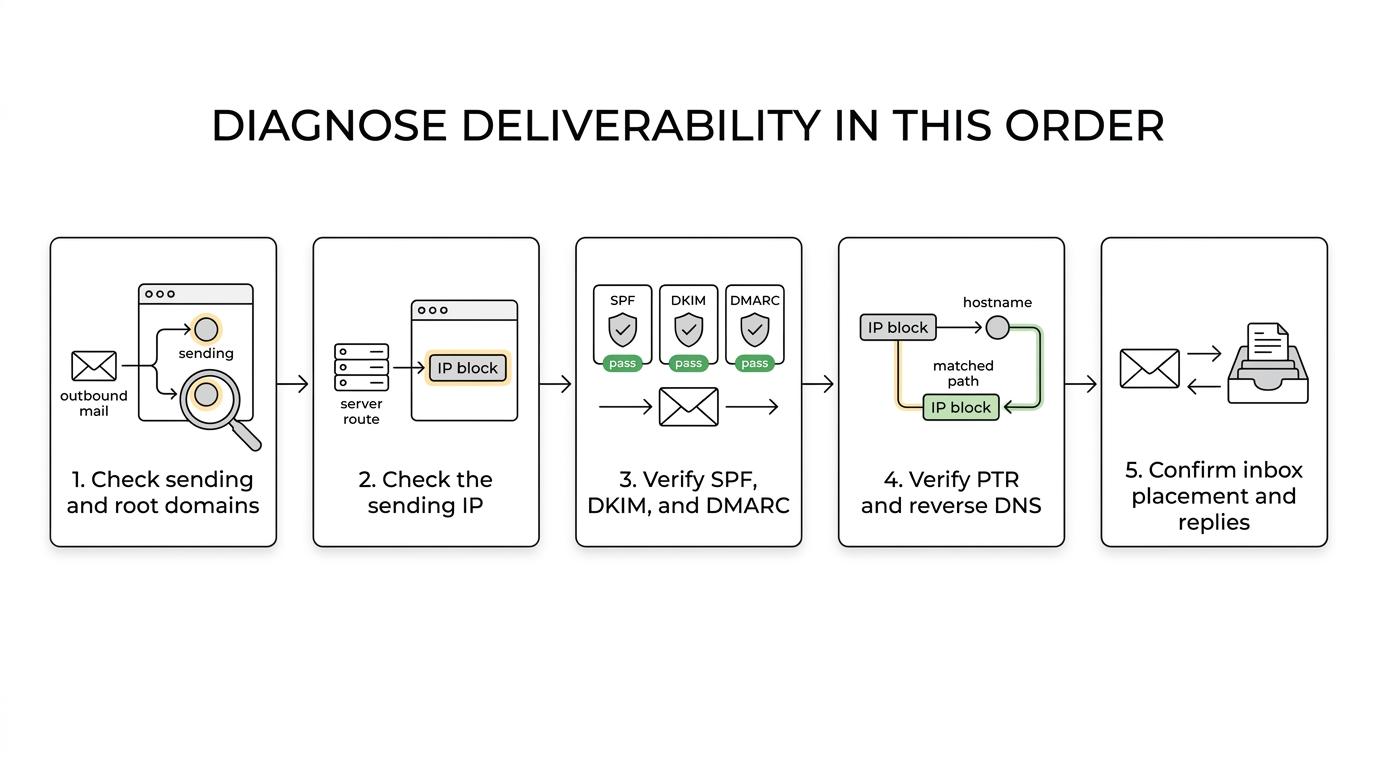
Here is the workflow we use when a campaign shows sudden deliverability damage.
[markdown] | Step | What to check | What bad looks like | Time cost | | --- | --- | --- | --- | | 1 | Sending subdomain and root domain | Listed on a domain blocklist | 5 to 10 minutes | | 2 | Sending IP | Public IP blocklist hit or shared IP issues | 5 to 10 minutes | | 3 | SPF, DKIM, DMARC | Missing record, alignment failure, or DMARC not live | 15 to 45 minutes | | 4 | PTR or reverse DNS | No PTR record or mismatch between hostname and IP | 10 to 20 minutes | | 5 | Seed inbox placement and live replies | Inbox placement drops, out-of-office replies dry up | 1 to 2 days of observation | [/markdown]One operator rule here matters more than people expect. If a list is older than 3 months, re-validate it before you send another message. Cheap data is one of the fastest ways to create a blacklist problem that looks like an infrastructure problem.
Why are your emails going to spam if the domain is not blacklisted?
Because mailbox providers do not need a public blacklist to distrust you.
Microsoft says poor sender reputation can come from spam complaints, blocklist entries, or low sending volume. It also says SPF, DKIM, or DMARC failures can make composite authentication fail. Google says unauthenticated mail can be marked as spam or rejected, and mail from blocklisted IPs is more likely to be filtered.
That means a domain can pass an email blacklist check and still perform badly for at least four common reasons: broken authentication, missing PTR, weak mailbox reputation, or bad sending behavior.
[markdown] | Source | Year | What it says | What you do with it | | --- | --- | --- | --- | | Google Help | 2026 | Bulk senders must use SPF, DKIM, and DMARC | Treat auth as required, not optional | | Google Help | 2026 | Sending IP must match PTR hostname, and hostname must resolve back to the same IP | Verify reverse DNS before launch | | Microsoft Learn | 2026 | SPF, DKIM, or DMARC failures raise suspicion | Check alignment, not just record existence | | Microsoft Learn | 2026 | Reputation can fall from complaints, blocklists, or low volume | Watch complaint trends and mailbox health | | Spamhaus | 2026 | DBL is domain-only and applies at the main domain level | Check the root domain, not just the subdomain | [/markdown]This is also why a blocklist result should never be read in isolation. If you need the wider picture, read Reachly’s domain reputation guide. A good deliverability process tells you why it happened, whether the domain is worth saving, and how to keep your main domain out of the line of fire next time.
What should you fix first after a blacklist hit?
First, stop sending from the affected domain. If you keep pushing volume through a listed domain, you are telling mailbox providers the behavior that got you listed is still active.
Second, find the real object that is damaged. Is it the root domain, the sending subdomain, the mailbox provider IP, or the whole setup because authentication broke? A lot of panic starts when a team checks one domain, sees a result, and assumes every part of the system needs the same fix.
After that, the repair work is pretty mechanical.
- Pause sending: Do not keep testing copy or subject lines on a listed domain.
- Confirm the scope: Check root domain, subdomain, and sending IP separately.
- Repair authentication: SPF, DKIM, DMARC, and PTR all need to pass before you ask for removal.
- Clean the audience: Re-validate old lists, suppress bad addresses, and cut any segment that is throwing complaints.
- Request delisting: Only after the sending pattern and technical setup are fixed.
Spamhaus says DBL listings often expire automatically after the domain stops matching the listing criteria. That is useful, but it should not make you passive. If the root cause was bad list quality, a rushed warm-up, or broken DNS, the domain will get right back into trouble the moment you restart the old pattern.
When should you replace the domain instead of trying to save it?
If the domain is a secondary outbound domain, we replace it fast. That is the whole point of secondary infrastructure.
Thibault Garcia, founder of Reachly, puts it plainly: “A blacklisted domain is a dead domain. We do not try to save it. We throw it away and switch on a fresh one that has already been warming for a month.”
That sounds aggressive until you have lived through a few recoveries. Delisting requests take time. Rebuilding sender trust takes longer. And even when a domain comes off a list, inbox placement does not snap back overnight.
[markdown] | Scenario | Replace or recover? | Why | Cost of the wrong move | | --- | --- | --- | --- | | Secondary domain used only for outbound | Replace | It is isolated, cheap to swap, and should not hold your system hostage | Low setup cost, low business risk | | Main company domain used for site and staff email | Recover first | It carries brand and operational risk beyond outbound | Very high if you abandon it too fast | | One tired mailbox, domain still clean | Rest mailbox | The issue may be mailbox reputation, not domain reputation | Low if caught early | | Shared IP issue outside your control | Replace provider path or move infrastructure | You may not be able to fix the IP yourself | Medium to high | [/markdown]This is where Reachly’s setup matters. Reachly sends from dedicated secondary domains that redirect to the client site, with separate sending mailboxes, so the client’s main domain never takes the outbound hit. If a sending domain degrades, the company domain that runs the website and staff email stays out of the blast radius.
How do you keep your main domain out of blacklist trouble?
You separate cold outreach from the domain your company lives on. That means secondary domains, separate mailboxes, and a warm-up period before a single live email goes out.
Reachly does this by default on its outbound lead generation services. The reason is simple. Outbound is a testing environment. Your main domain should not be the thing absorbing the risk while you test audience, offer, and copy.
Garcia has a hard line on warm-up: “Four weeks of warmup before a single real email goes out. There is no version of this that goes faster, and everyone who tries to find one pays for it within a month.”
The setup that keeps blacklist risk contained is not fancy. It is disciplined.
- secondary domains only
- 30 days of warm-up
- separate sending mailboxes
- SPF, DKIM, DMARC, and custom tracking domain live
- Google to Google, Outlook to Outlook
- list re-validation after 3 months
- bounce rate under 3%
As of 2026, we also keep daily volume low. Google mailboxes sit around 15 emails per day. Outlook mailboxes sit around 10 to 12. That sounds conservative until you compare it with the cost of burning a domain and losing a month to recovery work.
One more point gets missed a lot. A blacklist hit is not always a copy problem, but weak offers still hurt deliverability because they produce silence. No replies means no positive engagement, and no positive engagement makes it harder for future mail to earn the inbox. The goal of a cold email is a reply, not a meeting.
Do you want a protected outbound setup instead of risking your main domain?
If your team is still sending cold email from the company’s primary domain, you are taking a risk you do not need to take. Reachly runs signal-based outbound across cold email, LinkedIn, cold calling using dedicated secondary domains, separate mailboxes, and verification before contacts enter a sequence.
If you want help checking your setup or rebuilding it the safer way, start with Reachly’s outbound lead generation services and book the meeting from there. That is the fastest route if you want your main domain protected before the next blacklist scare turns into a real revenue problem.
A good email blacklist check tells you whether the domain or IP has already crossed a line. A good deliverability process tells you why it happened, whether the domain is worth saving, and how to keep your main domain out of the line of fire next time.










