Learn outlook sending limits for cold email in 2026: why safe Outlook volume is just 10-12 emails daily per mailbox.
If you are using Outlook mailboxes for cold email in 2026, the practical limit is 10 to 12 emails a day per mailbox, even though Microsoft publishes much higher platform caps like 10,000 recipients a day and 30 messages a minute for Exchange Online. Those official numbers are transport ceilings, not safe cold outbound limits. Push anywhere near them and you risk throttling, spam enforcement, and burned infrastructure before you book the meeting.
That gap is what trips people up. They read Microsoft’s docs, assume Outlook can handle serious outbound volume, then wonder why replies dry up after a few days. Outlook sending limits matter, but cold email lives or dies on reputation, list quality, and how fast Microsoft decides you look like bulk mail.
What are Microsoft’s actual Outlook sending limits in 2026?
Microsoft uses two different models, and you need to separate them.
Outlook.com is the consumer side. Exchange Online is the Microsoft 365 business side. The limits are not identical, and neither set of limits was designed with cold outbound in mind.
Here is the clean version.
[markdown] | Product | Source | Year | Official limit | What it means for cold email | | --- | --- | ---: | --- | --- | | Outlook.com for Microsoft 365 subscribers | Microsoft Support | 2026 | 5,000 daily recipients | Far above a safe cold email volume | | Outlook.com for Microsoft 365 subscribers | Microsoft Support | 2026 | 500 recipients per message | Irrelevant for one-to-one cold email | | Outlook.com for Microsoft 365 subscribers | Microsoft Support | 2026 | 1,000 daily non-relationship recipients | Important signal that Microsoft tracks sender-recipient familiarity | | Exchange Online | Microsoft Learn | 2026 | 10,000 recipients per day | Transport cap, not a recommended cold outbound target | | Exchange Online | Microsoft Learn | 2026 | 30 messages per minute | Throttling threshold, not inbox safety | | Exchange Online tenant control | Microsoft Learn | 2026 | Tenant External Recipient Rate Limit applies | Your whole tenant can be affected, not just one mailbox | | Client SMTP submission | Microsoft Learn | 2026 | 10,000 recipients per day and 30 messages per minute | Same story, still not a cold email green light | [/markdown]The key phrase is the one Microsoft uses around bulk email: best-effort basis. Microsoft 365 is not sold as a supported bulk-email channel, and Microsoft says so in its own outbound spam guidance.
That matters because cold email is not judged only by whether a platform lets a message leave the server. It is judged by what happens before and after that, including spam filtering, junk placement, sender throttling, and mailbox reputation decay.
Why do Microsoft’s published limits mislead cold email teams?
The official Outlook sending limits answer the wrong question.
They tell you how much a Microsoft system may permit before a hard stop. They do not tell you what volume keeps a new outbound mailbox healthy, what pace avoids junk folders, or how much cold email you can send without training Microsoft to distrust your domain.
This is why teams get hurt by “10,000 recipients a day.” It sounds like capacity. In practice, it is a compliance ceiling inside a system that is also watching for spam patterns, external-recipient behavior, low engagement, and non-relationship sending.
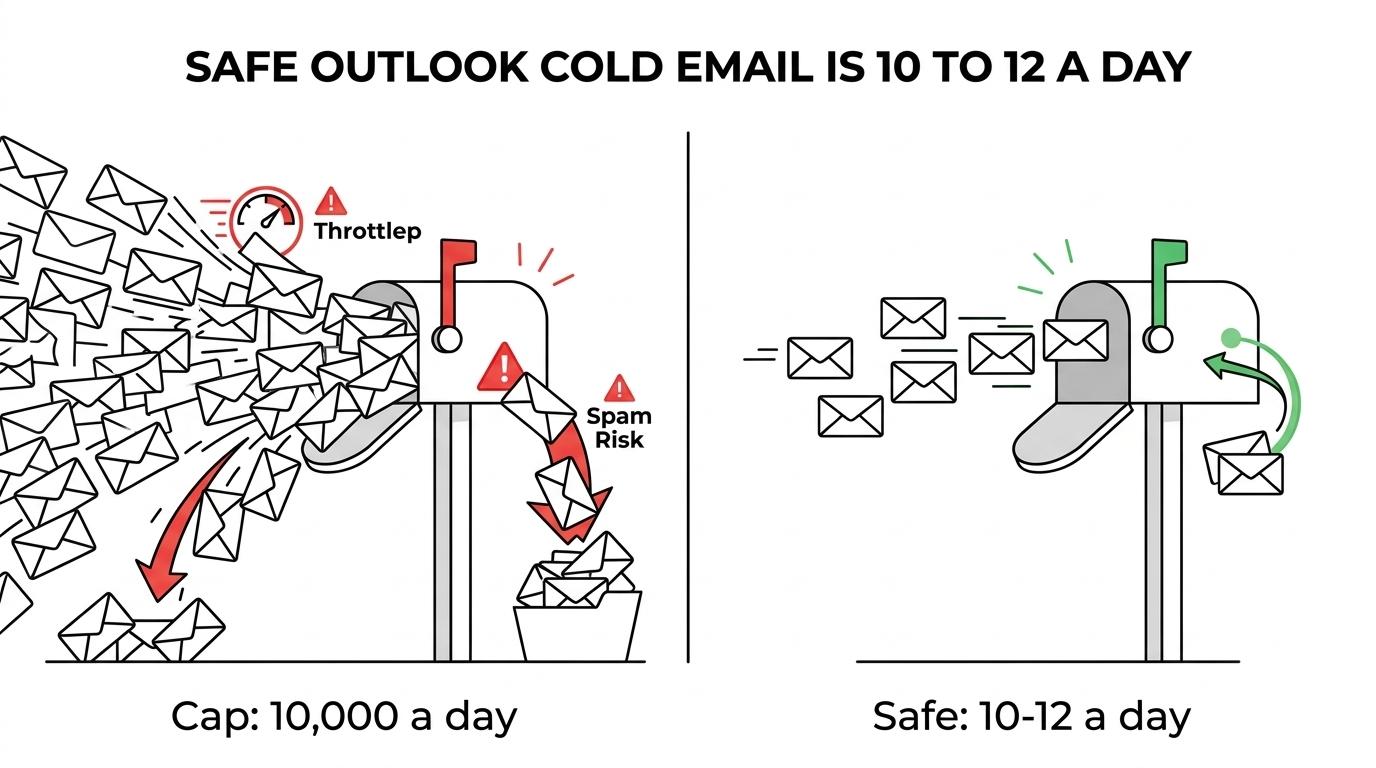
Microsoft is not subtle about this. Its docs say accounts sending spam can be blocked, and accounts can also be blocked for hitting an overall outbound message limit even when the messages are not detected as spam. That is a huge warning sign for cold outreach.
There is also a product reality here. Microsoft built these services for business communication, not for your SDR team to hammer a cold list.
How many cold emails should you send from an Outlook mailbox?
Our rule in 2026 is simple: 10 to 12 emails a day per Outlook mailbox.
That is not a typo. It is also lower than Google, where we usually cap at 15 emails a day per mailbox. Outlook is less forgiving, especially on new domains and newer mailboxes.
Across 400+ campaigns, the pattern is consistent. The safe cold outbound number sits miles below Microsoft’s published recipient ceilings. You are protecting inbox placement, not trying to win a rate-limit contest.
Here is the setup we use when Outlook is part of the sending stack.
[markdown] | Item | Reachly rule for 2026 | Cost of ignoring it | | --- | --- | --- | | Daily send per Outlook mailbox | 10 to 12 emails | Throttling, junk placement, reply-rate drop | | Daily send per Google mailbox | 15 emails | Same issues, just later | | Mailboxes per domain | 2 to 3 | Too much concentration on one domain | | Warm-up period | 30 days, 4 weeks minimum | New-domain distrust and poor placement | | Bounce target | Under 3% | Domain damage | | Deliverability score target | Above 97% | Lower inbox placement | | List age before re-check | Re-validate after 3 months | More bounces and dead data | [/markdown]Thibault Garcia, founder of Reachly, puts it plainly: “Four weeks of warmup before a single real email goes out. There is no version of this that goes faster, and everyone who tries to find one pays for it within a month.”
That 30-day setup time is the price of entry. If you are not willing to wait four weeks, Outlook is the wrong place to get impatient.
What setup keeps Outlook mailboxes alive in 2026?
Volume is only one piece. Outlook mailboxes fail because teams stack volume on top of bad infrastructure.
Every mailbox needs full authentication. That means SPF, DKIM, DMARC, and a custom tracking domain configured correctly. Then you keep the actual email plain text, with no links in the first touch and no open tracking.
We also match sender ESP to recipient ESP. Google to Google, Outlook to Outlook. That adds setup work, extra mailboxes, and more routing logic, but it gives you a better shot at landing where the message needs to land.
The tool stack is not complicated, but the discipline matters. We usually build and enrich in Clay, Apollo, and LinkedIn Sales Navigator, verify in ZeroBounce or MillionVerifier, send through Smartlead, and run LinkedIn through HeyReach.
A few rules do most of the heavy lifting:
- Authenticate everything: SPF, DKIM, DMARC, and custom tracking domain are not optional.
- Match the mailbox type: Outlook should mainly send to Outlook recipients, Google to Google.
- Plain text only
- No links in the first email
- Re-validate any list older than 3 months
- Keep bounce rate under 3%
One more point matters here. AI is useful for short signal snippets, not for writing the full email. If the whole message sounds machine-made, Outlook recipients react like humans do. They ignore it.
What sequence works when Outlook volume is capped?
When Outlook sending limits are low, you do not solve the problem with more mailboxes first. You solve it with a better offer and tighter targeting.
The goal of a cold email is a reply, not a meeting. No reply, no meeting. That is why low daily volume can still work if the list is signal-based and the CTA is cheap enough to answer.
We keep cold emails around 70 to 80 words in 2026. Two emails, six to seven days apart, then stop. If the list is worth revisiting, come back 1.5 to 2.5 months later with a fresh angle.
A simple multichannel pattern works better than trying to stretch Outlook volume:
[markdown] | Day | Channel | Action | | --- | --- | --- | | 1 | LinkedIn + cold email | Visit profile, send connection request, send Email 1 with signal opener | | 6 or 7 | cold email | Send Email 2 from a new angle | | 8 to 12 | LinkedIn or cold calling | Short lowercase question or one targeted call | | 45 to 75 | cold email | Re-engage same list with a fresh angle | [/markdown]This is where signal-based targeting matters. A company with hiring growth, leadership changes, tech stack movement, traffic decline, or ranking gaps gives you a reason to write now. A random list does not.
That is also why volume is not the lever people think it is. One Series A client sending 20,000 to 30,000 emails a month moved reply rate from 0.5% to 1% and then 1.6% after switching to direct, question-based copy, a lead magnet, and a stronger offer. The offer changed. The market responded.
You can see the same principle in Primal, where outbound produced 85+ SQLs in 6 months, 6 deals signed, and 4.57x ROI. The campaign averaged an 8% positive reply rate. That did not come from squeezing extra sends out of Outlook.
What should you do when Outlook starts throttling or reply rate drops?
Do not rewrite the copy first.
When an Outlook mailbox goes sideways, the first pass is always technical. Copy is the last thing we touch unless replies show the market hates the message.
Garcia’s diagnostic rule is useful here: “Three weeks in with nothing to show, we go in a fixed order. Overall reply rate including out of office, then inbox placement tests, then bounce rate. If people are actively replying ‘not interested’, everything technical is fine and the offer is what needs work.”
Use this order:
- Pause the mailbox: Give it 7 to 14 days off while warm-up keeps running.
- Check reply rate first: Under 0.5% and the mailbox comes out of rotation.
- Look for out of office replies: They are one of the best inbox-placement signals you have.
- Audit infrastructure: SPF, DKIM, DMARC, and routing errors before touching copy.
- Re-check the list: Anything older than 3 months gets verified again.
- Cut the email down: If it does not fit on one phone screen, shorten it.
If a domain gets blacklisted, we do not try to save it. A blacklisted domain is a dead domain. You replace it with a fresh one that has already been warming.
That idle reserve is part of the system. Around 30% of good sending infrastructure should be sitting unused so a campaign does not stop the day one domain goes bad.
Who should skip Outlook-based cold email?
Some teams should not use Outlook for cold email at all.
If your average contract value is under $5,000, send the emails yourself for now. If your market is tiny, founder-led outreach beats automation. If you have no proof of product-market fit, outbound is still a gamble.
And if your plan is “we’ll just use Microsoft 365 as a bulk sender,” skip that idea. Microsoft’s own docs tell you it is not a supported bulk-email use case.
Outlook can work inside a real outbound system. It is a bad place to improvise.
If you want the infrastructure, mailbox math, signal-based targeting, and reply handling built for you, see Reachly’s outbound lead generation services or book a meeting with Reachly to map out the setup before you burn another domain.
Short version: Microsoft’s published Outlook sending limits are platform ceilings, not safe cold email targets. For cold outbound in 2026, keep Outlook mailboxes at 10 to 12 emails a day, use 2 to 3 mailboxes per domain, warm everything for 4 weeks, and let cold email, LinkedIn, cold calling work together instead of forcing volume through one mailbox.
Key findings: Outlook.com and Exchange Online both allow far more sending than a healthy cold email system should use. The real guardrails are inbox placement, reply rate, list quality, and domain reputation.