

Learn how to find past buyers who changed jobs, spot warm buying signals, and reach out within 60 days for higher reply rates.
A past buyer who lands at a new company is often your warmest cold prospect, but the window is short. At Reachly, a recent job change or promotion inside the last 60 days sits in the warm-signal bucket, because new leaders review tools, rebuild vendors, and bring prior category knowledge into the new seat. If you track those moves, pair them with company signals like hiring or headcount growth, and reach out before day 60, your odds of getting a reply usually beat anything you get from a static list.
Most teams miss this because they treat job changes like a LinkedIn notification, not a prospecting system. That leaves money sitting in your CRM, your customer notes, and your founders’ old inbox threads.
What is champion tracking in outbound prospecting?
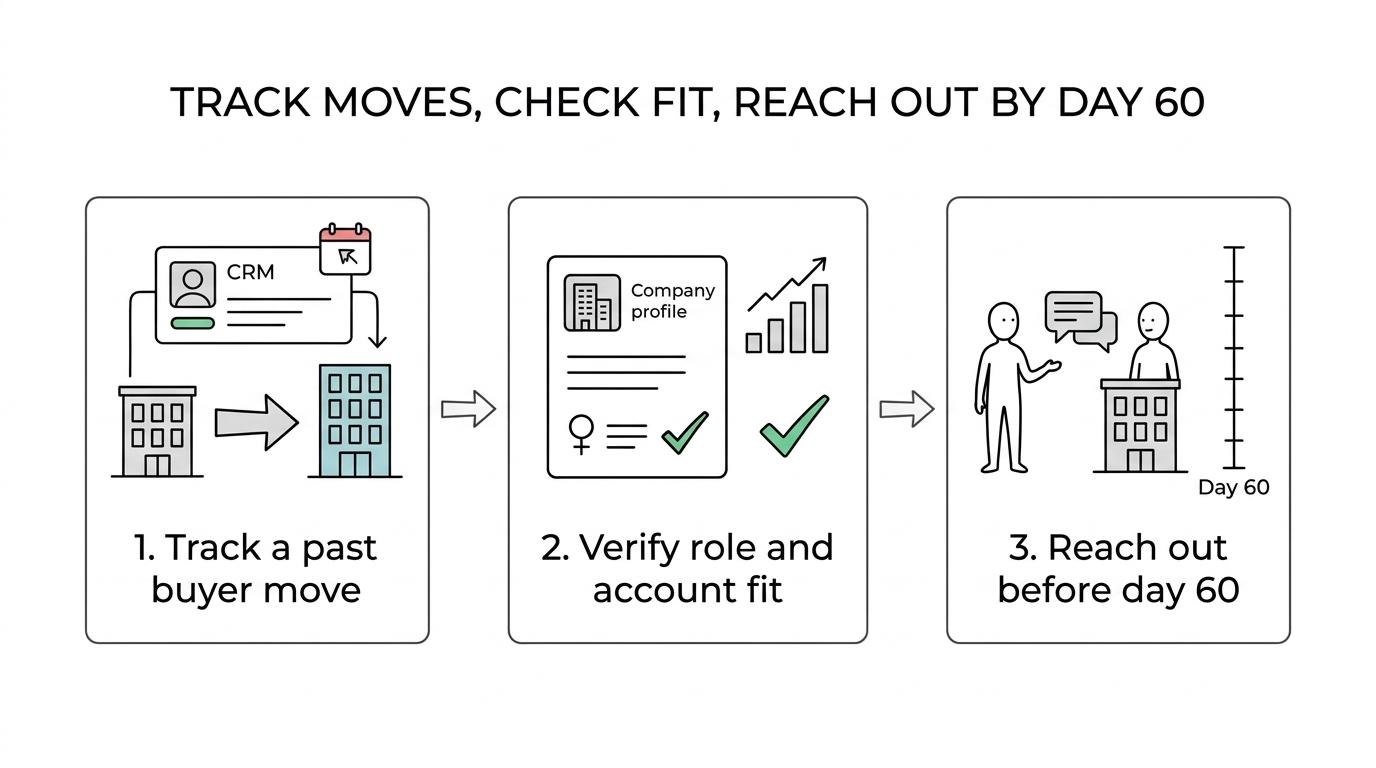
Champion tracking means watching for people who already bought from you, evaluated you seriously, or pushed a deal internally, then spotting when they move to a new company. When the move is real and the new company has the right conditions, that person becomes a high-priority outbound target.
This is not the same as scraping everyone with a new title. A true champion has history with your category and some memory of your product, your team, or your process. That matters because you are not starting from zero trust.
The trigger works because a job move is usually part of a wider business change, not just personal news. Gartner reported in 2024 that 99% of B2B purchases are driven by organizational changes. That is why champion tracking fits a signal-based motion much better than generic “congrats on the new role” outreach.
[markdown] | Source | Year | What the source says | What it means for champion tracking | | --- | ---: | --- | --- | | Gartner | 2024 | 99% of B2B purchases are driven by organizational changes | A job move often opens a buying window | | Reachly | 2026 | A recent job change or promotion within 60 days is a warm buying signal | You have a short window to act | | Columbia University Human Resources | 2026 | The first 60 days are a distinct onboarding period | New leaders are still defining priorities | [/markdown]If you want the wider signal model around this, read Reachly’s signal-based outbound playbook, the buying signals guide, and the trigger-based outreach post.
Why do past buyers who changed jobs reply more often?
First reason: category familiarity. A past buyer already knows the problem, the alternatives, and the internal friction around buying. You do not need to spend the first email teaching them why the category exists.
Second reason: they arrive with a point of view. New leaders are often hired to fix something, stand up a function, or tighten an old process. That creates urgency fast, even when the budget is not finalized yet.
Third reason: they can become your internal translator. If they bought before, they already know how to explain the value in the language a CFO, CEO, or ops lead wants to hear.
There is a catch, though. A former user is not always a former buyer. If they only liked the product but never owned the decision, the signal is still useful, just weaker. Your list quality matters more than your copy here.
Which job changes count as real buying signals?
Not every move deserves outreach. A clean job-change alert means very little if the new company is flat, shrinking, or outside your ICP. The best use of champion tracking is pairing the person-level trigger with company-level movement.
Reachly’s signal stack already looks at headcount growth, hiring, funding, and market expansion. Job changes fit well beside those signals because they answer a different question. Company signals tell you whether the account is moving. The job change tells you who inside that account may care first.
After you confirm the move, score the account with a few supporting signals.
- Strongest combo: Past buyer moved into a role with budget and the new company is hiring
- Good combo: Past evaluator joined a company with headcount growth or expansion
- Weak combo: Former user changed jobs, but the new role is unrelated
- Skip it: Job change is older than 60 days and no company signal is visible
Thibault Garcia, founder of Reachly, puts the limit clearly: “Job changes work beautifully on a list of fifty dream accounts. They fall apart the moment you try to run them at volume.”
That line matters. Champion tracking is a precision play, not a list-filling tactic.
How should you build a champion tracking list?
Start with your own data before you buy anything. Closed won contacts, late-stage evaluators, active champions from lost deals, and customers success notes are usually enough to build the first list. If your team cannot name 25 people who pushed hard for you before, the issue is not tools.
Then match those people to their LinkedIn profiles and keep watching for role changes. LinkedIn Sales Navigator is the cleanest source for this, and Clay is useful once you want to enrich the new company, pull firmographics, and add other signals. Apollo can help fill gaps, but the CRM should stay the source of truth for whether the person was an actual buyer.
You should also track whether the new employer is worth the time. A champion at the wrong company is still the wrong account.
A small, usable champion tracking sheet needs a few fields:
- Full name
- Previous company and role
- Type of relationship
- New company and role
- Date of move
- Supporting company signals
- Last outreach date
- Owner
If you already run multichannel outreach, move these contacts into a separate workflow. They should not sit in the same pool as first-touch cold prospects. The angle, timing, and bar for personalization are different.
When should you reach out after a job change?
The short answer is early, but not blindly. Reachly treats a job change or promotion as warm for 60 days, and Columbia’s onboarding framework backs up that window. In the first 60 days, new hires are still defining responsibilities, gaps, and expectations.
That does not mean you should message people just because a title changed yesterday. You still need a reason tied to the new role and the account context. That account-first logic shows up in other prospecting environments too, and Zakendoeninzweden makes a similar point in its work on B2B lead generation in Sweden, where timing and market fit matter as much as the individual contact. A bad message sent on perfect timing is still a bad message.
This is the simple timing model we use for champion tracking.
[markdown] | Timing from move | What is happening | What to do | | --- | --- | --- | | Days 1 to 14 | The new role is fresh, context is limited | Watch, confirm the move, score the account | | Days 15 to 45 | Priorities start to take shape | Send first outreach if the role and company fit | | Days 46 to 60 | Window is still warm, but attention narrows | Send a fresh angle or a short re-touch | | Day 61 onward | The move is old news | Treat it as a normal account unless other signals appear | [/markdown]For channel mix, keep it light. Cold email, LinkedIn, cold calling still works here, but the order matters less than the relevance. You are not trying to bully your way into a meeting. You are trying to restart a conversation with a reason.
What should your champion tracking message actually say?
The biggest mistake is writing a congratulation email with no business point. Nobody replies to that unless they already planned to. The new role is the trigger, not the pitch.
Your first message should connect three facts. You know they changed roles. You remember the problem they cared about before. You have a reason that the same problem is likely to matter at the new company.
Keep the email short. Garcia’s rule is still the right one: “Sixty to eighty words. If it does not fit on an iPhone screen in one go, it gets cut before it goes out.”
Here is a clean example:
subject: new role
saw you joined [company] as [title].
when you were at [previous company], you looked at ways to fix [problem]. if that is now on your plate again, I can send over a quick teardown of how teams in a similar spot are handling it today.
worth sending?
No links in the first email. No calendar link either. The goal of a cold email is a reply, not a meeting. If they reply, you can qualify, route, and then book the meeting.
If you use AI in this workflow, keep it narrow. Use it to pull a clean snippet about the new role or the new company’s hiring pattern. Do not let it write the whole email, and never ship it without checking the facts.
When does champion tracking break down?
This works poorly when the past contact was friendly but never influential. It also works poorly when the new role has no overlap with the old problem. A former marketing buyer who moves into a general operations seat may still be useful, but you need a different angle.
It also breaks down when you pretend it is a volume tactic. If you dump 5,000 job-change contacts into Smartlead with thin copy, you will burn time and probably damage good data. Champion tracking should feel closer to account work than bulk outbound.
A few failure modes show up again and again:
- Wrong champion: They liked the product but never bought or pushed internally
- Wrong timing: The move is stale, or you wrote before the prospect had any context
- Wrong account: No hiring, no growth, no reason to think the company needs what you sell
- Wrong ask: You pushed for a meeting before earning a reply
There is one more limit. If your TAM is tiny and the list is made of named accounts, the founder should often own this motion directly. The signal is so valuable that it deserves human attention.
What should you do next with champion tracking?
If you already have customers, late-stage lost deals, and an outbound system, champion tracking is one of the easiest signal layers to add. Start with 25 to 50 real past buyers, watch for role changes, pair each move with hiring or headcount growth, and send a short direct message inside the first 60 days. That is enough to tell you fast whether the motion deserves a bigger workflow.
If you want Reachly to build this inside a full signal-based outbound system, with data, scoring, cold email, LinkedIn, cold calling, and reply handling already wired together, see our outbound lead generation services or LinkedIn outreach services and book the meeting.
The short version is simple. Champion tracking works because job moves create a short buying window, and past buyers already know the problem. It works best when you treat the move as one signal inside a wider account picture, not as a magic shortcut.
- Best window: First 60 days after the move
- Best filter: Pair the person signal with hiring, headcount growth, funding, or expansion
- Best message: Tie the old pain to the new role, then ask for a reply, not a meeting